
In this chapter, we are going to discuss the architectural style of
Magento, for implementing user interfaces. The following diagram shows
architecture of Magento:
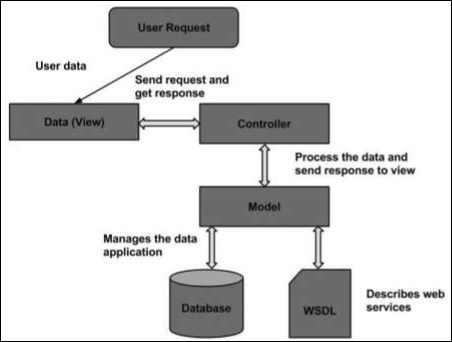 The Magento architecture comes with Models, Views and Controllers.
The Magento architecture comes with Models, Views and Controllers.- User Request: The user sends a request to a server in the form of request message where web browsers, search engines etc acts like clients.
- View: View represents the data in particular format. Views represents the user interface which is responsible for displaying the response for user request. It specifies an idea behind the presentation of the model's data to the user. Views are used to reflect "how your data should looks like".
- Controller: The controller is responsible for responding to user input and perform interactions on the data model objects. It uses models to process the data and send response back to the view.
- Model: The model is responsible for managing the data of the application. It contains logic of the data and represents basic data object in the framework. It responds to request from the view and responds to the instructions from the controller to update itself.
- Database: It contains the information which is requested from the user. When user requests data, view sends requests to controller, controller requests from the model and model fetches the required information from the database and responds to the user.
- WSDL: It stands for Web Services Description Language. It is used for describing web services and how to access them.


No comments:
Post a Comment