C is a general-purpose, high-level language that was originally
developed by Dennis M. Ritchie to develop the UNIX operating system at
Bell Labs. C was originally first implemented on the DEC PDP-11 computer
in 1972.

Saturday, January 28, 2017


C - Environment Setup
Try it Option Online
We have set up the C Programming environment on-line, so that you can compile and execute all the available examples on line. It gives you confidence in what you are reading and enables you to verify the programs with different options. Feel free to modify any example and execute it on-line.
C - Basic Syntax
You have seen the basic structure of a C program, so it will be easy
to understand other basic building blocks of the C programming language.
C - Data Types
Data types in c refer to an extensive system used for declaring
variables or functions of different types. The type of a variable
determines how much space it occupies in storage and how the bit pattern
stored is interpreted.
C - Variables
A variable is nothing but a name given to a storage area that our
programs can manipulate. Each variable in C has a specific type, which
determines the size and layout of the variable's memory; the range of
values that can be stored within that memory; and the set of operations
that can be applied to the variable.
C - Constants & Literals
Constants refer to fixed values that the program may not alter during its execution. These fixed values are also called literals.
Constants can be of any of the basic data types like an integer constant, a floating constant, a character constant, or a string literal. There are enumeration constants as well.
Constants are treated just like regular variables except that their values cannot be modified after their definition.
Constants can be of any of the basic data types like an integer constant, a floating constant, a character constant, or a string literal. There are enumeration constants as well.
Constants are treated just like regular variables except that their values cannot be modified after their definition.
C - Storage Classes
A storage class defines the scope (visibility) and life-time of
variables and/or functions within a C Program. They precede the type
that they modify. We have four different storage classes in a C program −
C - Operators
An operator is a symbol that tells the compiler to perform specific
mathematical or logical functions. C language is rich in built-in
operators and provides the following types of operators −
C - Decision Making
Decision making structures require that the programmer specifies one
or more conditions to be evaluated or tested by the program, along with a
statement or statements to be executed if the condition is determined
to be true, and optionally, other statements to be executed if the
condition is determined to be false.
C - Loops
You may encounter situations, when a block of code needs to be
executed several number of times. In general, statements are executed
sequentially: The first statement in a function is executed first,
followed by the second, and so on.
C - Functions
A function is a group of statements that together perform a task. Every C program has at least one function, which is main(), and all the most trivial programs can define additional functions.
You can divide up your code into separate functions. How you divide up your code among different functions is up to you, but logically the division is such that each function performs a specific task.
You can divide up your code into separate functions. How you divide up your code among different functions is up to you, but logically the division is such that each function performs a specific task.
C - Scope Rules
A scope in any programming is a region of the program where a defined
variable can have its existence and beyond that variable it cannot be
accessed. There are three places where variables can be declared in C
programming language −
C - Arrays
Arrays a kind of data structure that can store a fixed-size
sequential collection of elements of the same type. An array is used to
store a collection of data, but it is often more useful to think of an
array as a collection of variables of the same type.
C - Pointers
Pointers in C are easy and fun to learn. Some C programming tasks are
performed more easily with pointers, and other tasks, such as dynamic
memory allocation, cannot be performed without using pointers. So it
becomes necessary to learn pointers to become a perfect C programmer.
Let's start learning them in simple and easy steps.
C - Strings
Strings are actually one-dimensional array of characters terminated by a null character '\0'. Thus a null-terminated string contains the characters that comprise the string followed by a null.
The following declaration and initialization create a string consisting of the word "Hello". To hold the null character at the end of the array, the size of the character array containing the string is one more than the number of characters in the word "Hello."
The following declaration and initialization create a string consisting of the word "Hello". To hold the null character at the end of the array, the size of the character array containing the string is one more than the number of characters in the word "Hello."
C - Structures
Arrays allow to define type of variables that can hold several data items of the same kind. Similarly structure is another user defined data type available in C that allows to combine data items of different kinds.
C - Unions
A union is a special data type available in C that allows to
store different data types in the same memory location. You can define a
union with many members, but only one member can contain a value at any
given time. Unions provide an efficient way of using the same memory
location for multiple-purpose.
C - Bit Fields
Suppose your C program contains a number of TRUE/FALSE variables grouped in a structure called status, as follows −
struct {
   unsigned int widthValidated;
   unsigned int heightValidated;
} status;
C - typedef
The C programming language provides a keyword called typedef, which you can use to give a type, a new name. Following is an example to define a term BYTE for one-byte numbers −
typedef unsigned char BYTE;
C - Input & Output
When we say Input, it means to feed some data into a program.
An input can be given in the form of a file or from the command line. C
programming provides a set of built-in functions to read the given input
and feed it to the program as per requirement.
C - File I/O
The last chapter explained the standard input and output devices
handled by C programming language. This chapter cover how C programmers
can create, open, close text or binary files for their data storage.
A file represents a sequence of bytes, regardless of it being a text file or a binary file.
A file represents a sequence of bytes, regardless of it being a text file or a binary file.
C - Preprocessors
The C Preprocessor is not a part of the compiler, but is a
separate step in the compilation process. In simple terms, a C
Preprocessor is just a text substitution tool and it instructs the
compiler to do required pre-processing before the actual compilation.
We'll refer to the C Preprocessor as CPP.
C - Header Files
A header file is a file with extension .h which contains C
function declarations and macro definitions to be shared between several
source files. There are two types of header files: the files that the
programmer writes and the files that comes with your compiler.
C - Type Casting
Type casting is a way to convert a variable from one data type to
another data type. For example, if you want to store a 'long' value into
a simple integer then you can type cast 'long' to 'int'. You can
convert the values from one type to another explicitly using the cast operator as follows −
(type_name) expression
C - Error Handling
As such, C programming does not provide direct support for error
handling but being a system programming language, it provides you access
at lower level in the form of return values. Most of the C or even Unix
function calls return -1 or NULL in case of any error and set an error
code errno. It is set as a global variable and indicates an error
occurred during any function call. You can find various error codes
defined in <error.h> header file.
C - Recursion
Recursion is the process of repeating items in a self-similar way. In
programming languages, if a program allows you to call a function
inside the same function, then it is called a recursive call of the
function.
void recursion() {
   recursion(); /* function calls itself */
C - Variable Arguments
Sometimes, you may come across a situation, when you want to have a
function, which can take variable number of arguments, i.e., parameters,
instead of predefined number of parameters. The C programming language
provides a solution for this situation and you are allowed to define a
function which can accept variable number of parameters based on your
requirement.
C - Memory Management
This chapter explains dynamic memory management in C. The C
programming language provides several functions for memory allocation
and management. These functions can be found in the <stdlib.h> header file.
C - Command Line Arguments
It is possible to pass some values from the command line to your C programs when they are executed. These values are called command line arguments
and many times they are important for your program especially when you
want to control your program from outside instead of hard coding those
values inside the code.
C Programming Questions and Answers
C Programming Questions and Answers has been designed with a special intention of helping students and professionals preparing for various Certification Exams and Job Interviews.
This section provides a useful collection of sample Interview Questions
and Multiple Choice Questions (MCQs) and their answers with
appropriate explanations.
C - Quick Guide
C - Language Overview
C is a general-purpose, high-level language that was originally developed by Dennis M. Ritchie to develop the UNIX operating system at Bell Labs. C was originally first implemented on the DEC PDP-11 computer in 1972.C - Useful Resources
The following resources contain additional information on C. Please use them to get more in-depth knowledge on this topic.
Discuss C
C is a general-purpose, procedural, imperative computer programming
language developed in 1972 by Dennis M. Ritchie at the Bell Telephone
Laboratories to develop the UNIX operating system. C is the most widely
used computer language. It keeps fluctuating at number one scale of
popularity along with Java programming language, which is also equally
popular and most widely used among modern software programmers.
C++ Library -
Introduction
This data type represents the file stream generally, and has the capabilities of both ofstream and ifstream which means it can create files, write information to files, and read information from files.
C++ Library -
Introduction
iomanip is a library that is used to manipulate the output of C++ program. Using C++, header providing parametric manipulators as shown below −
C++ Library -
Introduction
The C++ standard libraries provide an extensive set of input/output capabilities which we will see in subsequent chapters. This chapter will discuss very basic and most common I/O operations required for C++ programming.Input-Output base classes and types for the IOStream hierarchy of classes as shown below −
C++ Library -
Description
It is used to input-Output forward declarations,this header provides forward declarations for the types of the standard input/output library.
C++ Library -
Description
It is used in standard Input / Output Streams Library.Declaration
Following is the declaration for iosstream function.
C++ Library -
Description
The Istream used for header providing the standard input and combined input/output stream classes.Class templates
C++ Library -
Introduction
It is an output stream objects can write sequences of characters and represent other kinds of data. Specific members are provided to perform these output operations.
C++ Library -
Introduction
It is a string stream for header.Class Templates
Following are the Class Templates for sstram.| S.N. | Class Templates | Definition |
|---|---|---|
| 1 | basic_istringstream | It is an input string stream |
| 2 | basic_ostringstream | It is an output string stream |
| 3 | basic_stringstream | It is a basic string steam |
| 4 | basic_stringbuf | It is a string stream buffer |
C++ Library -
Introduction
It is a stream buffer and it is to be used in combination with input/output streams.Class templates
| S.N. | Class | Definition |
|---|---|---|
| 1 | basic_streambuf | It is a basic stream buffer |
| 2 | wstreambuf | It is used in base buffer class in stream |
C++ Library -
Introduction
These are types that encapsulate a value whose access is guaranteed to not cause data races and can be used to synchronize memory accesses among different threads and he atomic library provides components for fine-grained atomic operations allowing for lockless concurrent programming. Each atomic operation is indivisible with regards to any other atomic operation that involves the same object.
C++ Library -
Introduction
It implements the complex class to contain complex numbers in cartesian form and several functions and overloads to operate with them.
C++ Library -
Introduction
It is a standard exception class. All objects thrown by components of the standard library are derived from this class. Therefore, all standard exceptions can be caught by catching this type by reference.
C++ Library -
Introduction
Function objects are objects specifically designed to be used with a syntax similar to that of functions. Instances of std::function can store, copy, and invoke any Callable target -- functions, lambda expressions, bind expressions, or other function objects, as well as pointers to member functions and pointers to data members.
C++ Library -
Introduction
It is a Numeric limits type and it provides information about the properties of arithmetic types (either integral or floating-point) in the specific platform for which the library compiles.
C++ Library -
Introduction
It is a localization library and a set of features that are culture-specific, which can be used by programs to be more portable internationally.
C++ Library -
Introduction
It defines general utilities to manage dynamic memory in header.Allocators
| S.N. | Allocator & description |
|---|---|
| 1 | allocator
It is a default allocator. |
C++ Library -
Introduction
It is a header describes functions used to manage dynamic storage in C++.The header also defines some specific types and the set_new_handler / get_new_handler pair of functions as shown below −
C++ Library -
Introduction
It is used to generalized numeric operations and this header describes a set of algorithms to perform certain operations on sequences of numeric values. In C++, It includes common mathematical functions and types, as well as optimized numeric arrays and support for random number generation.
C++ Library -
Introduction
It is a standardized way to express patterns to be matched against sequences of characters. some of typical regex parameters are as shown below −
C++ Library -
Introduction
It is an exception classes and this header defines a set of standard exceptions that both the library and programs can use to report common errors.
C++ Library -
Introduction
String is a class and all objects that in string represent sequences of characters.Declaration
Following is the declaration for std::string.typedef basic_string<char> string;
C++ Library -
Introduction
Thread is a sequence of instructions that can be executed concurrently with other such sequences in multithreading environments, while sharing a same address spac.
C++ Library -
Introduction
These are objects that pack elements of -possibly- different types together in a single object, just like pair objects do for pairs of elements, but generalized for any number of elements. It is closely related to the pair class (defined in header ): Tuples can be constructed from pairs, and pairs can be treated as tuples for certain purposes.
C++ Library -
Introduction
It defines in header and related to operators typeid and dynamic_cast.Declaration
Following is the declaration for std::type_info.class type_info;
C++ Library -
Introduction
It contains utilities in unrelated domains.- Pairs − these objects can hold two values of different types: pair, make_pair, piecewise_construct, piecewise_construct_t.
C++ Library -
Introduction
It is a library for arrays of numeric values and this header declares the valarray class and its auxiliary classes and functions.
C++ Library -
Introduction
Arrays are sequence container of fixed size. Container is a objects that holds data of same type. Sequence containers store elements strictly in linear sequence.
C++ Library -
Introduction
Bitset represents a fixed-size sequence of N bits and stores values either 0 or 1. Zero means value is false or bit is unset and one means value is true or bit is set. Bitset class emulates space efficient array of boolean values, where each element occupies only one bit.
C++ Library -
Introduction
Deque is acronym for Double Ended Queue. It is a sequence container that can change it's size runtime. Container is an object that holds data of same type. Sequence containers store elements strictly in linear sequence.
C++ Library -
Introduction
forward_list is a popularly used sequence container. Container is an object that holds data of same type. forward_list container is implemented as singly linked-list, hence it provides unidirectional sequential access to it's data.
C++ Library -
Introduction
List is a popularly used sequence container. Container is an object that holds data of same type. List container is implemented as doubly linked-list, hence it provides bidirectional sequential access to it's data.List doesn't provide fast random access, it only supports sequential access in both directions. List allows insertion and deletion operation anywhere within a sequence in constant time.
C++ Library -
Introduction to queue
Queue is a data structure designed to operate in FIFO (First in First out) context. In queue elements are inserted from rear end and get removed from front end.Queue class is container adapter. Container is an objects that hold data of same type. Queue can be created from different sequence containers.
C++ Library -
Introduction
A set is an Associative container which contains a sorted set of unique objects of type Key. Each element may occur only once, so duplicates are not allowed.There are four kind of Associative containers: set, multiset, map and multimap.
C++ Library -
Introduction
Stack is a data structure designed to operate in LIFO (Last in First out) context. In stack elements are inserted as well as get removed from only one end.Stack class is container adapter. Container is an objects that hold data of same type. Stack can be created from different sequence containers.
C++ Library -
Introduction to unordered_map
Unordered map is dictionary like data structure. It is a sequence of (key, value) pair, where only single value is associated with each unique key. It is often referred as associative array. It enables fast retrieval of individual elements based on their keys.
C++ Library -
Introduction
It is an associative container that store unique elements in no particular order, and which allow for fast retrieval of individual elements based on their value.
C++ Library -
Introduction to algorithm
The algorithm library provides several functions that can be used for a variety of purposes, for instance searching, sorting, counting, manipulating and so on. These functions operate on ranges of elements and the range is defined as [first, last).C++ - Overview
C++ is a statically typed, compiled, general-purpose, case-sensitive,
free-form programming language that supports procedural,
object-oriented, and generic programming.
C++ is regarded as a middle-level language, as it comprises a combination of both high-level and low-level language features.
C++ is regarded as a middle-level language, as it comprises a combination of both high-level and low-level language features.
C++ Environment Setup
Try it Option Online
You really do not need to set up your own environment to start learning C++ programming language. Reason is very simple, we already have set up C++ Programming environment online, so that you can compile and execute all the available examples online at the same time when you are doing your theory work.
C++ Basic Syntax
When we consider a C++ program, it can be defined as a collection of
objects that communicate via invoking each other's methods. Let us now
briefly look into what do class, object, methods and Instance variables
mean.
Comments in C++
Program comments are explanatory statements that you can include in
the C++ code that you write and helps anyone reading it's source code.
All programming languages allow for some form of comments.
C++ supports single-line and multi-line comments. All characters available inside any comment are ignored by C++ compiler.
C++ supports single-line and multi-line comments. All characters available inside any comment are ignored by C++ compiler.
C++ Data Types
While doing programming in any programming language, you need to use
various variables to store various information. Variables are nothing
but reserved memory locations to store values. This means that when you
create a variable you reserve some space in memory.
Variable Scope in C++
A scope is a region of the program and broadly speaking there are three places, where variables can be declared −
- Inside a function or a block which is called local variables,
- In the definition of function parameters which is called formal parameters.
- Outside of all functions which is called global variables.
C++ Constants/Literals
Constants refer to fixed values that the program may not alter and they are called literals.
Constants can be of any of the basic data types and can be divided into Integer Numerals, Floating-Point Numerals, Characters, Strings and Boolean Values.
Constants can be of any of the basic data types and can be divided into Integer Numerals, Floating-Point Numerals, Characters, Strings and Boolean Values.
C++ Modifier Types
C++ allows the char, int, and double data types to
have modifiers preceding them. A modifier is used to alter the meaning
of the base type so that it more precisely fits the needs of various
situations.
The data type modifiers are listed here:
The data type modifiers are listed here:
Storage Classes in C++
A storage class defines the scope (visibility) and life-time of
variables and/or functions within a C++ Program. These specifiers
precede the type that they modify. There are following storage classes,
which can be used in a C++ Program
Operators in C++
An operator is a symbol that tells the compiler to perform specific
mathematical or logical manipulations. C++ is rich in built-in operators
and provides the following types of operators:
C++ Loop Types
There may be a situation, when you need to execute a block of code
several number of times. In general statements are executed
sequentially: The first statement in a function is executed first,
followed by the second, and so on.
C++ decision making statements
Decision making structures require that the programmer specify one or
more conditions to be evaluated or tested by the program, along with a
statement or statements to be executed if the condition is determined to
be true, and optionally, other
statements to be executed if the condition is determined to be false.
C++ Functions
A function is a group of statements that together perform a task. Every C++ program has at least one function, which is main(), and all the most trivial programs can define additional functions.
You can divide up your code into separate functions. How you divide up your code among different functions is up to you, but logically the division usually is so each function performs a specific task.
You can divide up your code into separate functions. How you divide up your code among different functions is up to you, but logically the division usually is so each function performs a specific task.
Numbers in C++
Normally, when we work with Numbers, we use primitive data types such
as int, short, long, float and double, etc. The number data types,
their possible values and number ranges have been explained while
discussing C++ Data Types.
C++ Arrays
C++ provides a data structure, the array, which stores a
fixed-size sequential collection of elements of the same type. An array
is used to store a collection of data, but it is often more useful to
think of an array as a collection of variables of the same type.
C++ Strings
C++ provides following two types of string representations:
- The C-style character string.
- The string class type introduced with Standard C++.
C++ Pointers
C++ pointers are easy and fun to learn. Some C++ tasks are performed
more easily with pointers, and other C++ tasks, such as dynamic memory
allocation, cannot be performed without them.
As you know every variable is a memory location and every memory location has its address defined which can be accessed using ampersand (&) operator which denotes an address in memory.
As you know every variable is a memory location and every memory location has its address defined which can be accessed using ampersand (&) operator which denotes an address in memory.
C++ References
A reference variable is an alias, that is, another name for an
already existing variable. Once a reference is initialized with a
variable, either the variable name or the reference name may be used to
refer to the variable.
C++ Date and Time
The C++ standard library does not provide a proper date type. C++
inherits the structs and functions for date and time manipulation from
C. To access date and time related functions and structures, you would
need to include <ctime> header file in your C++ program.
C++ Basic Input/Output
The C++ standard libraries provide an extensive set of input/output
capabilities which we will see in subsequent chapters. This chapter will
discuss very basic and most common I/O operations required for C++
programming.
C++ Data Structures
C/C++ arrays allow you to define variables that combine several data items of the same kind but structure is another user defined data type which allows you to combine data items of different kinds.
Structures are used to represent a record, suppose you want to keep track of your books in a library. You might want to track the following attributes about each book:
Structures are used to represent a record, suppose you want to keep track of your books in a library. You might want to track the following attributes about each book:
C++ Classes and Objects
The main purpose of C++ programming is to add object orientation to
the C programming language and classes are the central feature of C++
that supports object-oriented programming and are often called
user-defined types.
C++ Inheritance
One of the most important concepts in object-oriented programming is
that of inheritance. Inheritance allows us to define a class in terms of
another class, which makes it easier to create and maintain an
application. This also provides an opportunity to reuse the code
functionality and fast implementation time.
C++ Overloading (Operator and Function)
C++ allows you to specify more than one definition for a function name or an operator in the same scope, which is called function overloading and operator overloading respectively.
Polymorphism in C++
The word polymorphism means having many forms. Typically, polymorphism occurs when there is a hierarchy of classes and they are related by inheritance.
C++ polymorphism means that a call to a member function will cause a different function to be executed depending on the type of object that invokes the function.
C++ polymorphism means that a call to a member function will cause a different function to be executed depending on the type of object that invokes the function.
Data Abstraction in C++
Data abstraction refers to, providing only essential information to the outside world and hiding their background details, i.e., to represent the needed information in program without presenting the details.
Data abstraction is a programming (and design) technique that relies on the separation of interface and implementation.
Data abstraction is a programming (and design) technique that relies on the separation of interface and implementation.
Data Encapsulation in C++
All C++ programs are composed of the following two fundamental elements:
- Program statements (code): This is the part of a program that performs actions and they are called functions.
- Program data: The data is the information of the program which affected by the program functions.
Interfaces in C++ (Abstract Classes)
An interface describes the behavior or capabilities of a C++ class
without committing to a particular implementation of that class.
The C++ interfaces are implemented using abstract classes and these abstract classes should not be confused with data abstraction which is a concept of keeping implementation details separate from associated data.
The C++ interfaces are implemented using abstract classes and these abstract classes should not be confused with data abstraction which is a concept of keeping implementation details separate from associated data.
Friday, January 27, 2017
C++ Files and Streams
So far, we have been using the iostream standard library, which provides cin and cout methods for reading from standard input and writing to standard output respectively.
This tutorial will teach you how to read and write from a file. This requires another standard C++ library called fstream, which defines three new data types:
This tutorial will teach you how to read and write from a file. This requires another standard C++ library called fstream, which defines three new data types:
C++ Exception Handling
An exception is a problem that arises during the execution of a
program. A C++ exception is a response to an exceptional circumstance
that arises while a program is running, such as an attempt to divide by
zero.
Exceptions provide a way to transfer control from one part of a program to another. C++ exception handling is built upon three keywords: try, catch, and throw.
Exceptions provide a way to transfer control from one part of a program to another. C++ exception handling is built upon three keywords: try, catch, and throw.
C++ Dynamic Memory
A good understanding of how dynamic memory really works in C++ is
essential to becoming a good C++ programmer. Memory in your C++ program
is divided into two parts:
- The stack: All variables declared inside the function will take up memory from the stack.
- The heap: This is unused memory of the program and can be used to allocate the memory dynamically when program runs.
Namespaces in C++
Consider a situation, when we have two persons with the same name,
Zara, in the same class. Whenever we need to differentiate them
definitely we would have to use some additional information along with
their name, like either the area if they live in different area or their
mother or father name, etc.
C++ Templates
Templates are the foundation of generic programming, which involves
writing code in a way that is independent of any particular type.
A template is a blueprint or formula for creating a generic class or a function. The library containers like iterators and algorithms are examples of generic programming and have been developed using template concept.
A template is a blueprint or formula for creating a generic class or a function. The library containers like iterators and algorithms are examples of generic programming and have been developed using template concept.
C++ Preprocessor
The preprocessors are the directives, which give instruction to the
compiler to preprocess the information before actual compilation starts.
All preprocessor directives begin with #, and only white-space characters may appear before a preprocessor directive on a line. Preprocessor directives are not C++ statements, so they do not end in a semicolon (;).
All preprocessor directives begin with #, and only white-space characters may appear before a preprocessor directive on a line. Preprocessor directives are not C++ statements, so they do not end in a semicolon (;).
C++ Signal Handling
Signals are the interrupts delivered to a process by the operating
system which can terminate a program prematurely. You can generate
interrupts by pressing Ctrl+C on a UNIX, LINUX, Mac OS X or Windows
system.
C++ Multithreading
Multithreading is a specialized form of multitasking and a
multitasking is the feature that allows your computer to run two or more
programs concurrently. In general, there are two types of
multitasking: process-based and thread-based.
C++ Web Programming
What is CGI?
- The Common Gateway Interface, or CGI, is a set of standards that define how information is exchanged between the web server and a custom script.
- The CGI specs are currently maintained by the NCSA and NCSA defines CGI is as follows:
- The Common Gateway Interface, or CGI, is a standard for external
gateway programs to interface with information servers such as HTTP
servers.
- The current version is CGI/1.1 and CGI/1.2 is under progress.
C++ Questions and Answers
C++ Questions and Answers has been designed with a special intention of helping students and professionals preparing for various Certification Exams and Job Interviews.
This section provides a useful collection of sample Interview Questions
and Multiple Choice Questions (MCQs) and their answers with
appropriate explanations.
C++ Quick Guide
C++ is a statically typed, compiled, general-purpose, case-sensitive,
free-form programming language that supports procedural,
object-oriented, and generic programming.
C++ is regarded as a middle-level language, as it comprises a combination of both high-level and low-level language features.
C++ is regarded as a middle-level language, as it comprises a combination of both high-level and low-level language features.
C++ Object Oriented
The prime purpose of C++ programming was to add object orientation to
the C programming language, which is in itself one of the most powerful
programming languages.
The core of the pure object-oriented programming is to create an object, in code, that has certain properties and methods.
The core of the pure object-oriented programming is to create an object, in code, that has certain properties and methods.
C++ STL Tutorial
Hope you already understand the concept of C++ Template which we
already have discussed in one of the chapters. The C++ STL (Standard
Template Library) is a powerful set of C++ template classes to provides
general-purpose templatized classes and functions that implement many
popular and commonly used algorithms and data structures like vectors,
lists, queues, and stacks.
C++ Standard Library
The C++ Standard Library can be categorized into two parts:
- The Standard Function Library: This library consists of general-purpose,stand-alone functions that are not part of any class. The function library is inherited from C.
- The Object Oriented Class Library: This is a collection of classes and associated functions.
C++ Useful Resources
The following resources contain additional information on C++. Please use them to get more in-depth knowledge on this topic.
Discuss C++
C++ is a middle-level programming language developed by Bjarne
Stroustrup starting in 1979 at Bell Labs. C++ runs on a variety of
platforms, such as Windows, Mac OS, and the various versions of UNIX.
This reference will take you through simple and practical approach while
learning C++ Programming language.
Computer Programming - Overview
Introduction to Computer Program
Before getting into computer programming, let us first understand computer programs and what they do.
A computer program is a sequence of
instructions written using a Computer Programming Language to perform a
specified task by the computer.
The two important terms that we have used in the above definition are −Computer Programming - Basics
We assume you are well aware of English Language, which is a well-known Human Interface Language.
English has a predefined grammar, which needs to be followed to write
English statements in a correct way. Likewise, most of the Human
Interface Languages (Hindi, English, Spanish, French, etc.) are made of
several elements like verbs, nouns, adjectives, adverbs, propositions,
and conjunctions, etc.
Computer Programming - Environment
Though Environment Setup is not an element of any Programming
Language, it is the first step to be followed before setting on to write
a program.
When we say Environment Setup, it simply implies a base on top of which we can do our programming. Thus, we need to have the required software setup, i.e., installation on our PC which will be used to write computer programs, compile, and execute them.
When we say Environment Setup, it simply implies a base on top of which we can do our programming. Thus, we need to have the required software setup, i.e., installation on our PC which will be used to write computer programs, compile, and execute them.
Computer Programming - Basic Syntax
Let’s start with a little coding, which will really make you a
computer programmer. We are going to write a single-line computer
program to write Hello, World! on your screen. Let’s see how it can be written using different programming languages.
Computer Programming - Data Types
Let's discuss about a very simple but very important concept available in almost all the programming languages which is called data types.
As its name indicates, a data type represents a type of the data which
you can process using your computer program. It can be numeric,
alphanumeric, decimal, etc.
Computer Programming - Variables
Variables are the names you give to computer memory locations which are used to store values in a computer program.
For example, assume you want to store two values 10 and 20 in your program and at a later stage, you want to use these two values. Let's see how you will do it. Here are the following three simple steps −
For example, assume you want to store two values 10 and 20 in your program and at a later stage, you want to use these two values. Let's see how you will do it. Here are the following three simple steps −
Computer Programming - Keywords
So far, we have covered two important concepts called variables and their data types. We discussed how to use int, long, and float to specify different data types. We also learnt how to name the variables to store different values.
Computer Programming - Operators
An operator in a programming language is a symbol that tells the
compiler or interpreter to perform specific mathematical, relational or
logical operation and produce final result. This chapter will explain
the concept of operators and it will take you through the important arithmetic and relational operators available in C, Java, and Python.
Computer Programming - Decision
Decision making is critical to computer programming. There will be
many situations when you will be given two or more options and you will
have to select an option based on the given conditions. For example, we
want to print a remark about a student based on his secured marks.
Following is the situation −
Computer Programming - Loops
Let's consider a situation when you want to print Hello, World! five times. Here is a simple C program to do the same −
#include <stdio.h>

main() {
Computer Programming - Numbers
Every programming language provides support for manipulating
different types of numbers such as simple whole integers and floating
point numbers. C, Java, and Python categorize these numbers in several
categories based on their nature.
Computer Programming - Characters
If it was easy to work with numbers in computer programming, it would
be even easier to work with characters. Characters are simple alphabets
like a, b, c, d...., A, B, C, D,....., but with an exception. In
computer programming, any single digit number like 0, 1, 2,....and
special characters like $, %, +, -.... etc., are also treated as
characters and to assign them in a character type variable, you simply
need to put them inside single quotes.
Computer Programming - Arrays
Consider a situation where we need to store five integer numbers. If
we use programming's simple variable and data type concepts, then we
need five variables of int data type and the program will be as follows −
#include <stdio.h>
Computer Programming - Strings
During our discussion about characters, we learnt that
character data type deals with a single character and you can assign any
character from your keyboard to a character type variable.
Computer Programming - Functions
A function is a block of organized, reusable code that is used to
perform a single, related action. Functions provide better modularity
for your application and a high degree of code reusing. You have already
seen various functions like printf() and main().
Computer Programming - File I/O
Computer Files
A computer file is used to store data in digital format like plain text, image data, or any other content. Computer files can be organized inside different directories. Files are used to keep digital data, whereas directories are used to keep files.Computer Programming - Summary
We appreciate your patience for going through this tutorial. We have
tried to keep it concise but as this subject contains several topics, we
have shown a few examples in detail.
Computer Programming - Quick Guide
Computer Programming - Overview
Introduction to Computer Program
Before getting into computer programming, let us first understand computer programs and what they do.
A computer program is a sequence of
instructions written using a Computer Programming Language to perform a
specified task by the computer.
The two important terms that we have used in the above definition are −Computer Programming - Useful Resources
The following resources contain additional information on Computer
Programming. Please use them to get more in-depth knowledge on this
topic.
Discuss Computer Programming
Computer programming is the act of writing computer programs, which
are a sequence of instructions written using a Computer Programming
Language to perform a specified task by the computer.
COBOL - Overview
COBOL is a high-level language. One must understand the way COBOL
works. Computers only understand machine code, a binary stream of 0s and
1s. COBOL code must be converted into machine code using a compiler.
COBOL - Environment Setup
Try it Option Online
We have set up the COBOL Programming environment online, so that you can compile and execute all the available examples online. It gives you confidence in what you are reading and enables you to verify the programs with different options. Feel free to modify any example and execute it online.
COBOL - Program Structure
A COBOL program structure consists of divisions as shown in the following image:
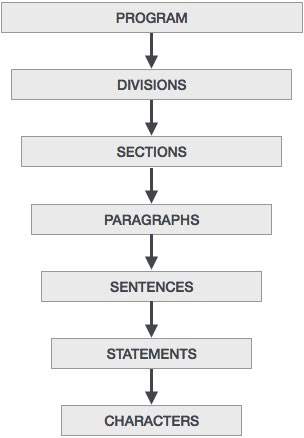 A brief introduction of these divisions is given below:
A brief introduction of these divisions is given below:COBOL - Basic Syntax
Character Set
'Characters' are lowest in the hierarchy and they cannot be divided further. The COBOL Character Set includes 78 characters which are shown below:COBOL - Data Types
Data Division is used to define the variables used in a program. To
describe data in COBOL, one must understand the following terms:
- Data Name
- Level Number
- Picture Clause
- Value Clause
COBOL - Basic Verbs
COBOL verbs are used in the procedure division for data processing. A
statement always start with a COBOL verb. There are several COBOL verbs
with different types of actions.
COBOL - Data Layout
COBOL layout is the description of use of each field and the values
present in it. Following are the data description entries used in COBOL:
- Redefines Clause
- Renames Clause
- Usage Clause
- Copybooks
COBOL - Condition Statements
Conditional statements are used to change the execution flow
depending on certain conditions specified by the programmer. Conditional
statements will always evaluate to true or false. Conditions are used
in IF, Evaluate and Perform statements. The different types of
conditions are as follows:
COBOL - Loop Statements
There are some tasks that need to be done over and over again like
reading each record of a file till its end. The loop statements used in
COBOL are:
- Perform Thru
- Perform Until
- Perform Times
- Perform Varying
COBOL - String Handling
String handling statements in COBOL are used to do multiple
functional operations on strings. Following are the string handling
statements:
- Inspect
- String
- Unstring
COBOL - Table Processing
Arrays in COBOL are known as tables. An array is a linear data
structure and is collection of individual data items of same type. Data
items of a table are internally sorted.
COBOL - File Handling
The concept of files in COBOL is different from that in C/C++. While
learning the basics of 'File' in COBOL, the concepts of both languages
should not be co-related. Simple text files cannot be used in COBOL,
instead PS (Physical Sequential) and VSAM files are used. PS files will be discussed in this module.
COBOL - File Organization
File organization indicates how the records are organized in a file.
There are different types of organizations for files so as to increase
their efficiency of accessing the records. Following are the types of
file organization schemes:
COBOL - File Access Mode
Till now, file organization schemes have been discussed. For each
file organization scheme, different access modes can be used. Following
are the types of file access modes:
- Sequential Access
- Random Access
- Dynamic Access
COBOL - File Handling Verbs
File handling verbs are used to perform various operations on files. Following are the file handling verbs:
- Open
- Read
- Write
- Rewrite
- Delete
- Start
- Close
COBOL - Subroutines
Cobol subroutine is a program that can be compiled independently but
cannot be executed independently. There are two types of subroutines: internal subroutines like Perform statements and external subroutines like CALL verb.
COBOL - Internal Sort
Sorting of data in a file or merging of two or more files is a common
necessity in almost all business-oriented applications. Sorting is used
for arranging records either in ascending or descending order, so that
sequential processing can be performed. There are two techniques which
are used for sorting files in COBOL:
COBOL - Database Interface
As of now, we have learnt the use of files in COBOL. Now, we will
discuss how a COBOL program interacts with DB2. It involves the
following terms:
- Embedded SQL
- DB2 Application Programming
- Host Variables
- SQLCA
- SQL Queries
- Cursors
COBOL Interview Questions
Dear readers, these COBOL Interview Questions have been
designed especially to get you acquainted with the nature of questions
you may encounter during your interview for the subject of COBOL Programming Language.
As per my experience, good interviewers hardly plan to ask any
particular question during your interview.
COBOL Questions and Answers
COBOL Questions and Answers has been designed with a special intention of helping students and professionals preparing for various Certification Exams and Job Interviews.
This section provides a useful collection of sample Interview Questions
and Multiple Choice Questions (MCQs) and their answers with
appropriate explanations.
COBOL - Quick Guide
COBOL - Overview
Introduction to COBOL
COBOL is a high-level language. One must understand the way COBOL works. Computers only understand machine code, a binary stream of 0s and 1s. COBOL code must be converted into machine code using a compiler. Run the program source through a compiler.COBOL - Useful Resources
The following resources contain additional information on COBOL. Please use them to get more in-depth knowledge on this topic.
Discuss COBOL
COBOL stands for Common Business Oriented Language.The US Department
of Defense, in a conference, formed CODASYL (Conference on Data Systems
Language) to develop a language for business data processing needs which
is now known as COBOL.
Clojure - Overview
Clojure is a high level, dynamic functional programming language.
Clojure is designed based on the LISP programming language and has
compilers which makes it run on both Java and .Net runtime environment.
Before we talk about Clojure, let’s just have a quick description of LISP programming language.
Before we talk about Clojure, let’s just have a quick description of LISP programming language.
Clojure - Environment
Try it Option Online
We have set up the Clojure Programming environment on-line, so that you can compile and execute all the available examples on line. It gives you confidence in what you are reading and enables you to verify the programs with different options. Feel free to modify any example and execute it on-line.
Clojure - Basic Syntax
In order to understand the basic syntax of Clojure, let’s first look at a simple Hello World program.
Hello World as a Complete Program
Write ‘Hello world’ in a complete Clojure program. Following is an example.Clojure - REPL
REPL (read-eval-print loop) is a tool for experimenting with Clojure
code. It allows you to interact with a running program and quickly try
out if things work out as they should. It does this by presenting you
with a prompt where you can enter the code. It then reads your input,
evaluates it, prints the result, and loops, presenting you with a prompt
again.
Clojure - Data Types
Clojure offers a wide variety of built-in data types.
Built-in Data Types
Following is a list of data types which are defined in Clojure.- Integers − Following are the representation of Integers available in Clojure.
- Decimal Integers (Short, Long and Int) − These are used to represent whole numbers. For example, 1234.
- Decimal Integers (Short, Long and Int) − These are used to represent whole numbers. For example, 1234.
Clojure - Variables
In Clojure, variables are defined by the ‘def’ keyword.
It’s a bit different wherein the concept of variables has more to do
with binding. In Clojure, a value is bound to a variable. One key thing
to note in Clojure is that variables are immutable, which means that in
order for the value of the variable to change, it needs to be destroyed
and recreated again.
Clojure - Operators
An operator is a symbol that tells the compiler to perform specific mathematical or logical manipulations.
Clojure has the following types of operators −
Clojure has the following types of operators −
- Arithmetic operators
- Relational operators
- Logical operators
- Bitwise operators
Clojure - Loops
So far we have seen statements which are executed one after the other
in a sequential manner. Additionally, statements are provided in
Clojure to alter the flow of control in a program’s logic. They are then
classified into flow of control statements which we will see in detail.
Clojure - Decision Making
Decision-making structures require that the programmer specify
one or more conditions to be evaluated or tested by the program, along
with a statement or statements to be executed if the condition is
determined to be true, and optionally, other statements to be executed
if the condition is determined to be false.
Clojure - Functions
Clojure is known as a functional programming language, hence you
would expect to see a lot of emphasis on how functions work in Clojure.
This chapter covers what all can be done with functions in Clojure.
Clojure - Numbers
Numbers datatype in Clojure is derived from Java classes.
Clojure supports integer and floating point numbers.
Clojure supports integer and floating point numbers.
- An integer is a value that does not include a fraction.
- A floating-point number is a decimal value that includes a decimal fraction.
Clojure - Recursion
We have seen the recur statement in an earlier topic and whereas the ‘for’ loop is somewhat like a loop, recur is a real loop in Clojure.
Clojure - File I/O
Clojure provides a number of helper methods when working with I/O. It
offers easier classes to provide the following functionalities for
files.
- Reading files
- Writing to files
- Seeing whether a file is a file or directory
Clojure - Strings
A String literal is constructed in Clojure by enclosing the
string text in quotations. Strings in Clojure need to be constructed
using the double quotation marks such as “Hello World”.
Clojure - Lists
List is a structure used to store a collection of data items. In Clojure, the List implements the ISeq interface. Lists are created in Clojure by using the list function.
Clojure - Sets
Sets in Clojure are a set of unique values. Sets are created in Clojure with the help of the set command.
Example
Following is an example of the creation of sets in Clojure.(ns clojure.examples.example (:gen-class))
Clojure - Vectors
A Vector is a collection of values indexed by contiguous integers. A vector is created by using the vector method in Clojure.
Clojure - Maps
A Map is a collection that maps keys to values. Two different map types are provided - hashed and sorted. HashMaps require keys that correctly support hashCode and equals. SortedMaps require keys that implement Comparable, or an instance of Comparator.
Clojure - Namespaces
Namespaces in Clojure are used to differentiate classes into separate logical spaces just like in Java. Consider the following statement.
(:require [clojure.set :as set])
Clojure - Exception Handling
Exception handling is required in any programming language to
handle the runtime errors so that the normal flow of the application can
be maintained. Exception usually disrupts the normal flow of the
application, which is the reason why we need to use exception handling
in our application.
Clojure - Sequences
Sequences are created with the help of the ‘seq’ command. Following is a simple example of a sequence creation.
(ns clojure.examples.example
   (:gen-class))
Clojure - Regular Expressions
A regular expression is a pattern that is used to find
substrings in text. Regular expressions are used in a variety of
programming languages and used a lot in LISP type programming languages.
Following is an example of a regular expression.
Following is an example of a regular expression.
Clojure - Predicates
Predicates are functions that evaluate a condition and provide
a value of either true or false. We have seen predicate functions in
the examples of the chapter on numbers. We have seen functions like
‘even?’ which is used to test if a number is even or not, or ‘neg?’
which is used to test if a number is greater than zero or not.
Clojure - Destructuring
Destructuring is a functionality within Clojure, which allows
one to extract values from a data structure, such as a vector and bind
them to symbols without having to explicitly traverse the datastructure.
Let’s look at an example of what exactly Destructuring means and how does it happen.
Let’s look at an example of what exactly Destructuring means and how does it happen.
Clojure - Date and Time
Since the Clojure framework is derived from Java classes, one can use the date-time classes available in Java in Clojure. The class date represents a specific instant in time, with millisecond precision.
Following are the methods available for the date-time class.
Following are the methods available for the date-time class.
Clojure - Atoms
Atoms are a data type in Clojure that provide a way to manage
shared, synchronous, independent state. An atom is just like any
reference type in any other programming language. The primary use of an
atom is to hold Clojure’s immutable datastructures. The value held by an
atom is changed with the swap! method.
Clojure - Metadata
In Clojure, metadata is used to annotate the data in a
collection or for the data stored in a symbol. This is normally used to
annotate data about types to the underlying compiler, but can also be
used for developers.
Clojure - StructMaps
StructMaps are used for creating structures in Clojure. For
example, if you wanted to create a structure which comprised of an
Employee Name and Employeeid, you can do that with StructMaps.
The following operations are possible in Clojure with regards to StructMaps.
The following operations are possible in Clojure with regards to StructMaps.
Clojure - Agents
As pointed out many times, Clojure is a programming language wherein
many of the data types are immutable, which means that the only way one
can change the value of a variable is to create a new variable and
assign the new value to it. However, Clojure does provide some elements,
which can create an mutable state.
Clojure - Watchers
Watchers are functions added to variable types such as atoms
and reference variables which get invoked when a value of the variable
type changes. For example, if the calling program changes the value of
an atom variable, and if a watcher function is attached to the atom
variable, the function will be invoked as soon as the value of the atom
is changed.
Clojure - Macros
In any language, Macros are used to generate inline code.
Clojure is no exception and provides simple macro facilities for
developers. Macros are used to write code-generation routines, which
provide the developer a powerful way to tailor the language to the needs
of the developer.
Clojure - Reference Values
Reference values are another way Clojure can work with the
demand to have mutable variables. Clojure provides mutable data types
such as atoms, agents, and reference types.
Following are the operations available for reference values.
Following are the operations available for reference values.
Clojure - Databases
In order to use the database functionality, please ensure to first download the jdbc files from the following url − https://codeload.github.com/clojure/java.jdbc/zip/master
You will find a zip file which has the necessary drivers for Clojure to have the ability to connect to databases. Once the zip file is extracted, ensure to add the unzipped location to your classpath.
You will find a zip file which has the necessary drivers for Clojure to have the ability to connect to databases. Once the zip file is extracted, ensure to add the unzipped location to your classpath.
Clojure - Java Interface
As we already know, Clojure code runs on the Java virtual environment
at the end. Thus it only makes sense that Clojure is able to utilize
all of the functionalities from Java. In this chapter, let’s discuss the
correlation between Clojure and Java.
Clojure - Concurrent Programming
In Clojure programming most data types are immutable, thus when it comes to concurrent programming, the code using these data types are pretty safe when the code runs on multiple processors. But many a times, there is a requirement to share data, and when it comes to shared data across multiple processors, it becomes necessary to ensure that the state of the data is maintained in terms of integrity when working with multiple processors. This is known as
Clojure - Applications
Clojure has some contributed libraries which have the enablement for creating Desktop and Web-based applications. Let’s discuss each one of them.
Clojure - Automated Testing
In this chapter, let’s discuss automated testing options provided by Clojure.
Testing for Client Applications
In order to use testing for Clojure framework, you have to use the dependencies located at https://github.com/slagyr/speclj#manual-installationClojure - Libraries
One thing which makes the Clojure library so powerful is the number of libraries available for the Clojure framework. We have already seen so many libraries used in our earlier examples for web testing, web development, developing swing-based applications, the jdbc library for connecting to MySQL databases. Following are just a couple of examples of few more libraries.
Clojure - Quick Guide
Clojure - Overview
Clojure is a high level, dynamic functional programming language. Clojure is designed based on the LISP programming language and has compilers which makes it run on both Java and .Net runtime environment.Clojure - Useful Resources
The following resources contain additional information on Clojure. Please use them to get more in-depth knowledge on this.
Discuss Clojure
Clojure is a high level, dynamic functional programming language. It is
designed, based on the LISP programming language, and has compilers that
makes it possible to be run on both Java and .Net runtime environment.
This tutorial is fairly comprehensive and covers various functions
involved in Clojure. All the functions are explained using examples for
easy understanding.
Thursday, January 26, 2017
C Library -
The assert.h header file of the C Standard Library provides a macro called assert which can be used to verify assumptions made by the program and print a diagnostic message if this assumption is false.
C Library -
The ctype.h header file of the C Standard Library declares several functions that are useful for testing and mapping characters.
All the functions accepts int as a parameter, whose value must be EOF or representable as an unsigned char.
All the functions return non-zero (true) if the argument c satisfies the condition described, and zero(false) if not.
All the functions accepts int as a parameter, whose value must be EOF or representable as an unsigned char.
All the functions return non-zero (true) if the argument c satisfies the condition described, and zero(false) if not.
C Library -
The errno.h header file of the C Standard Library defines the integer variable errno,
which is set by system calls and some library functions in the event of
an error to indicate what went wrong. This macro expands to a
modifiable lvalue of type int, therefore it can be both read and
modified by a program.
C Library -
The float.h header file of the C Standard Library contains a
set of various platform-dependent constants related to floating point
values. These constants are proposed by ANSI C. They allow making more
portable programs. Before checking all the constants, it is good to
understand that floating-point number is composed of following four
elements −
C Library -
The limits.h header determines various properties of the
various variable types. The macros defined in this header, limits the
values of various variable types like char, int and long.
These limits specify that a variable cannot store any value beyond these limits, for example an unsigned character can store up to a maximum value of 255.
These limits specify that a variable cannot store any value beyond these limits, for example an unsigned character can store up to a maximum value of 255.
C Library -
The locale.h header defines the location specific settings,
such as date formats and currency symbols. You will find several macros
defined along with an important structure struct lconv and two important functions listed below.
C Library -
The math.h header defines various mathematical functions and one macro. All the functions available in this library take double as an argument and return double as the result.
C Library -
The setjmp.h header defines the macro setjmp(), one function longjmp(), and one variable type jmp_buf, for bypassing the normal function call and return discipline.
C Library -
The signal.h header defines a variable type sig_atomic_t, two function calls, and several macros to handle different signals reported during a program's execution.
C Library -
The stdarg.h header defines a variable type va_list and
three macros which can be used to get the arguments in a function when
the number of arguments are not known i.e. variable number of arguments.
A function of variable arguments is defined with the ellipsis (,...) at the end of the parameter list.
A function of variable arguments is defined with the ellipsis (,...) at the end of the parameter list.
C Library -
The stddef.h header defines various variable types and macros. Many of these definitions also appear in other headers.
C Library -
The stdio.h header defines three variable types, several macros, and various functions for performing input and output.
C Library -
The stdlib.h header defines four variable types, several macros, and various functions for performing general functions.
C Library -
The string.h header defines one variable type, one macro, and various functions for manipulating arrays of characters.
C Library -
The time.h header defines four variable types, two macro and various functions for manipulating date and time.
Discuss C Standard Library
C is a general-purpose, procedural, imperative computer programming
language developed in 1972 by Dennis M. Ritchie at the Bell Telephone
Laboratories to develop the Unix operating system.
C Tutorial
C is a general-purpose, procedural, imperative computer programming
language developed in 1972 by Dennis M. Ritchie at the Bell Telephone
Laboratories to develop the UNIX operating system. C is the most widely
used computer language. It keeps fluctuating at number one scale of
popularity along with Java programming language, which is also equally
popular and most widely used among modern software programmers.
Audience
This tutorial is designed for software programmers with a need to understand the C programming language starting from scratch. This tutorial will give you enough understanding on C programming language from where you can take yourself to higher level of expertise.C - Useful Resources
The following resources contain additional information on C. Please use them to get more in-depth knowledge on this topic.
AWK - Overview
AWK is an interpreted programming language. It is very powerful and
specially designed for text processing. Its name is derived from the
family names of its authors − Alfred Aho, Peter Weinberger, and Brian Kernighan.
AWK - Environment
This chapter describes how to set up the AWK environment on your GNU/Linux system.
Installation Using Package Manager
AWK - Workflow
To become an expert AWK programmer, you need to know its internals.
AWK follows a simple workflow − Read, Execute, and Repeat. The following
diagram depicts the workflow of AWK −
AWK - Basic Syntax
AWK is simple to use. We can provide AWK commands either directly
from the command line or in the form of a text file containing AWK
commands.
AWK - Basic Examples
This chapter describes several useful AWK commands and their appropriate examples. Consider a text file marks.txt to be processed with the following content −
1) Amit     Physics   80
2) Rahul    Maths     90
3) Shyam    Biology   87
4) Kedar    English   85
5) Hari     History   89
AWK - Built-in Variables
AWK provides several built-in variables. They play an important role
while writing AWK scripts. This chapter demonstrates the usage of
built-in variables.
Standard AWK variables
The standard AWK variables are discussed below.AWK - Operators
Like other programming languages, AWK also provides a large set of
operators. This chapter explains AWK operators with suitable examples.
AWK - Regular Expressions
AWK is very powerful and efficient in handling regular expressions. A
number of complex tasks can be solved with simple regular expressions.
Any command-line expert knows the power of regular expressions.
This chapter covers standard regular expressions with suitable examples.
This chapter covers standard regular expressions with suitable examples.
AWK - Arrays
AWK has associative arrays and one of the best thing about it is –
the indexes need not to be continuous set of number; you can use either
string or number as an array index. Also, there is no need to declare
the size of an array in advance – arrays can expand/shrink at runtime.
Its syntax is as follows −
Its syntax is as follows −
AWK - Control Flow
Like other programming languages, AWK provides conditional statements
to control the flow of a program. This chapter explains AWK's control
statements with suitable examples.
AWK - Loops
This chapter explains AWK's loops with suitable example. Loops are
used to execute a set of actions in a repeated manner. The loop
execution continues as long as the loop condition is true.
AWK - Built-in Functions
AWK has a number of functions built into it that are always available
to the programmer. This chapter describes Arithmetic, String, Time, Bit
manipulation, and other miscellaneous functions with suitable examples.
AWK - User Defined Functions
Functions are basic building blocks of a program. AWK allows us to
define our own functions. A large program can be divided into functions
and each function can be written/tested independently. It provides
re-usability of code.
Given below is the general format of a user-defined function −
Given below is the general format of a user-defined function −
AWK - Output Redirection
So far, we displayed data on standard output stream. We can also redirect data to a file. A redirection appears after the print or printf
statement. Redirections in AWK are written just like redirection in
shell commands, except that they are written inside the AWK program.
This chapter explains redirection with suitable examples.
AWK - Pretty Printing
So far we have used AWK's print and printf functions to
display data on standard output. But printf is much more powerful than
what we have seen before. This function is borrowed from the C language
and is very helpful while producing formatted output. Below is the
syntax of the printf statement −
AWK - Quick Guide
AWK - Overview
AWK is an interpreted programming language. It is very powerful and specially designed for text processing. Its name is derived from the family names of its authors − Alfred Aho, Peter Weinberger, and Brian Kernighan.AWK - Useful Resources
The following resources contain additional information on AWK. Please use them to get more in-depth knowledge on this.
Discuss AWK
This tutorial takes you through AWK, one of the most prominent
text-processing utility on GNU/Linux. It is very powerful and uses
simple programming language. It can solve complex text processing tasks
with a few lines of code.
Assembly - Introduction
What is Assembly Language?
Each personal computer has a microprocessor that manages the computer's arithmetical, logical, and control activities.Each family of processors has its own set of instructions for handling various operations such as getting input from keyboard, displaying information on screen and performing various other jobs.
Assembly - Environment Setup
Try it Option Online
We already have set up NASM assembler to experiment with Assembly programming online, so that you can execute all the available examples online at the same time when you are doing your theory work.
Assembly - Basic Syntax
An assembly program can be divided into three sections −
- The data section,
- The bss section, and
- The text section.
Assembly - Memory Segments
We have already discussed the three sections of an assembly program. These sections represent various memory segments as well.
Interestingly, if you replace the section keyword with segment, you will get the same result. Try the following code −
Interestingly, if you replace the section keyword with segment, you will get the same result. Try the following code −
Assembly - Registers
Processor operations mostly involve processing data. This data can be
stored in memory and accessed from thereon. However, reading data from
and storing data into memory slows down the processor, as it involves
complicated processes of sending the data request across the control bus
and into the memory storage unit and getting the data through the same
channel.
Assembly - System Calls
System calls are APIs for the interface between the user space and
the kernel space. We have already used the system calls. sys_write and
sys_exit, for writing into the screen and exiting from the program,
respectively.
Assembly - Addressing Modes
Most assembly language instructions require operands to be processed.
An operand address provides the location, where the data to be
processed is stored. Some instructions do not require an operand,
whereas some other instructions may require one, two, or three operands.
Assembly - Variables
NASM provides various define directives for reserving storage
space for variables. The define assembler directive is used for
allocation of storage space. It can be used to reserve as well as
initialize one or more bytes.
Assembly - Constants
There are several directives provided by NASM that define constants.
We have already used the EQU directive in previous chapters. We will
particularly discuss three directives −
Assembly - Arithmetic Instructions
The INC Instruction
The INC instruction is used for incrementing an operand by one. It works on a single operand that can be either in a register or in memory.Assembly - Logical Instructions
The processor instruction set provides the instructions AND, OR, XOR,
TEST, and NOT Boolean logic, which tests, sets, and clears the bits
according to the need of the program.
The format for these instructions −
The format for these instructions −
Assembly - Conditions
Conditional execution in assembly language is accomplished by several
looping and branching instructions. These instructions can change the
flow of control in a program. Conditional execution is observed in two
scenarios −
Assembly - Loops
The JMP instruction can be used for implementing loops. For example,
the following code snippet can be used for executing the loop-body 10
times.
MOV CL, 10
L1:
<LOOP-BODY>
Assembly - Numbers
Numerical data is generally represented in binary system. Arithmetic
instructions operate on binary data. When numbers are displayed on
screen or entered from keyboard, they are in ASCII form.
Assembly - Strings
We have already used variable length strings in our previous
examples. The variable length strings can have as many characters as
required. Generally, we specify the length of the string by either of
the two ways −
- Explicitly storing string length
- Using a sentinel character
Assembly - Arrays
We have already discussed that the data definition directives to the
assembler are used for allocating storage for variables. The variable
could also be initialized with some specific value. The initialized
value could be specified in hexadecimal, decimal or binary form.
Assembly - Procedures
Procedures or subroutines are very important in assembly language, as
the assembly language programs tend to be large in size. Procedures are
identified by a name. Following this name, the body of the procedure is
described which performs a well-defined job. End of the procedure is
indicated by a return statement.
Assembly - Recursion
A recursive procedure is one that calls itself. There are two kind of
recursion: direct and indirect. In direct recursion, the procedure
calls itself and in indirect recursion, the first procedure calls a
second procedure, which in turn calls the first procedure.
Assembly - Macros
Writing a macro is another way of ensuring modular programming in assembly language.
- A macro is a sequence of instructions, assigned by a name and could be used anywhere in the program.
- In NASM, macros are defined with %macro and %endmacro directives.
- The macro begins with the %macro directive and ends with the %endmacro directive.
Assembly - File Management
The system considers any input or output data as stream of bytes. There are three standard file streams −
- Standard input (stdin),
- Standard output (stdout), and
- Standard error (stderr).
Assembly - Memory Management
The sys_brk() system call is provided by the kernel, to
allocate memory without the need of moving it later. This call allocates
memory right behind the application image in the memory. This system
function allows you to set the highest available address in the data
section.
Assembly - Quick Guide
Assembly - Introduction
What is Assembly Language?
Each personal computer has a microprocessor that manages the computer's arithmetical, logical, and control activities.Assembly - Useful Resources
The following resources contain additional information on Assembly
Programming. Please use them to get more in-depth knowledge on this
topic.
Discuss Assembly Programming
Assembly language is a low-level programming language for a computer or
other programmable device specific to a particular computer architecture
in contrast to most high-level programming languages, which are
generally portable across multiple systems. Assembly language is
converted into executable machine code by a utility program referred to
as an assembler like NASM, MASM, etc.
Arduino - Overview
Arduino is a prototype platform (open-source) based on an easy-to-use
hardware and software. It consists of a circuit board, which can be
programed (referred to as a microcontroller) and a ready-made software
called Arduino IDE (Integrated Development Environment), which is used
to write and upload the computer code to the physical board.
The key features are −
The key features are −
Arduino - Board Description
In this chapter, we will learn about the different components on the
Arduino board. We will study the Arduino UNO board because it is the
most popular board in the Arduino board family. In addition, it is the
best board to get started with electronics and coding. Some boards look a
bit different from the one given below, but most Arduinos have majority
of these components in common.
Arduino - Installation
After learning about the main parts of the Arduino UNO board, we are
ready to learn how to set up the Arduino IDE. Once we learn this, we
will be ready to upload our program on the Arduino board.
In this section, we will learn in easy steps, how to set up the Arduino IDE on our computer and prepare the board to receive the program via USB cable.
In this section, we will learn in easy steps, how to set up the Arduino IDE on our computer and prepare the board to receive the program via USB cable.
Arduino - Program Structure
In this chapter, we will study in depth, the Arduino program
structure and we will learn more new terminologies used in the Arduino
world. The Arduino software is open-source. The source code for the Java
environment is released under the GPL and the C/C++ microcontroller
libraries are under the LGPL.
Sketch − The first new terminology is the Arduino program called “sketch”.
Sketch − The first new terminology is the Arduino program called “sketch”.
Arduino - Data Types
Data types in C refers to an extensive system used for declaring
variables or functions of different types. The type of a variable
determines how much space it occupies in the storage and how the bit
pattern stored is interpreted.
Arduino - Variables & Constants
Before we start explaining the variable types, a very important
subject we need to make sure, you fully understand is called the variable scope.
Arduino - Operators
An operator is a symbol that tells the compiler to perform specific
mathematical or logical functions. C language is rich in built-in
operators and provides the following types of operators −
Arduino - Control Statements
Decision making structures require that the programmer specify one or
more conditions to be evaluated or tested by the program. It should be
along with a statement or statements to be executed if the condition is
determined to be true, and optionally, other statements to be executed
if the condition is determined to be false.
Arduino - Loops
Programming languages provide various control structures that allow for more complicated execution paths.
A loop statement allows us to execute a statement or group of statements multiple times and following is the general form of a loop statement in most of the programming languages −
A loop statement allows us to execute a statement or group of statements multiple times and following is the general form of a loop statement in most of the programming languages −
Arduino - Functions
Functions allow structuring the programs in segments of code to
perform individual tasks. The typical case for creating a function is
when one needs to perform the same action multiple times in a program.
Standardizing code fragments into functions has several advantages −
Standardizing code fragments into functions has several advantages −
Arduino - Strings
Strings are used to store text. They can be used to display text on
an LCD or in the Arduino IDE Serial Monitor window. Strings are also
useful for storing the user input. For example, the characters that a
user types on a keypad connected to the Arduino.
There are two types of strings in Arduino programming −
There are two types of strings in Arduino programming −
Arduino - String Object
The second type of string used in Arduino programming is the String Object.
What is an Object?
An object is a construct that contains both data and functions. A String object can be created just like a variable and assigned a value or string. The String object contains functions (which are calledArduino - Arrays
An array is a consecutive group of memory locations that are of the
same type. To refer to a particular location or element in the array, we
specify the name of the array and the position number of the particular
element in the array.
Arduino - I/O Functions
The pins on the Arduino board can be configured as either inputs or
outputs. We will explain the functioning of the pins in those modes. It
is important to note that a majority of Arduino analog pins, may be
configured, and used, in exactly the same manner as digital pins.
Arduino - Advanced I/O Function
In this chapter, we will learn some advanced Input and Output Functions.
analogReference() Function
Configures the reference voltage used for analog input (i.e. the value used as the top of the input range). The options are −Arduino - Character Functions
All data is entered into computers as characters, which includes
letters, digits and various special symbols. In this section, we discuss
the capabilities of C++ for examining and manipulating individual
characters.
Arduino - Math Library
The Arduino Math library (math.h) includes a number of useful mathematical functions for manipulating floating-point numbers.
Arduino - Trigonometric Functions
You need to use Trigonometry practically like calculating the
distance for moving object or angular speed. Arduino provides
traditional trigonometric functions (sin, cos, tan, asin, acos, atan)
that can be summarized by writing their prototypes. Math.h contains the
trigonometry function's prototype.
Arduino - Due & Zero
The Arduino Due is a microcontroller board based on the Atmel SAM3X8E ARM Cortex-M3 CPU. It is the first Arduino board based on a 32-bit ARM core microcontroller.
Important features −
Important features −
Arduino - Pulse Width Modulation
Pulse Width Modulation or PWM is a common technique used to vary the width of the pulses in a pulse-train. PWM has many applications such as controlling servos and speed controllers, limiting the effective power of motors and LEDs.
Arduino - Random Numbers
To generate random numbers, you can use Arduino random number functions. We have two functions −
- randomSeed(seed)
- random()
randomSeed (seed)
Arduino - Interrupts
Interrupts stop the current work of Arduino such that some other work can be done.
Suppose you are sitting at home, chatting with someone. Suddenly the telephone rings. You stop chatting, and pick up the telephone to speak to the caller.
Suppose you are sitting at home, chatting with someone. Suddenly the telephone rings. You stop chatting, and pick up the telephone to speak to the caller.
Arduino - Communication
Hundreds of communication protocols have been defined to achieve this data exchange. Each protocol can be categorized into one of the two categories: parallel or serial.
Arduino - Inter Integrated Circuit
Inter-integrated circuit (I2C) is a system for serial data exchange between the microcontrollers and specialized integrated circuits of a new generation. It is used when the distance between them is short (receiver and transmitter are usually on the same printed board). Connection is established via two conductors. One is used for data transfer and the other is used for synchronization (clock signal).
Arduino - Serial Peripheral Interface
A Serial Peripheral Interface (SPI) bus is a system for serial
communication, which uses up to four conductors, commonly three. One
conductor is used for data receiving, one for data sending, one for
synchronization and one alternatively for selecting a device to
communicate with.
Subscribe to:
Posts (Atom)