
Thursday, February 9, 2017


Angular Material - Environment Setup
How to Use Angular Material?
There are two ways to use Angular Material:- Local Installation - You can download the Angular Material
libraries using npm, jspm, or bower on your local machine and include
it in your HTML code.
Angular Material - Autocomplete
md-autocomplete, an Angular Directive, is used as a
special input control with an inbuilt drop-down to show all possible
matches to a custom query. This control acts as a real-time suggestion
box as soon as the user types in the input area.Angular Material - Bottom Sheet
$mdBottomSheet, an Angular Service, is used to open a bottom sheet over the application and provides a simple promise API.Methods
| S.N. | Method & Description |
|---|---|
| 1 | $mdBottomSheet.show(options); Show a bottom sheet with the specified options. |
Angular Material - Cards
md-card, an Angular Directive, is a container directive
and is used to draw cards in angularjs application. Following are the
angular directives and classes used in md-card.Angular Material - Widgets
Angular Material provide a rich library of UI widgets allows users to have advanced interaction capability with the application.
Angular Material - Layouts
Layout Directive
layout directive on a container element is used to specify the layout direction for its children. Following are the assignable values:Angular Material - Inputs
The
md-input-container an Angular directive, is a container component to contains any <input> or <textarea> element as a child. md-input-container
also supports error handling using the standard ng-messages directives
and animates the messages using ngEnter/ngLeave events or the
ngShow/ngHide events.Angular Material - Icons
The
md-icon an Angular directive, is a component to show
vector-based icons in application. It supports icon fonts and SVG icons
also apart from using Google Material Icons.Angular Material - Grids
The
md-grid-list an Angular directive, is a component
for laying out content for varying screen sizes. A grid has 12 columns
in the desktop size screen, 8 in the tablet size screen, and 4 in the
phone size screen, where each size have predefined margins and gutters.
Cells are laid out in sequential manner in a row, in the order they are
defined.Angular Material - SideNav
The
md-sidenav, an Angular directives is used to show a
container component which can be shown or hide programmatically. It
slides out over the top of the main content region by default.Angular Material - Fab Speed Dial
The
md-fab-speed-dial an Angular directive, is used to show a series of popup elements or buttons for quick access to common actions.Attributes
Angular Material - Subheaders
The
am_subheaders.htm
md-subheader, an Angular directives is used to show a subheader for a section.Example
The following example showcases the use ofmd-subheader showcase uses of subheader component.am_subheaders.htm
<html lang="en" >
Angular Material - Swipe
Swipe functionality is meant for mobile devices. Following directives are used to handle swipes.
md-swipe-down, an Angular directives is used to specify custom behavior when an element is swiped down.md-swipe-left, an Angular directives is used to specify custom behavior when an element is swiped left.
Angular Material - Switches
The
md-switch, an Angular directives is used to show a switch.Attributes
| S.N. | Parameter & Description |
|---|---|
| 1 | * ng-model Assignable angular expression to data-bind to. |
| 2 | name |
Angular Material - Theme
Angular Material Components uses intention group classes like
md-primary, md-accent, md-warn and additional classes for color
differences like md-hue-1, md-hue-2, or md-hue-3. Following components
supports use of above mentioned classes.
Angular Material - Toasts
The Angular Material provides various special methods to show
unobtrusive alerts to the users. Angular Material provides a term toast
for them and
$mdToast service is used to show toasts.Angular Material - Typography
Angular Material provides various typography CSS classes which can be
used to create visual consistency across Angular JS application.
| S.N. | Class Name & Description |
|---|---|
| 1 | md-display-1 Shows the text with Regular 34px. |
Angular Material - Virtual Repeat
md-virtual-repeat-container
md-virtual-repeat-container is the scroll container for the md-virtual-repeat component.Attributes - md-virtual-repeat-container
| S.N. | Parameter & Description |
|---|---|
| 1 | md-top-index Binds the index of the item that is at the top of the scroll container to $scope. It can both read and set the scroll position. |
Angular Material - WhiteFrame
Angular Material has several special classes to display containers as paper-like cards with shadow.
| S.N. | Class Name & Description |
|---|---|
| 1 | md-whiteframe-1dp Styles a container for any HTML content with 1px bordered shadow. Adds z-depth of 1. |
Angular Material - Quick Guide
What is Angular Material?
Angular Material is a UI component library for Angular JS developers. Angular Material's reusable UI components helps in constructing attractive, consistent, and functional web pages and web apps while adhering to modern web design principles like browser portability, device independence, and graceful degradation.Angular Material - Useful Resources
If you want to list down your website, book or any other resource on
this page then please contact at webmaster@tutorialspoint.com
Angular Material - Discussion
Angular Material is a UI component library for Angular JS developers.
Angular Material's reusable UI components helps in constructing
attractive, consistent, and functional web pages and web apps while
adhering to modern web design principles like browser portability,
device independence, and graceful degradation.
What is AJAX?
- AJAX stands for Asynchronous JavaScript and XML. AJAX is a new technique for creating better, faster, and more interactive web applications with the help of XML, HTML, CSS, and Java Script.
- Ajax uses XHTML for content, CSS for presentation, along with Document Object Model and JavaScript for dynamic content display.
AJAX - Technologies
AJAX cannot work independently. It is used in combination with other technologies to create interactive webpages.
JavaScript
- Loosely typed scripting language.
- JavaScript function is called when an event occurs in a page.
- Glue for the whole AJAX operation.
AJAX - Examples
Here is a list of some famous web applications that make use of AJAX.
Google Maps
A user can drag an entire map by using the mouse, rather than clicking on a button.AJAX - Browser Support
All the available browsers cannot support AJAX. Here is a list of major browsers, that support AJAX.
- Mozilla Firefox 1.0 and above.
- Netscape version 7.1 and above.
- Apple Safari 1.2 and above.
AJAX - Action
This chapter gives you a clear picture of the exact steps of AJAX operation.
Steps of AJAX Operation
- A client event occurs.
- An XMLHttpRequest object is created.
- The XMLHttpRequest object is configured.
AJAX - XMLHttpRequest
The XMLHttpRequest object is the key to AJAX. It has been available
ever since Internet Explorer 5.5 was released in July 2000, but was not
fully discovered until AJAX and Web 2.0 in 2005 became popular.
AJAX - Database Operations
To clearly illustrate how easy it is to access information from a
database using AJAX, we are going to build MySQL queries on the fly and
display the results on "ajax.html". But before we proceed, let us do the
ground work. Create a table using the following command.
AJAX - Security
AJAX Security: Server Side
- AJAX-based Web applications use the same server-side security schemes of regular Web applications.
AJAX - Issues
AJAX is growing very fast and that is the reason that it contains
many issues with it. We hope with the passes of time, they will be
resolved and AJAX will become ideal for web applications. We are listing
down a few issues that AJAX currently suffers from.
AJAX - Quick Guide
What is AJAX?
- AJAX stands for Asynchronous JavaScript and XML.
AJAX is a new technique for creating better, faster, and more
interactive web applications with the help of XML, HTML, CSS, and Java
Script.
AJAX - Useful Resources
The following resources contain additional information on AJAX. Please use them to get more in-depth knowledge on this topic.
Discuss AJAX
AJAX, is a web development technique for creating interactive web applications.
If you know JavaScript, HTML, CSS, and XML, then you need to spend just one hour to start with AJAX.
If you know JavaScript, HTML, CSS, and XML, then you need to spend just one hour to start with AJAX.
VBA - Overview
VBA stands for Visual Basic for Applications an
event-driven programming language from Microsoft that is now
predominantly used with Microsoft office applications such as MSExcel,
MS-Word, and MS-Access.
It helps techies to build customized applications and solutions to enhance the capabilities of those applications.
It helps techies to build customized applications and solutions to enhance the capabilities of those applications.
VBA - Excel Macros
In this chapter, you will learn how to write a simple macro in a step by step manner.
Step 1 − First, enable 'Developer' menu in Excel 20XX. To do the same, click File → Options.
Step 2 − Click ‘Customize the Ribbon’ tab and check 'Developer'. Click 'OK'.
Step 1 − First, enable 'Developer' menu in Excel 20XX. To do the same, click File → Options.
Step 2 − Click ‘Customize the Ribbon’ tab and check 'Developer'. Click 'OK'.
VBA - Excel Terms
In this chapter, you will acquaint yourself with the commonly used
excel VBA terminologies. These terminologies will be used in further
modules, hence understanding each one of these is important.
VBA - Macro Comments
Comments are used to document the program logic and the user
information with which other programmers can seamlessly work on the same
code in future.
VBA - Message Box
The MsgBox function displays a message box and waits for the
user to click a button and then an action is performed based on the
button clicked by the user.
VBA - InputBox
The InputBox function prompts the users to enter values. After
entering the values, if the user clicks the OK button or presses ENTER
on the keyboard, the InputBox function will return the text in the text
box. If the user clicks the Cancel button, the function will return an
empty string ("").
VBA - Variables
Variable is a named memory location used to hold a value that
can be changed during the script execution. Following are the basic
rules for naming a variable.
VBA - Constants
Constant is a named memory location used to hold a value that CANNOT
be changed during the script execution. If a user tries to change a
Constant value, the script execution ends up with an error. Constants
are declared the same way the variables are declared.
VBA - Operators
An Operator can be defined using a simple expression - 4 + 5 is equal to 9. Here, 4 and 5 are called operands and + is called operator. VBA supports following types of operators −
VBA - Decisions
Decision making allows the programmers to control the execution flow
of a script or one of its sections. The execution is governed by one or
more conditional statements.
Following is the general form of a typical decision making structure found in most of the programming languages.
Following is the general form of a typical decision making structure found in most of the programming languages.
VBA - Loops
There may be a situation when you need to execute a block of code
several number of times. In general, statements are executed
sequentially: The first statement in a function is executed first,
followed by the second, and so on.
VBA - Strings
Strings are a sequence of characters, which can consist of either
alphabets, numbers, special characters, or all of them. A variable is
said to be a string if it is enclosed within double quotes " ".
VBA - Date-Time Function
VBScript Date and Time Functions help the developers to convert date
and time from one format to another or to express the date or time value
in the format that suits a specific condition.
VBA - Arrays
We know very well that a variable is a container to store a value.
Sometimes, developers are in a position to hold more than one value in a
single variable at a time. When a series of values are stored in a
single variable, then it is known as an array variable.
VBA - User Defined Functions
A function is a group of reusable code which can be called
anywhere in your program. This eliminates the need of writing the same
code over and over again. This enables the programmers to divide a big
program into a number of small and manageable functions.
VBA - Sub Procedure
Sub Procedures are similar to functions, however there are a few differences.
- Sub procedures DO NOT Return a value while functions may or may not return a value.
- Sub procedures CAN be called without a call keyword.
- Sub procedures are always enclosed within Sub and End Sub statements.
VBA - Events
VBA, an event-driven programming can be triggered when you change a
cell or range of cell values manually. Change event may make things
easier, but you can very quickly end a page full of formatting. There
are two kinds of events.
VBA - Error Handling
There are three types of errors in programming: (a) Syntax Errors, (b) Runtime Errors, and (c) Logical Errors.
Syntax errors
Syntax errors, also called as parsing errors, occur at the interpretation time for VBScript. For example, the following line causes a syntax error because it is missing a closing parenthesis.VBA - Excel Objects
When programming using VBA, there are few important objects that a user would be dealing with.
- Application Objects
- Workbook Objects
- Worksheet Objects
- Range Objects
VBA - Text Files
You can also read Excel File and write the contents of the cell into a Text File using VBA. VBA allows the users to work with text files using two methods −
- File System Object
- using Write Command
VBA - Programming Charts
Using VBA, you can generate charts based on certain criteria. Let us take a look at it using an example.
Step 1 − Enter the data against which the graph has to be generated.
Step 1 − Enter the data against which the graph has to be generated.
VBA - User Forms
A User Form is a custom-built dialog box that makes a user data entry more controllable and easier to use for the user. In this chapter, you will learn to design a simple form and add data into excel.
VBA - Quick Guide
VBA stands for Visual Basic for Applications an
event-driven programming language from Microsoft that is now
predominantly used with Microsoft office applications such as MSExcel,
MS-Word, and MS-Access.
It helps techies to build customized applications and solutions to enhance the capabilities of those applications.
It helps techies to build customized applications and solutions to enhance the capabilities of those applications.
VBA - Useful Resources
The following resources contain additional information on VBA. Please use them to get more in-depth knowledge on this topic.
Discuss VBA
VBA stands for Visual Basic for Applications, an
event-driven programming language from Microsoft. It is now
predominantly used with Microsoft Office applications such as MSExcel,
MS-Word and MS-Access. This tutorial teaches the basics of VBA. Each of
the sections contain related topics with simple and useful examples.
Wednesday, February 8, 2017
VB.Net - Overview
Visual Basic .NET (VB.NET) is an object-oriented computer programming
language implemented on the .NET Framework. Although it is an evolution
of classic Visual Basic language, it is not backwards-compatible with
VB6, and any code written in the old version does not compile under
VB.NET.
VB.Net - Environment Setup
In this chapter, we will discuss the tools available for creating VB.Net applications.
We have already mentioned that VB.Net is part of .Net framework and used for writing .Net applications. Therefore before discussing the available tools for running a VB.Net program, let us understand how VB.Net relates to the .Net framework.
We have already mentioned that VB.Net is part of .Net framework and used for writing .Net applications. Therefore before discussing the available tools for running a VB.Net program, let us understand how VB.Net relates to the .Net framework.
VB.Net - Program Structure
Before we study basic building blocks of the VB.Net programming
language, let us look a bare minimum VB.Net program structure so that we
can take it as a reference in upcoming chapters.
VB.Net - Basic Syntax
VB.Net is an object-oriented programming language. In Object-Oriented
Programming methodology, a program consists of various objects that
interact with each other by means of actions. The actions that an object
may take are called methods. Objects of the same kind are said to have
the same type or, more often, are said to be in the same class.
VB.Net - Data Types
Data types refer to an extensive system used for declaring variables
or functions of different types. The type of a variable determines how
much space it occupies in storage and how the bit pattern stored is
interpreted.
VB.Net - Variables
A variable is nothing but a name given to a storage area that our
programs can manipulate. Each variable in VB.Net has a specific type,
which determines the size and layout of the variable's memory; the range
of values that can be stored within that memory; and the set of
operations that can be applied to the variable.
VB.Net - Constants and Enumerations
The constants refer to fixed values that the program may not alter during its execution. These fixed values are also called literals.
Constants can be of any of the basic data types like an integer constant, a floating constant, a character constant, or a string literal. There are also enumeration constants as well.
Constants can be of any of the basic data types like an integer constant, a floating constant, a character constant, or a string literal. There are also enumeration constants as well.
VB.Net - Modifiers
The modifiers are keywords added with any programming element to give
some especial emphasis on how the programming element will behave or
will be accessed in the program
VB.Net - Statements
A statement is a complete instruction in Visual Basic
programs. It may contain keywords, operators, variables, literal values,
constants and expressions.
Statements could be categorized as:
Statements could be categorized as:
VB.Net - Directives
The VB.Net compiler directives give instructions to the compiler to preprocess the information before actual compilation starts.
All these directives begin with #, and only white-space characters may appear before a directive on a line. These directives are not statements.
All these directives begin with #, and only white-space characters may appear before a directive on a line. These directives are not statements.
VB.Net - Operators
An operator is a symbol that tells the compiler to perform specific
mathematical or logical manipulations. VB.Net is rich in built-in
operators and provides following types of commonly used operators:
VB.Net - Decision Making
Decision making structures require that the programmer specify one or
more conditions to be evaluated or tested by the program, along with a
statement or statements to be executed if the condition is determined to
be true, and optionally, other statements to be executed if the
condition is determined to be false.
VB.Net - Loops
There may be a situation when you need to execute a block of code
several number of times. In general, statements are executed
sequentially: The first statement in a function is executed first,
followed by the second, and so on.
VB.Net - Strings
In VB.Net, you can use strings as array of characters, however, more
common practice is to use the String keyword to declare a string
variable. The string keyword is an alias for the System.String class.
VB.Net - Date & Time
Most of the softwares you write need implementing some form of date
functions returning current date and time. Dates are so much part of
everyday life that it becomes easy to work with them without thinking.
VB.Net also provides powerful tools for date arithmetic that makes
manipulating dates easy.
VB.Net - Arrays
An array stores a fixed-size sequential collection of elements of the
same type. An array is used to store a collection of data, but it is
often more useful to think of an array as a collection of variables of
the same type.
All arrays consist of contiguous memory locations.
All arrays consist of contiguous memory locations.
VB.Net - Collections
Collection classes are specialized classes for data storage and
retrieval. These classes provide support for stacks, queues, lists, and
hash tables. Most collection classes implement the same interfaces.
VB.Net - Functions
A procedure is a group of statements that together perform a task
when called. After the procedure is executed, the control returns to the
statement calling the procedure. VB.Net has two types of procedures:
- Functions
- Sub procedures or Subs
VB.Net - Sub Procedures
As we mentioned in the previous chapter, Sub procedures are
procedures that do not return any value. We have been using the Sub
procedure Main in all our examples. We have been writing console
applications so far in these tutorials.
VB.Net - Classes & Objects
When you define a class, you define a blueprint for a data type. This
doesn't actually define any data, but it does define what the class
name means, that is, what an object of the class will consist of and
what operations can be performed on such an object.
VB.Net - Exception Handling
An exception is a problem that arises during the execution of a
program. An exception is a response to an exceptional circumstance that
arises while a program is running, such as an attempt to divide by zero.
Exceptions provide a way to transfer control from one part of a program to another. VB.Net exception handling is built upon four keywords: Try, Catch, Finally and Throw.
Exceptions provide a way to transfer control from one part of a program to another. VB.Net exception handling is built upon four keywords: Try, Catch, Finally and Throw.
VB.Net - File Handling
A file is a collection of data stored in a disk with a
specific name and a directory path. When a file is opened for reading or
writing, it becomes a stream.
The stream is basically the sequence of bytes passing through the communication path. There are two main streams: the input stream and the output stream.
The stream is basically the sequence of bytes passing through the communication path. There are two main streams: the input stream and the output stream.
VB.Net - Basic Controls
An object is a type of user interface element you create on a Visual
Basic form by using a toolbox control. In fact, in Visual Basic, the
form itself is an object. Every Visual Basic control consists of three
important elements:
VB.Net - Dialog Boxes
There are many built-in dialog boxes to be used in Windows forms for
various tasks like opening and saving files, printing a page, providing
choices for colors, fonts, page setup, etc., to the user of an
application. These built-in dialog boxes reduce the developer's time and
workload.
VB.Net - Advanced Form
In this chapter, let us study the following concepts:
- Adding menus and sub menus in an application
- Adding the cut, copy and paste functionalities in a form
- Anchoring and docking controls in a form
- Modal forms
VB.Net - Event Handling
Events are basically a user action like key press, clicks, mouse
movements, etc., or some occurrence like system generated notifications.
Applications need to respond to events when they occur.
Clicking on a button, or entering some text in a text box, or clicking on a menu item, all are examples of events. An event is an action that calls a function or may cause another event.
Clicking on a button, or entering some text in a text box, or clicking on a menu item, all are examples of events. An event is an action that calls a function or may cause another event.
VB.Net - Regular Expressions
A regular expression is a pattern that could be matched
against an input text. The .Net framework provides a regular expression
engine that allows such matching. A pattern consists of one or more
character literals, operators, or constructs.
VB.Net - Database Access
Applications communicate with a database, firstly, to retrieve the
data stored there and present it in a user-friendly way, and secondly,
to update the database by inserting, modifying and deleting data.
Microsoft ActiveX Data Objects.Net (ADO.Net) is a model, a part of the .Net framework that is used by the .Net applications for retrieving, accessing and updating data.
Microsoft ActiveX Data Objects.Net (ADO.Net) is a model, a part of the .Net framework that is used by the .Net applications for retrieving, accessing and updating data.
VB.Net - Excel Sheet
VB.Net provides support for interoperability between the COM object model of Microsoft Excel 2010 and your application.
To avail this interoperability in your application, you need to import the namespace Microsoft.Office.Interop.Excel in your Windows Form Application.
To avail this interoperability in your application, you need to import the namespace Microsoft.Office.Interop.Excel in your Windows Form Application.
VB.Net - Send Email
VB.Net allows sending e-mails from your application. The System.Net.Mail namespace contains classes used for sending e-mails to a Simple Mail Transfer Protocol (SMTP) server for delivery.
The following table lists some of these commonly used classes:
The following table lists some of these commonly used classes:
VB.Net - XML Processing
The Extensible Markup Language (XML) is a markup language much like
HTML or SGML. This is recommended by the World Wide Web Consortium and
available as an open standard.
The System.Xml namespace in the .Net Framework contains classes for processing XML documents.
The System.Xml namespace in the .Net Framework contains classes for processing XML documents.
VB.Net - Web Programming
A dynamic web application consists of either or both of the following two types of programs:
- Server-side scripting - these are programs executed on a
web server, written using server-side scripting languages like ASP
(Active Server Pages) or JSP (Java Server Pages).
VB.Net - Quick Guide
VB.Net - Overview
Visual Basic .NET (VB.NET) is an object-oriented computer programming language implemented on the .NET Framework. Although it is an evolution of classic Visual Basic language, it is not backwards-compatible with VB6, and any code written in the old version does not compile under VB.NET.VB.Net - Useful Resources
The following resources contain additional information on VB.Net. Please use them to get more in-depth knowledge on this topic.
Discuss VB.Net
VB.Net is a simple, modern, object-oriented computer programming
language developed by Microsoft to combine the power of .NET Framework
and the common language runtime with the productivity benefits that are
the hallmark of Visual Basic.
Swift - Overview
Swift is a new programming language developed by Apple Inc for iOS
and OS X development. Swift adopts the best of C and Objective-C,
without the constraints of C compatibility.
Swift - Environment
Try it Option Online
We have set up the Swift Programming environment online, so that you can compile and execute all the available examples online. It gives you confidence in what you are reading and enables you to verify the programs with different options. Feel free to modify any example and execute it online.
Swift - Basic Syntax
We have already seen a piece of Swift program while setting up the environment. Let's start once again with the following Hello, World! program created for OS X playground, which includes import Cocoa as shown below −
Swift - Data Types
While doing programming in any programming language, you need to use
different types of variables to store information. Variables are nothing
but reserved memory locations to store values. This means that when you
create a variable, you reserve some space in memory.
Swift - Variables
A variable provides us with named storage that our programs can
manipulate. Each variable in Swift has a specific type, which determines
the size and layout of the variable's memory; the range of values that
can be stored within that memory; and the set of operations that can be
applied to the variable.
Swift supports the following basic types of variables −
Swift supports the following basic types of variables −
Swift - Optionals
Swift also introduces Optionals type, which handles the
absence of a value. Optionals say either "there is a value, and it
equals x" or "there isn't a value at all".
An Optional is a type on its own, actually one of Swift’s new super-powered enums. It has two possible values, None and Some(T), where T is an associated value of the correct data type available in Swift.
An Optional is a type on its own, actually one of Swift’s new super-powered enums. It has two possible values, None and Some(T), where T is an associated value of the correct data type available in Swift.
Swift - Constants
Constants refer to fixed values that a program may not alter during
its execution. Constants can be of any of the basic data types like an integer constant, a floating constant, a character constant, or a string literal. There are enumeration constants as well.
Swift - Literals
A literal is the source code representation of a value of an integer,
floating-point number, or string type. The following are examples of
literals −
42               // Integer literal
3.14159          // Floating-point literal
"Hello, world!"  // String literal
Swift - Operators
An operator is a symbol that tells the compiler to perform specific
mathematical or logical manipulations. Objective-C is rich in built-in
operators and provides the following types of operators −
- Arithmetic Operators
- Comparison Operators
- Logical Operators
Swift - Decision Making
Decision making structures require that the programmer specifies one
or more conditions to be evaluated or tested by the program, along with a
statement or statements to be executed if the condition is determined
to be true, and optionally, other statements to be executed if the condition is determined to be false.
Swift - Loops
There may be a situation when you need to execute a block of code
several number of times. In general statements are executed
sequentially: The first statement in a function is executed first,
followed by the second, and so on.
Swift - Strings
Strings in Swift are an ordered collection of characters, such as
"Hello, World!" and they are represented by the Swift data type String, which in turn represents a collection of values of Character type.
Swift - Characters
A character in Swift is a single character String literal, addressed by the data type character. Take a look at the following example. It uses two Character constants −
import Cocoa

let char1: Character = "A"
let char2: Character = "B"
Swift - Arrays
Swift arrays are used to store ordered lists of values of the same
type. Swift puts strict checking which does not allow you to enter a
wrong type in an array even by mistake.
Swift - Dictionaries
Swift dictionaries are used to store unordered lists of values
of the same type. Swift puts strict checking which does not allow you
to enter a wrong type in a dictionary even by mistake.
Swift - Functions
A function is a set of statements organized together to perform a
specific task. A Swift function can be as simple as a simple C function
to as complex as an Objective C language function. It allows us to pass
local and global parameter values inside the function calls.
Swift - Closures
Closures in Swift are similar to that of self-contained functions
organized as blocks and called anywhere like C and Objective C
languages. Constants and variable references defined inside the
functions are captured and stored in closures. Functions are considered
as special cases of closures and it takes the following three forms −
Swift - Enumerations
An enumeration is a user-defined data type which consists of set of related values. Keyword enum is used to defined enumerated data type.
Swift - Structures
Swift provides a flexible building block of making use of constructs
as Structures. By making use of these structures once can define
constructs methods and properties.
Swift - Classes
Classes in Swift are building blocks of flexible constructs. Similar
to constants, variables and functions the user can define class
properties and methods. Swift provides us the functionality that while
declaring classes the users need not create interfaces or implementation
files.
Swift - Properties
Swift language provides properties for class, enumeration or
structure to associate values. Properties can be further classified into
Stored properties and Computed properties.
Difference between Stored Properties and Computed Properties.
Difference between Stored Properties and Computed Properties.
Swift - Methods
In Swift language Functions associated with particular types are
referred to as Methods. In Objective C Classes are used to define
methods, whereas Swift language provides the user flexibility to have
methods for Classes, Structures and Enumerations.
Swift - Subscripts
Accessing the element members of a collection, sequence and a list in
Classes, Structures and Enumerations are carried out with the help of
subscripts. These subscripts are used to store and retrieve the values
with the help of index.
Swift - Inheritance
The ability to take than more form is defined as Inheritance.
Generally a class can inherit methods, properties and functionalities
from another class. Classes can be further categorized in to sub class
and super class.
- Sub Class − when a class inherits properties, methods and functions from another class it is called as sub class
Swift - Initialization
Classes, structures and enumerations once declared in Swift are
initialized for preparing instance of a class. Initial value is
initialized for stored property and also for new instances too the
values are initialized to proceed further.
Swift - Deinitialization
Before a class instance needs to be deallocated 'deinitializer' has
to be called to deallocate the memory space. The keyword 'deinit' is
used to deallocate the memory spaces occupied by the system resources.
Deinitialization is available only on class types.
Swift - ARC Overview
Memory management functions and its usage are handled in Swift
language through Automatic reference counting (ARC). ARC is used to
initialize and deinitialize the system resources thereby releasing
memory spaces used by the class instances when the instances are no
longer needed.
Swift - Optional Chaining
The process of querying, calling properties, subscripts and methods
on an optional that may be 'nil' is defined as optional chaining.
Optional chaining return two values −
- if the optional contains a 'value' then calling its related property, methods and subscripts returns values.
- if the optional contains a 'nil' value all its its related property, methods and subscripts returns nil.
Swift - Type Casting
To validate the type of an instance 'Type Casting' comes into play in
Swift language. It is used to check whether the instance type belongs
to a particular super class or subclass or it is defined in its own
hierarchy.
Swift type casting provides two operators 'is' to check the type of a value and 'as' and to cast the type value to a different type.
Swift type casting provides two operators 'is' to check the type of a value and 'as' and to cast the type value to a different type.
Swift - Extensions
Functionality of an existing class, structure or enumeration type can
be added with the help of extensions. Type functionality can be added
with extensions but overriding the functionality is not possible with
extensions.
Swift - Protocols
Protocols provide a blueprint for Methods, properties and other
requirements functionality. It is just described as a methods or
properties skeleton instead of implementation. Methods and properties
implementation can further be done by defining classes, functions and
enumerations.
Swift - Generics
Swift language provides 'Generic' features to write flexible and
reusable functions and types. Generics are used to avoid duplication and
to provide abstraction. Swift standard libraries are built with
generics code. Swifts 'Arrays' and 'Dictionary' types belong to generic
collections.
Swift - Access Control
To restrict access to code blocks, modules and abstraction is done
through access control. Classes, structures and enumerations can be
accessed according to their properties, methods, initializers and
subscripts by access control mechanisms.
Swift - Quick Guide
Swift is a new programming language developed by Apple Inc for iOS
and OS X development. Swift adopts the best of C and Objective-C,
without the constraints of C compatibility.
- Swift makes use of safe programming patterns.
- Swift provides modern programming features.
- Swift provides Objective-C like syntax.
Swift - Useful Resources
The following resources contain additional information on Swift. Please use them to get more in-depth knowledge on this.
Discuss Swift
Swift is a new programming language developed by Apple Inc for iOS
and OS X development. Swift adopts the best of C and Objective-C,
without the constraints of C compatibility. Swift uses the same runtime
as the existing Obj-C system on Mac OS and iOS which makes Swift
programs run on many existing iOS 6 and OS X 10.8 platforms.
Socket.IO - Overview
Socket.IO
Socket.IO is a JavaScript library for realtime web applications. It enables realtime, bi-directional communication between web clients and servers. It has two parts: a client-side library that runs in the browser, and a server-side library for node.js. Both components have a nearly identical API.Socket.IO - Environment
To get started with developing using the Socket.IO, you need to have Node and npm(node package manager)
installed. If you don’t already have these, head over to Node setup to
install node on your local system. Confirm that node and npm are
installed by running the following commands in your terminal.
Socket.IO - Hello World
Create a file called app.js and enter the following to set up an express application:
var app = require('express')();
var http = require('http').Server(app);

app.get('/', function(req, res){
  res.sendfile('index.html');
});
Socket.IO - Event Handling
Sockets work based on events. There are some reserved events that can
be accessed using the socket object on the server side: connect,
message, disconnect, reconnect, ping, join and leave. The client side
socket object also provides us with some reserved events: connect,
connect_error, connect_timeout, reconnect, etc.
Socket.IO - Broadcasting
Broadcasting means sending a message to all connected clients.
Broadcasting can be done at multiple levels. We can send the message to
all connected clients, to clients on a namespace and clients in a
particular room. The latter 2 would be covered in their respective
chapters.
Socket.IO - Namespaces
Socket.IO allows you to “namespace” your sockets, which essentially means assigning different endpoints or paths.
This is a useful feature to minimize the number of resources (TCP connections) and at the same time separate concerns within your application by introducing separation between communication channels.
This is a useful feature to minimize the number of resources (TCP connections) and at the same time separate concerns within your application by introducing separation between communication channels.
Socket.IO - Rooms
Within each namespace, you can also define arbitrary channels that
sockets can join and leave. These channels are called rooms. Rooms are
used to further separate concerns.
Rooms also share the same socket connection like namespaces.
Rooms also share the same socket connection like namespaces.
Socket.IO - Error Handling
We've worked on local servers till now which will almost never give
us errors related to connections, timeouts, etc. But in real life
production environments, handling such errors are of utmost importance.
So we'll now discuss how we can handle connection errors on the client
side.
Socket.IO - Logging and Debugging
Socket.IO uses a very famous debugging module developed by ExpresJS's main author, called debug.
Earlier socket.IO used to log everything to the console making it quite difficult to actually debug the problem. After the v1.0 release, you can specify what you want to log.
Earlier socket.IO used to log everything to the console making it quite difficult to actually debug the problem. After the v1.0 release, you can specify what you want to log.
Socket.IO - Internals
Fallbacks
Socket.IO has a lot of underlying transport mechanisms, which deal with various constraints arising due to cross browser issues, WebSocket implementations, firewalls, port blocking, etc.Though W3C has a defined specification for WebSocket API, it is still lacking in implementation.
Socket.IO - Chat Application
Now that we are well aquainted with Socket.IO, let us write a chat
application which we can use to chat on different chat rooms. We will
allow users to choose a username and allow them to chat using them. So
first let us set up our HTML file to request for a username:
Socket.IO - Quick Guide
Socket.IO
Socket.IO is a JavaScript library for realtime web applications. It enables realtime, bi-directional communication between web clients and servers. It has two parts: a client-side library that runs in the browser, and a server-side library for node.js. Both components have a nearly identical API.Socket.IO - Useful Resources
The following resources contain additional information on Socket.IO.
Please use them to get more in-depth knowledge on this topic.
Socket.IO - Discussion
Socket.IO enables real-time bidirectional event-based communication.
It works on every platform, browser or device, focusing equally on
reliability and speed. Socket.IO is built on top of the WebSockets
API(Client side) and Node.js. It is one of the most depended-upon
library on npm.
Scala - Overview
Scala, short for Scalable Language, is a hybrid functional
programming language. It was created by Martin Odersky. Scala smoothly
integrates the features of object-oriented and functional languages.
Scala is compiled to run on the Java Virtual Machine.
Scala - Environment Setup
Try it Option Online
We have set up the Scala Programming environment on-line, so that you can compile and execute all the available examples on line. It gives you confidence in what you are reading and enables you to verify the programs with different options. Feel free to modify any example and execute it on-line.
Scala - Basic Syntax
If you have a good understanding on Java, then it will be very easy
for you to learn Scala. The biggest syntactic difference between Scala
and Java is that the ';' line end character is optional.
Scala - Data Types
Scala has all the same data types as Java, with the same memory
footprint and precision. Following is the table giving details about all
the data types available in Scala −
Scala - Variables
Variables are nothing but reserved memory locations to store values.
This means that when you create a variable, you reserve some space in
memory.
Based on the data type of a variable, the compiler allocates memory and decides what can be stored in the reserved memory.
Based on the data type of a variable, the compiler allocates memory and decides what can be stored in the reserved memory.
Scala - Classes & Objects
This chapter takes you through how to use classes and objects in
Scala programming. A class is a blueprint for objects. Once you define a
class, you can create objects from the class blueprint with the keyword
new. Through the object you can use all functionalities of the defined class.
Scala - Access Modifiers
This chapter takes you through the Scala access modifiers. Members of
packages, classes or objects can be labeled with the access modifiers
private and protected, and if we are not using either of these two
keywords, then access will be assumed as public.
Scala - Operators
An operator is a symbol that tells the compiler to perform specific
mathematical or logical manipulations. Scala is rich in built-in
operators and provides the following types of operators −
- Arithmetic Operators
- Relational Operators
- Logical Operators
- Bitwise Operators
- Assignment Operators
Scala - IF ELSE Statements
This chapter takes you through the conditional construction
statements in Scala programming. Following is the general form of a
typical decision making IF...ELSE structure found in most of the
programming languages.
Scala - Loop Statements
This chapter takes you through the loop control structures in Scala programming languages.
There may be a situation, when you need to execute a block of code several number of times. In general, statements are executed sequentially: The first statement in a function is executed first, followed by the second, and so on.
There may be a situation, when you need to execute a block of code several number of times. In general, statements are executed sequentially: The first statement in a function is executed first, followed by the second, and so on.
Scala - Functions
A function is a group of statements that perform a task. You can
divide up your code into separate functions. How you divide up your code
among different functions is up to you, but logically, the division
usually is so that each function performs a specific task.
Scala - Closures
A closure is a function, whose return value depends on the value of one or more variables declared outside this function.
The following piece of code with anonymous function.
The following piece of code with anonymous function.
val multiplier = (i:Int) => i * 10
Scala - Strings
This chapter takes you through the Scala Strings. In Scala, as in Java, a string is an immutable object, that is, an object that cannot be modified. On the other hand, objects that can be modified, like arrays, are called mutable objects. Strings are very useful objects, in the rest of this section, we present important methods of java.lang.String class.
Scala - Arrays
Scala provides a data structure, the array, which stores a
fixed-size sequential collection of elements of the same type. An array
is used to store a collection of data, but it is often more useful to
think of an array as a collection of variables of the same type.
Scala - Collections
Scala has a rich set of collection library. Collections are
containers of things. Those containers can be sequenced, linear sets of
items like List, Tuple, Option, Map, etc. The collections may have an
arbitrary number of elements or be bounded to zero or one element (e.g.,
Option).
Scala - Traits
A trait encapsulates method and field definitions, which can then be
reused by mixing them into classes. Unlike class inheritance, in which
each class must inherit from just one superclass, a class can mix in any
number of traits.
Scala - Pattern Matching
Pattern matching is the second most widely used feature of Scala,
after function values and closures. Scala provides great support for
pattern matching, in processing the messages.
Scala - Regular Expressions
This chapter explains how Scala supports regular expressions through Regex class available in the scala.util.matching package.
Try the following example program where we will try to find out word Scala from a statement.
Try the following example program where we will try to find out word Scala from a statement.
Scala - Exception Handling
Scala's exceptions work like exceptions in many other languages like Java. Instead of returning a value in the normal way, a method can terminate by throwing an exception. However, Scala doesn't actually have checked exceptions.
Scala - Extractors
An extractor in Scala is an object that has a method called unapply as one of its members. The purpose of that unapply method is to match a value and take it apart. Often, the extractor object also defines a dual method apply for building values, but this is not required.
Scala - Files I/O
Scala is open to make use of any Java objects and java.io.File is one of the objects which can be used in Scala programming to read and write files.
The following is an example program to writing to a file.
The following is an example program to writing to a file.
Scala - Quick Guide
Scala - Overview
Scala, short for Scalable Language, is a hybrid functional programming language. It was created by Martin Odersky. Scala smoothly integrates the features of object-oriented and functional languages. Scala is compiled to run on the Java Virtual Machine.Scala - Useful Resources
The following resources contain additional information on Scala. Please use them to get more in-depth knowledge on this topic.
Discuss Scala
Scala is a modern multi-paradigm programming language designed to
express common programming patterns in a concise, elegant, and type-safe
way.
Monday, February 6, 2017
Rexx - Overview
Rexx (Restructured Extended Executor) is designed to be a
scripting language. Its goal is to make scripting as easy, fast,
reliable, and error-free as possible. Many programming languages are
designed for compatibility with older languages, and are written for
specific audiences or platforms.
Rexx - Environment
Try it Option Online
We have set up the Rexx Programming environment on-line, so that you can compile and execute all the available examples on line. It gives you confidence in what you are reading and enables you to verify the programs with different options. Feel free to modify any example and execute it on-line.
Rexx - Installation
The following steps will explain in detail how Rexx can be installed on a Windows system.
Step 1 − Launch the Installer downloaded in the earlier section. After the installer starts, click on the Run button.
Step 1 − Launch the Installer downloaded in the earlier section. After the installer starts, click on the Run button.
Rexx - Installation of Plugin-Ins
In this chapter, we will discuss on how to install plug-ins on popular IDE’s (Integrated Development Environment). Rexx as a programming language is also available in popular IDE’s such as Eclipse. Let’s look at how we can get the required plugin’s in these IDE’s, so that you have more choices in working with Rexx.
Rexx - Basic Syntax
In order to understand the basic syntax of Rexx, let us first look at a simple Hello World program.
Example
/* Main program */
say "Hello World"
Rexx - DataTypes
In any programming language, you need to use various variables to
store various types of information. Variables are nothing but reserved
memory locations to store values. This means that when you create a
variable you reserve some space in the memory to store the value
associated with that variable.
Rexx - Variables
In Rexx, all variables are bound with the ‘=’ statement. Variable
names are sometimes referred to as symbols. They may be composed of
Letters, Digits, and Characters such as ‘. ! ? _’. A variable
name you create must not begin with a digit or a period. A simple
variable name does not include a period. A variable name that includes a
period is called a compound variable and represents an array or table.
Rexx - Operators
An operator is a symbol that tells the compiler to perform specific mathematical or logical manipulations.
Rexx has various types of operators which are also explained in detail as follows −
Rexx has various types of operators which are also explained in detail as follows −
Rexx - Arrays
Arrays in any programming language allow you to group a list of
values of the same type. The use of arrays is that it allows you to
build a list of similar type of values which are sortable, searchable and can be easily manipulated. Rexx also allows one to define arrays. These arrays can be one dimensional or multidimensional.
Rexx - Loops
So far we have seen statements which have been executed one after the
other in a sequential manner. Additionally, statements are provided in
Rexx to alter the flow of control in a program’s logic. They are then
classified into a flow of control statements which we will study in
detail.
Rexx - Decision Making
Decision making structures require that the programmer specify one or more conditions to be evaluated or tested by the program.
The following diagram shows the general form of a typical decision-making structure found in most of the programming languages.
The following diagram shows the general form of a typical decision-making structure found in most of the programming languages.
Rexx - Numbers
Rexx has the following data types when it comes to numbers.
- Integer − A string of numerics that does not contain a
decimal point or exponent identifier. The first character can be a plus
(+) or minus (-) sign. The number that is represented must be between
-2147483648 and 2147483647, inclusive.
Rexx - Strings
Strings in Rexx are denoted by a sequence of characters. The following program is an example of strings −
/* Main program */
a = "This is a string"
say a
The output of the above program is as follows −
This is a string
Rexx - Functions
The code in Rexx is normally divided into Functions and Subroutines.
Using functions helps in segregating the code into many more logical
units. Let’s look at these functions in detail.
Rexx - Stacks
The stack is sometimes called the external data queue, but we follow
common usage and refer to it as the stack. It is a block of memory that
is logically external to Rexx. Instructions like push and queue place
data into the stack, and instructions like pull and parse pull extract
data from it.
Rexx - File I/O
Rexx provides a number of methods when working with I/O. Rexx
provides easier classes to provide the following functionalities for
files.
- Reading files
- Writing to files
- Seeing whether a file is a file or directory
Rexx - Functions For Files
In this chapter, we will discuss regarding some of the other functions that are available for files.
| S.No. | Functions for Files |
|---|---|
| 1 | Lines
This function returns either the value 1 or the number of lines left
to read in an input stream. The filename is given as the input to the
function. |
Rexx - Subroutines
In any programming language, the entire program is broken into
logical modules. This makes it easier to write code that can be
maintained easily. This is a basic requirement for any programming
language.
In Rexx, modules can be written using Subroutines and functions. Let’s look at the subroutines in detail.
In Rexx, modules can be written using Subroutines and functions. Let’s look at the subroutines in detail.
Rexx - Built-In Functions
Every programming language has some built-in functions that help the
programmer do some routine tasks. Rexx also has a lot of built in
functions.
Let’s look at all of these functions available in Rexx.
Let’s look at all of these functions available in Rexx.
Rexx - System Commands
One of the biggest advantages in Rexx is the ability to create
re-usable scripts. Often in organizations nowadays, having re-usable
scripts is a big value add in saving time to do common repetitive tasks.
For example, technology teams in an IT organization can have the need to have scripts which do common everyday tasks.
For example, technology teams in an IT organization can have the need to have scripts which do common everyday tasks.
Rexx - XML
XML is a portable, open source language that allows programmers to
develop applications that can be read by other applications, regardless
of the operating system and/or developmental language. This is one of
the most common languages used for exchanging data between applications.
Rexx - Regina
Regina is another Rexx interpreter available to compile and run Rexx programs. The official site for Regina is − www.regina-rexx.sourceforge.net/
Rexx - Parsing
One of the most powerful features of Rexx is its ability to parse
text values. You probably will not see this in any other programming
languages.
The general format of the parse statement is as follows −
The general format of the parse statement is as follows −
Rexx - Signals
In Rexx, the signal instruction is used generally for two purposes, which are −
- One is to transfer control to another part of the program. This is normally like the go-to label which is used in other programming languages.
- The other is to go to a specific trap label.
Rexx - Debugging
Debugging is an important feature in any programming language. It
helps the developer to diagnose errors, find the root cause and then
resolve them accordingly. In Rexx, the trace utility is used for
debugging. The trace instruction can be implemented in 2 ways, one is
the batch mode and the other is the interactive mode. Let’s look at how
to implement both options.
Rexx - Error Handling
Rexx has the ability to also work on Error handling as in other programming languages.
The following are some of the various error conditions that are seen in Rexx.
The following are some of the various error conditions that are seen in Rexx.
Rexx - Object Oriented
When you install ooRexx as per the environment chapter, you will also
have the ability to work with classes and objects. Please note that all
of the following code needs to be run in the ooRexx interpreter. The
normal Rexx interpreter will not be able to run this object oriented
code.
Rexx - Portability
Portability is an important aspect in any programming language. As
one knows, Rexx is available in a variety of operating systems such as
Windows and Linux. So it need to be ensured that when one develops a
program on the Windows platform, that it has the necessary precautions
taken if the same programs runs on a Linux platform.
Rexx - Extended Functions
Rexx provides a number of extended functions that gives a wide
variety of functionality, most of them which allow you to interact with
the Operating System. Let’s look at some of them in detail as explained
below.
Rexx - Instructions
Rexx provides a number of instructions that gives a wide variety of
functionality, most of them which allow you to interact with the
Operating System. Let’s look at some of them in detail.
Rexx - Implementations
The Rexx language has a lot of various implementations as we have
already seen in the previous chapters. Each implementation has its own
functionality. Let’s look at the various implementations available for
Rexx.
Rexx - Netrexx
NetRexx is the java implementation of Rexx. In NetRexx, the
implementer is used to convert the Rexx program to a java program which
can then be run on any Java virtual machine.
Rexx - Brexx
BRexx is a lighter weight implementation of Rexx. It still has a lot
of functionality to offer as part of the Rexx implementation.
Rexx - Databases
Rexx has the ability to work with a variety of databases which are listed below.
- HSQLDB
- Oracle
- SQL Server
- MySQL
- MongoDB
Rexx - Handheld & Embedded Programming
Handheld devices have come a long way and Rexx has a lot of ways in
which it can run on these devices. Rexx has support for Pocket PC’s,
Palm devices, PDA’s and other smart phone devices. The advantage of Rexx
to work on these platforms is that Rexx is really a small weight
programming system which just runs in the span of a few kilobytes.
Rexx - Performance
One of the key aspects of any programming language is the performance
of the application. Special practices need to be taken care of to
ensure that the application’s performance is not hampered. Let’s look at
some of the considerations described in steps for better understanding −
Rexx - Best Programming Practices
Every programmer wants their program to be the best when it comes to
quality and efficiency. The following are some of the best programing
practices or hints when writing Rexx programs which can help one achieve
these goals.
An example of the address command is shown below.
An example for the same is shown below.
Hint 1
Use the address command before you issue any command to the operating system or command prompt. This will help you get the address space beforehand in memory and cause your program to run more efficiently.An example of the address command is shown below.
Example
/* Main program */
address system dir
The output of the command is as follows, but it could vary from system to system.
Volume in drive H is Apps
Volume Serial Number is 8E66-AC3D
Directory of H:\
06/30/2016  01:28 AM    <DIR>          Apps
07/05/2016  03:40 AM               463 main.class
07/07/2016  01:30 AM                46 main.nrx
07/07/2016  01:42 AM                38 main.rexx
3 File(s)            547 bytes
Dir(s)  313,085,173,760 bytes free
Hint 2
Ensure all commands to the operating system are in upper case and in quotes wherever possible.An example for the same is shown below.
Example
/* Main program */
options arexx_bifs
say chdir('\REXXML100')
say directory()
When we run the above program, we will get the following result.
0
D:\rexxxml100
Hint 3
Avoid creating big comment blocks as shown in the following program.Example
/******/
/* */
/* */
/* */
/******/
/* Main program */
address system dir
Hint 4
Use the Parse statement to assign default values. An example for the same is shown below.Example
parse value 0 1 with
a,
b
Hint 5
Use the "Left(var1,2)" statement wherever possible instead of the “substr(var1,1,2)" statement.Hint 6
Use the "Right(var1,2)" statement wherever possible instead of the “substr(var1,length(var1),2)" statement.Rexx - Graphical User Interface
In order to use the graphic user interfaces available in Rexx, one needs to use 2 packages, one is called ActiveTcl and the other is the Rexxtk package. Along with these 2 packages, one can design normal forms which can have buttons and other controls on the forms.
Rexx - Reginald
Reginald is another Rexx interpreter which was developed by Jeff
Glantt and has some customizations on how Rexx programs can be run. In
this section, we will see how to get Reginald setup and run a few Rexx
programs in it.
Rexx - Web Programming
Rexx has the facility to work with web servers as well. The most
common being the apache web server. In order to use Rexxw with the
Apache web server, you need to first download the Rexx modules from the
following link − https://sourceforge.net/projects/modrexx/?source=typ_redirect
Once done, make sure to add the mod Rexx modules to the class path.
Once done, make sure to add the mod Rexx modules to the class path.
Rexx - Quick Guide
Rexx (Restructured Extended Executor) is designed to be a
scripting language. Its goal is to make scripting as easy, fast,
reliable, and error-free as possible. Many programming languages are
designed for compatibility with older languages, and are written for
specific audiences or platforms. Rexx ignores extraneous objectives.
Rexx - Useful Resources
The following resources contain additional information on Rexx. Please use them to get more in-depth knowledge on this.
Discuss Rexx
Rexx (Restructured Extended Executor) is designed to be a scripting
language. Its goal is to make scripting as easy, fast, reliable, and
error-free as possible. Many programming languages are designed for
compatibility with older languages, and are written for specific
audiences or platforms. Rexx ignores extraneous objectives.
R - Overview
R is a programming language and software environment for statistical
analysis, graphics representation and reporting. R was created by Ross
Ihaka and Robert Gentleman at the University of Auckland, New Zealand,
and is currently developed by the R Development Core Team.
The core of R is an interpreted computer language which allows branching and looping as well as modular programming using functions. R allows integration with the procedures written in the C, C++, .Net, Python or FORTRAN languages for efficiency.
R is freely available under the GNU General Public License, and pre-compiled binary versions are provided for various operating systems like Linux, Windows and Mac.
R is free software distributed under a GNU-style copy left, and an official part of the GNU project called GNU S.
The core of R is an interpreted computer language which allows branching and looping as well as modular programming using functions. R allows integration with the procedures written in the C, C++, .Net, Python or FORTRAN languages for efficiency.
R is freely available under the GNU General Public License, and pre-compiled binary versions are provided for various operating systems like Linux, Windows and Mac.
R is free software distributed under a GNU-style copy left, and an official part of the GNU project called GNU S.
Evolution of R
R was initially written by Ross Ihaka and Robert Gentleman at the Department of Statistics of the University of Auckland in Auckland, New Zealand. R made its first appearance in 1993.R - Environment Setup
Try it Option Online
You really do not need to set up your own environment to start learning R programming language. Reason is very simple, we already have set up R Programming environment online, so that you can compile and execute all the available examples online at the same time when you are doing your theory work.
R - Basic Syntax
As a convention, we will start learning R programming by writing a
"Hello, World!" program. Depending on the needs, you can program either
at R command prompt or you can use an R script file to write your
program. Let's check both one by one.
R - Data Types
Generally, while doing programming in any programming language, you
need to use various variables to store various information. Variables
are nothing but reserved memory locations to store values. This means
that, when you create a variable you reserve some space in memory.
R - Variables
A variable provides us with named storage that our programs can
manipulate. A variable in R can store an atomic vector, group of atomic
vectors or a combination of many Robjects. A valid variable name
consists of letters, numbers and the dot or underline characters. The
variable name starts with a letter or the dot not followed by a number.
R - Operators
An operator is a symbol that tells the compiler to perform specific
mathematical or logical manipulations. R language is rich in built-in
operators and provides following types of operators.
R - Decision making
Decision making structures require the programmer to specify one or
more conditions to be evaluated or tested by the program, along with a
statement or statements to be executed if the condition is determined to
be true, and optionally, other statements to be executed if the condition is determined to be false.
R - Loops
There may be a situation when you need to execute a block of code
several number of times. In general, statements are executed
sequentially. The first statement in a function is executed first,
followed by the second, and so on.
R - Functions
A function is a set of statements organized together to perform a
specific task. R has a large number of in-built functions and the user
can create their own functions.
R - Strings
Any value written within a pair of single quote or double quotes in R
is treated as a string. Internally R stores every string within double
quotes, even when you create them with single quote.
R - Vectors
Vectors are the most basic R data objects and there are six types of
atomic vectors. They are logical, integer, double, complex, character
and raw.
R - Lists
Lists are the R objects which contain elements of different types
like − numbers, strings, vectors and another list inside it. A list can
also contain a matrix or a function as its elements. List is created
using list() function.
R - Matrices
Matrices are the R objects in which the elements are arranged in a
two-dimensional rectangular layout. They contain elements of the same
atomic types. Though we can create a matrix containing only characters
or only logical values, they are not of much use.
R - Arrays
Arrays are the R data objects which can store data in more than two
dimensions. For example − If we create an array of dimension (2, 3, 4)
then it creates 4 rectangular matrices each with 2 rows and 3 columns.
Arrays can store only data type.
R - Factors
Factors are the data objects which are used to categorize the data
and store it as levels. They can store both strings and integers. They
are useful in the columns which have a limited number of unique values.
Like "Male, "Female" and True, False etc. They are useful in data
analysis for statistical modeling.
R - Data Frames
A data frame is a table or a two-dimensional array-like structure in
which each column contains values of one variable and each row contains
one set of values from each column.
Following are the characteristics of a data frame.
Following are the characteristics of a data frame.
R - Packages
R packages are a collection of R functions, complied code and sample data. They are stored under a directory called "library"
in the R environment. By default, R installs a set of packages during
installation. More packages are added later, when they are needed for
some specific purpose.
R - Data Reshaping
Data Reshaping in R is about changing the way data is organized into
rows and columns. Most of the time data processing in R is done by
taking the input data as a data frame.
R - CSV Files
In R, we can read data from files stored outside the R environment.
We can also write data into files which will be stored and accessed by
the operating system. R can read and write into various file formats
like csv, excel, xml etc.
R - Excel File
Microsoft Excel is the most widely used spreadsheet program which
stores data in the .xls or .xlsx format. R can read directly from these
files using some excel specific packages. Few such packages are -
XLConnect, xlsx, gdata etc. We will be using xlsx package. R can also
write into excel file using this package.
R - Binary Files
A binary file is a file that contains information stored only in form
of bits and bytes.(0’s and 1’s). They are not human readable as the
bytes in it translate to characters and symbols which contain many other
non-printable characters. Attempting to read a binary file using any
text editor will show characters like Ø and ð.
R - XML Files
XML is a file format which shares both the file format and the data
on the World Wide Web, intranets, and elsewhere using standard ASCII
text. It stands for Extensible Markup Language (XML). Similar to HTML it
contains markup tags. But unlike HTML where the markup tag describes
structure of the page, in xml the markup tags describe the meaning of
the data contained into he file.
R - JSON Files
JSON file stores data as text in human-readable format. Json stands
for JavaScript Object Notation. R can read JSON files using the rjson
package.
R - Web Data
Many websites provide data for consumption by its users. For example
the World Health Organization(WHO) provides reports on health and
medical information in the form of CSV, txt and XML files. Using R
programs, we can programmatically extract specific data from such
websites.
R - Databases
The data is Relational database systems are stored in a normalized
format. So, to carry out statistical computing we will need very
advanced and complex Sql queries. But R can connect easily to many
relational databases like MySql, Oracle, Sql server etc. and fetch
records from them as a data frame.
R - Pie Charts
R Programming language has numerous libraries to create charts and
graphs. A pie-chart is a representation of values as slices of a circle
with different colors. The slices are labeled and the numbers
corresponding to each slice is also represented in the chart.
R - Bar Charts
A bar chart represents data in rectangular bars with length of the
bar proportional to the value of the variable. R uses the function barplot()
to create bar charts. R can draw both vertical and horizontal bars in
the bar chart. In bar chart each of the bars can be given different
colors.
R - Boxplots
Boxplots are a measure of how well distributed is the data in a data
set. It divides the data set into three quartiles. This graph represents
the minimum, maximum, median, first quartile and third quartile in the
data set. It is also useful in comparing the distribution of data across
data sets by drawing boxplots for each of them.
R - Histograms
A histogram represents the frequencies of values of a variable
bucketed into ranges. Histogram is similar to bar chat but the
difference is it groups the values into continuous ranges. Each bar in
histogram represents the height of the number of values present in that
range.
R - Line Graphs
A line chart is a graph that connects a series of points by drawing
line segments between them. These points are ordered in one of their
coordinate (usually the x-coordinate) value. Line charts are usually
used in identifying the trends in data.
R - Scatterplots
Scatterplots show many points plotted in the Cartesian plane. Each
point represents the values of two variables. One variable is chosen in
the horizontal axis and another in the vertical axis.
The simple scatterplot is created using the plot() function.
The simple scatterplot is created using the plot() function.
R - Mean, Median & Mode
Statistical analysis in R is performed by using many in-built
functions. Most of these functions are part of the R base package. These
functions take R vector as an input along with the arguments and give
the result.
The functions we are discussing in this chapter are mean, median and mode.
The functions we are discussing in this chapter are mean, median and mode.
R - Linear Regression
Regression analysis is a very widely used statistical tool to
establish a relationship model between two variables. One of these
variable is called predictor variable whose value is gathered through
experiments. The other variable is called response variable whose value
is derived from the predictor variable.
R - Multiple Regression
Multiple regression is an extension of linear regression into
relationship between more than two variables. In simple linear relation
we have one predictor and one response variable, but in multiple
regression we have more than one predictor variable and one response
variable.
R - Logistic Regression
The Logistic Regression is a regression model in which the response
variable (dependent variable) has categorical values such as True/False
or 0/1. It actually measures the probability of a binary response as the
value of response variable based on the mathematical equation relating
it with the predictor variables.
R - Normal Distribution
In a random collection of data from independent sources, it is
generally observed that the distribution of data is normal. Which means,
on plotting a graph with the value of the variable in the horizontal
axis and the count of the values in the vertical axis we get a bell
shape curve.
R - Binomial Distribution
The binomial distribution model deals with finding the probability of
success of an event which has only two possible outcomes in a series of
experiments. For example, tossing of a coin always gives a head or a
tail.
R - Poisson Regression
Poisson Regression involves regression models in which the response
variable is in the form of counts and not fractional numbers. For
example, the count of number of births or number of wins in a football
match series. Also the values of the response variables follow a Poisson
distribution.
R - Analysis of Covariance
We use Regression analysis to create models which describe the effect
of variation in predictor variables on the response variable.
Sometimes, if we have a categorical variable with values like Yes/No or
Male/Female etc. The simple regression analysis gives multiple results
for each value of the categorical variable.
R - Time Series Analysis
Time series is a series of data points in which each data point is
associated with a timestamp. A simple example is the price of a stock in
the stock market at different points of time on a given day. Another
example is the amount of rainfall in a region at different months of the
year.
R - Nonlinear Least Square
When modeling real world data for regression analysis, we observe
that it is rarely the case that the equation of the model is a linear
equation giving a linear graph. Most of the time, the equation of the
model of real world data involves mathematical functions of higher
degree like an exponent of 3 or a sin function.
R - Decision Tree
Decision tree is a graph to represent choices and their results in
form of a tree. The nodes in the graph represent an event or choice and
the edges of the graph represent the decision rules or conditions. It is
mostly used in Machine Learning and Data Mining applications using R.
R - Random Forest
In the random forest approach, a large number of decision trees are
created. Every observation is fed into every decision tree. The most
common outcome for each observation is used as the final output. A new
observation is fed into all the trees and taking a majority vote for
each classification model.
R - Survival Analysis
Survival analysis deals with predicting the time when a specific
event is going to occur. It is also known as failure time analysis or
analysis of time to death. For example predicting the number of days a
person with cancer will survive or predicting the time when a mechanical
system is going to fail.
R - Chi Square Test
Chi-Square test is a statistical method to determine if two
categorical variables have a significant correlation between them. Both
those variables should be from same population and they should be
categorical like − Yes/No, Male/Female, Red/Green etc.
R - Interview Questions
Dear readers, these R Interview Questions have been designed
specially to get you acquainted with the nature of questions you may
encounter during your interview for the subject of R programming. As per
my experience good interviewers hardly plan to ask any particular
question during your interview, normally questions start with some basic
concept of the subject and later they continue based on further
discussion and what you answer −
R - Quick Guide
R - Overview
R is a programming language and software environment for statistical analysis, graphics representation and reporting. R was created by Ross Ihaka and Robert Gentleman at the University of Auckland, New Zealand, and is currently developed by the R Development Core Team.R - Useful Resources
The following resources contain additional information on R
Programming. Please use them to get more in-depth knowledge on this
topic.
Discuss R
R is a programming language and software environment for statistical
analysis, graphics representation and reporting. R was created by Ross
Ihaka and Robert Gentleman at the University of Auckland, New Zealand,
and is currently developed by the R Development Core Team.
Pascal - Overview
Pascal is a general-purpose, high-level language that was originally
developed by Niklaus Wirth in the early 1970s. It was developed for
teaching programming as a systematic discipline and to develop reliable
and efficient programs.
Pascal - Environment Set Up
Try it Option Online
We have set up the Pascal Programming environment online, so that you can compile and execute all the available examples online. It gives you confidence in what you are reading and enables you to verify the programs with different options. Feel free to modify any example and execute it online.
Pascal - Program Structures
Before we study basic building blocks of the Pascal programming
language, let us look a bare minimum Pascal program structure so that we
can take it as a reference in upcoming chapters.
Pascal - Basic Syntax
You have seen a basic structure of pascal program, so it will be easy
to understand other basic building blocks of the pascal programming
language.
Pascal - Data Types
Data types of an entity indicates the meaning, constraints, possible
values, operations, functions and mode of storage associated with it.
Integer, real, Boolean and character types are referred as standard data types. Data types can be categorized as scalar, pointer and structured data types. Examples of scalar data types are integer, real, Boolean, character, subrange and enumerated. Structured data types are made of the scalar types; for example, arrays, records, files and sets. We will discuss the pointer data types later.
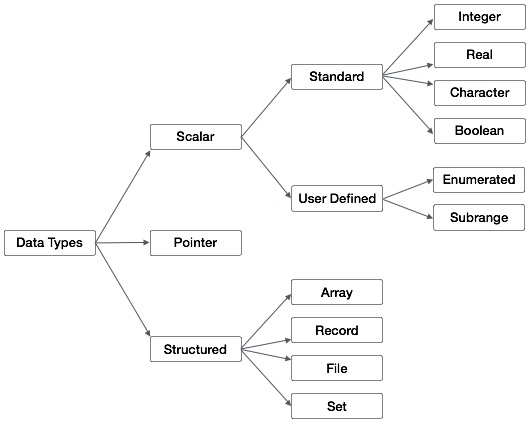
Syntax of constant type declaration is follows −
Integer, real, Boolean and character types are referred as standard data types. Data types can be categorized as scalar, pointer and structured data types. Examples of scalar data types are integer, real, Boolean, character, subrange and enumerated. Structured data types are made of the scalar types; for example, arrays, records, files and sets. We will discuss the pointer data types later.
Pascal Data Types
Pascal data types can be summarized as below in the following diagram −
Type Declarations
The type declaration is used to declare the data type of an identifier. Syntax of type declaration is −type-identifier-1, type-identfier-2 = type-specifier;For example, the following declaration defines the variables days and age as integer type, yes and true as Boolean type, name and city as string type, fees and expenses as real type.
type
days, age = integer;
yes, true = boolean;
name, city = string;
fees, expenses = real;
Integer Types
Following table gives you details about standard integer types with its storage sizes and value ranges used in Object Pascal −| Type | Minimum | Maximum | Format |
|---|---|---|---|
| Integer | -2147483648 | 2147483647 | signed 32-bit |
| Cardinal | 0 | 4294967295 | unsigned 32-bit |
| Shortint | -128 | 127 | signed 8-bit |
| Smallint | -32768 | 32767 | signed 16-bit |
| Longint | -2147483648 | 2147483647 | signed 32-bit |
| Int64 | -2^63 | 2^63 - 1 | signed 64-bit |
| Byte | 0 | 255 | unsigned 8-bit |
| Word | 0 | 65535 | unsigned 16-bit |
| Longword | 0 | 4294967295 | unsigned 32-bit |
Constants
Use of constants makes a program more readable and helps to keep special quantities at one place in the beginning of the program. Pascal allows numerical, logical, string and character constants. Constants can be declared in the declaration part of the program by specifying the const declaration.Syntax of constant type declaration is follows −
const
Identifier = contant_value;
Following are some examples of constant declarations −
VELOCITY_LIGHT = 3.0E=10;
PIE = 3.141592;
NAME = 'Stuart Little';
CHOICE = yes;
OPERATOR = '+';
All constant declarations must be given before the variable declaration.
Enumerated types
Enumerated data types are user-defined data types. They allow values to be specified in a list. Only assignment operators and relational operators are permitted on enumerated data type. Enumerated data types can be declared as follows −type enum-identifier = (item1, item2, item3, ... )Following are some examples of enumerated type declarations −
type
SUMMER = (April, May, June, July, September);
COLORS = (Red, Green, Blue, Yellow, Magenta, Cyan, Black, White);
TRANSPORT = (Bus, Train, Airplane, Ship);
The order in which the items are listed in the domain of an enumerated type defines the order of the items. For example, in the enumerated type SUMMER, April comes before May, May comes before June, and so on. The domain of enumerated type identifiers cannot consist of numeric or character constants.
Subscribe to:
Posts (Atom)