
In MVC framework, “C” stands for the Controller which refers to the
switchboards of the web application. The actions undertaken by the
controller, helps to pass parameters to the view so that it can display
and respond to the user input accordingly.
For example, if we register through a sign-up form which includes details of the user such as username, email address and password, and click the Submit button, the data inserted or posted by the user is sent through the controller with the help of associated action or function.
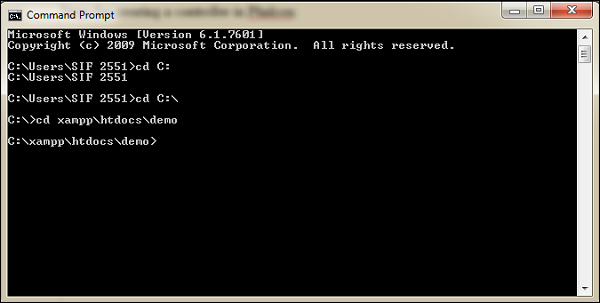 As referred in the above screenshot, “demo” is the project associated with Phalcon PHP framework.
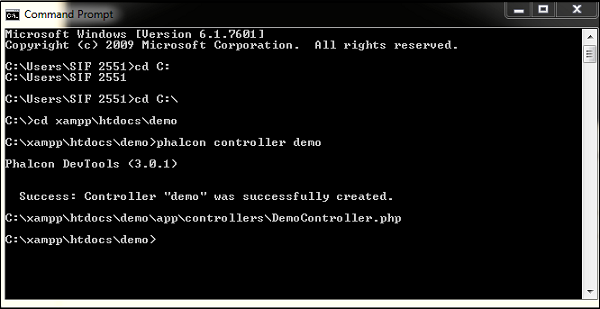
Step 2 − Use the following command to create an associated controller.
 Note − The class names of the controllers must have the suffix
“controller”. This implies a good naming convention which is followed
in Phalcon.
Note − The class names of the controllers must have the suffix
“controller”. This implies a good naming convention which is followed
in Phalcon.
By default, when the application is created in Phalcon PHP framework, it includes a controller named “IndexController”. This controller is invoked by default to trigger the actions.
This controller is extended by controller-base unlike other controllers which extends \Phalcon\Mvc\Controller.
Code −
For example, if we register through a sign-up form which includes details of the user such as username, email address and password, and click the Submit button, the data inserted or posted by the user is sent through the controller with the help of associated action or function.
Features of a Controller
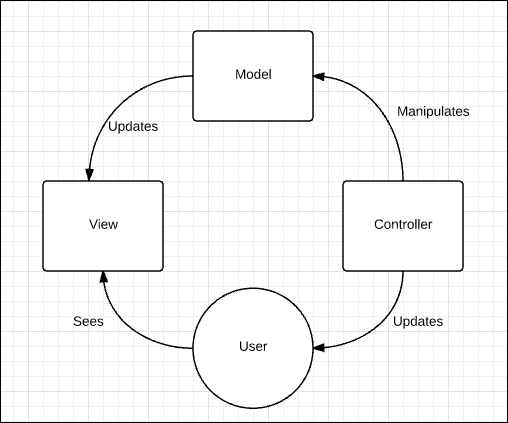
A controller accepts inputs from the view and interacts with the associated model.- It helps in updating the model's state by sending commands to the model. It can also send commands to the associated view, which helps in changing the presentation of the view as per the model's state.
- A controller acts as an intermediary between the model and the view.
Workflow of a MVC in Phalcon
The following illustration shows the workflow of MVC in Phalcon
Steps to Create a Controller in Phalcon
Step 1 − Redirect to the project path with the help of command prompt. Refer to the following screenshot.
As referred in the above screenshot, “demo” is the project associated with Phalcon PHP framework.Step 2 − Use the following command to create an associated controller.
phalcon controller <controller-name>Following is the output on successful execution of the above command.
Note − The class names of the controllers must have the suffix
“controller”. This implies a good naming convention which is followed
in Phalcon.By default, when the application is created in Phalcon PHP framework, it includes a controller named “IndexController”. This controller is invoked by default to trigger the actions.
This controller is extended by controller-base unlike other controllers which extends \Phalcon\Mvc\Controller.
Code −
<?php
class IndexController extends ControllerBase {
   public function indexAction() {
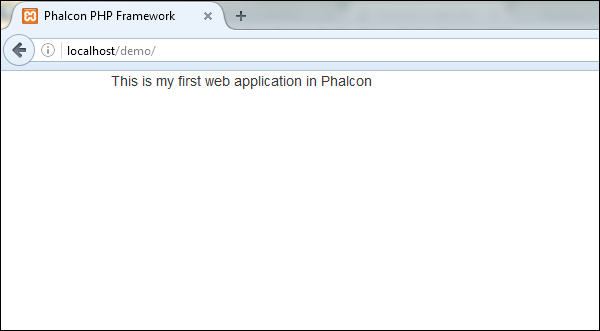
      echo "This is my first web application in Phalcon";
   }
}
Output −


No comments:
Post a Comment