
Rails provide various ways of implementing authentication and
authorization. But the simplest one is a new module which has been added
in Rails 2.0. This module turned out to be a great way to do API
authentication over SSL.
To use this authentication you will need to use SSL for traffic transportation. In out tutorial we are going to test it without a SSL.
Let us start with our library example we have discussed throughout of the tutorial. We do not have much to do to implement authentication. I'm going to add few lines in blue in our ~library/app/controllers/book_controller.rb:
Finally your book_controller.rb file will look like as follows −
To use this authentication you will need to use SSL for traffic transportation. In out tutorial we are going to test it without a SSL.
Let us start with our library example we have discussed throughout of the tutorial. We do not have much to do to implement authentication. I'm going to add few lines in blue in our ~library/app/controllers/book_controller.rb:
Finally your book_controller.rb file will look like as follows −
class BookController < ApplicationController

USER_ID, PASSWORD = "zara", "pass123"

# Require authentication only for edit and delete operation
   before_filter :authenticate, :only => [ :edit, :delete ]

def list
   @books = Book.find(:all)
end

def show
   @book = Book.find(params[:id])
end

def new
   @book = Book.new
   @subjects = Subject.find(:all)
end

def create
   @book = Book.new(params[:book])
   if @book.save
      redirect_to :action => 'list'
   else
      @subjects = Subject.find(:all)
      render :action => 'new'
   end
end

def edit
   @book = Book.find(params[:id])
   @subjects = Subject.find(:all)
end

def update
   @book = Book.find(params[:id])
   if @book.update_attributes(params[:book])
      redirect_to :action => 'show', :id => @book
   else
      @subjects = Subject.find(:all)
      render :action => 'edit'
   end
end

def delete
   Book.find(params[:id]).destroy
   redirect_to :action => 'list'
end

def show_subjects
   @subject = Subject.find(params[:id])
end

private
   def authenticate
      authenticate_or_request_with_http_basic do |id, password|
         id == USER_ID && password == PASSWORD
      end
   end
end
Let me explain these new lines −
- First line is just to define user ID and password to access various pages.
- Second line, I have put before_filter which is used to run the configured method authenticate before any action in the controller. A filter may be limited to specific actions by declaring the actions to include or exclude. Both options accept single actions (:only => :index) or arrays of actions (:except => [:foo, :bar]). So here we have put authentication for edit and delete operations only.
- Because of second line, whenever you would try to edit or delete a book record, it will execute private authenticate method.
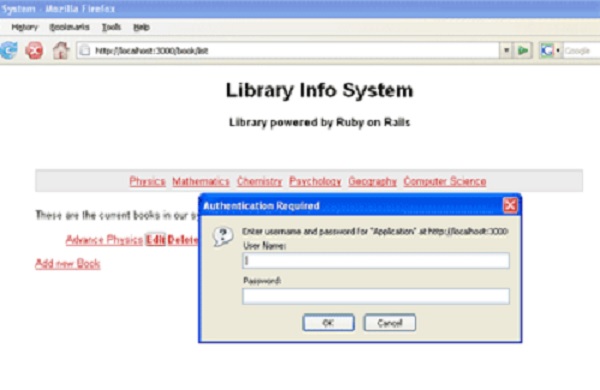
- A private authenticate method is calling authenticate_or_request_with_http_basic method which comprises of a block and displays a dialogue box to ask for User ID and Password to proceed. If you enter a correct user ID and password then it will proceed otherwise it would display access denied.


No comments:
Post a Comment