
Showing posts with label Laravel Tutorial. Show all posts
Showing posts with label Laravel Tutorial. Show all posts
Friday, March 3, 2017


Laravel - Installation
For managing dependencies, Laravel uses composer. Make sure you have a Composer installed on your system before you install Laravel.
Step 1 − Visit the following URL and download composer to install it on your system.
Step 1 − Visit the following URL and download composer to install it on your system.
Laravel - Application Structure
Root Directory
The root directory of Laravel contains various folders and files as shown in the following figure.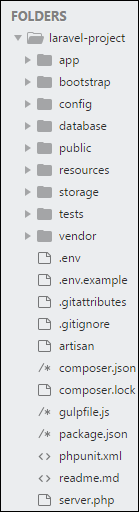
Laravel - Configuration
The config directory, as the name implies, contains all of your
application's configuration files. In this directory, you will find
various files needed to configure database, session, mail, application,
services etc.
Laravel - Routing
Basic Routing
Basic routing is meant to route your request to an appropriate controller. The routes of the application can be defined in app/Http/routes.php file. Here is the general route syntax for each of the possible request.Route::get('/', function () { return 'Hello World';
Laravel - Middleware
Define Middleware
As the name suggest, Middleware acts as a middle man between request and response. It is a type of filtering mechanism. For example, Laravel includes a middleware that verifies whether user of the application is authenticated or not. If the user is authenticated, he will be redirected to the home page otherwise, he will be redirected to the login page.Laravel - Controllers
Basic Controllers
In MVC framework, the letter ‘C’ stands for Controller. It acts as a directing traffic between Views and Models.Laravel - Request
Retrieving the Request URI
The “path” method is used to retrieve the requested URI. The “is” method is used to retrieve the requested URI which matches the particular pattern specified in the argument of the method. To get the full URL, we can use the “url” method.Laravel - Cookie
Creating Cookie
Cookie can be created by global cookie helper of Laravel. It is an instance of Symfony\Component\HttpFoundation\Cookie. The cookie can be attached to the response using the withCookie() method. Create a response instance of Illuminate\Http\Response class to call the withCookie() method. CookieLaravel - Response
Basic Response
Each request has a response. Laravel provides several different ways to return response. Response can be sent either from route or from controller. The basic response that can be sent is simple string as shown in the below sample code. This string will be automatically converted to appropriate HTTP response.Laravel - Views
Understanding Views
In MVC framework, the letter “V” stands for Views. It separates the application logic and the presentation logic. Views are stored in resources/views directory. Generally, the view contains the HTML which will be served by the application.Laravel - Redirections
Redirecting to Named Routes
Named route is used to give specific name to a route. The name can be assigned using the “as” array key.Route::get('user/profile', ['as' => 'profile', function () {
//
}]);
Note − Here, we have given the name “profile” to a route “user/profile”.Laravel - Working With Database
Connecting to Database
Laravel has made processing with database very easy. Laravel currently supports following 4 databases −- MySQL
- Postgres
- SQLite
- SQL Server
Laravel - Errors and Logging
Errors
A project while underway, is borne to have a few errors. Errors and exception handling is already configured for you when you start a new Laravel project. Normally, in a local environment we need to see errors for debugging purposes. We need to hide these errors from users in production environment.Thursday, March 2, 2017
Laravel - Forms
Laravel provides various in built tags to handle HTML forms easily
and securely. All the major elements of HTML are generated using
Laravel. To support this, we need to add HTML package to Laravel using
composer.
Laravel - Localization
Localization feature of Laravel supports different language to be
used in application. You need to store all the strings of different
language in a file and these files are stored at resources/views
directory. You should create a separate directory for each supported
language. All the language files should return an array of keyed strings
as shown below.
Laravel - Session
Sessions are used to store information about the user across the requests. Laravel provides various drivers like file, cookie, apc, array, Memcached, Redis, and database
to handle session data. By default, file driver is used because it is
lightweight. Session can be configured in the file stored at config/session.php.
Laravel - Validation
Validation is the most important aspect while designing an
application. It validates the incoming data. By default, base controller
class uses a ValidatesRequests trait which provides a convenient method to validate incoming HTTP requests with a variety of powerful validation rules.
Laravel - File Uploading
Uploading Files in Laravel is very easy. All we need to do is to
create a view file where a user can select a file to be uploaded and a
controller where uploaded files will be processed.
In a view file, we need to generate a file input by adding the following line of code.
In a view file, we need to generate a file input by adding the following line of code.
Laravel - Sending Email
Laravel uses free feature-rich library “SwiftMailer” to send
emails. Using the library function, we can easily send emails without
too many hassles. The e-mail templates are loaded in the same way as
views, which means you can use the Blade syntax and inject data into
your templates. The following is the syntax of the send function.
Subscribe to:
Posts (Atom)