CakePHP is an open source MVC framework. It makes developing,
deploying and maintaining applications much easier. CakePHP has number
of libraries to reduce the overload of most common tasks. Following are
the advantages of using CakePHP.

Showing posts with label CakePHP Tutorial. Show all posts
Showing posts with label CakePHP Tutorial. Show all posts
Tuesday, February 14, 2017


CakePHP - Installation
Installing CakePHP is simple and easy. You can install it from composer or you can download it from github − https://github.com/cakephp/cakephp/releases.
We will further understand how to install CakePHP in WampServer. After
downloading it from github, extract all the files in a folder called
“CakePHP” in WampServer. You can give custom name to folder but we have
used “CakePHP”.
CakePHP - Folder Structure
Take a look at the following screenshot. It shows the folder structure of CakePHP.
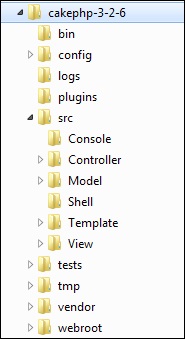 The following table describes the role of each folder −
The following table describes the role of each folder −CakePHP - Configuration
CakePHP comes with one configuration file by default and we can modify it according to our needs. There is one dedicated folder “config” for this purpose. CakePHP comes withdifferent configuration options.
CakePHP - Email Configuration
Email can be configured in file config/app.php. It is not
required to define email configuration in config/app.php. Email can be
used without it; just use the respective methods to set all
configurations separately or load an array of configs. Configuration for
Email defaults is created using config() and configTransport().
CakePHP - Routing
Routing maps your URL to specific controller’s action. In this
section, we will see how you can implement routes, how you can pass
arguments from URL to controller’s action, how you can generate URLs,
and how you can redirect to a specific URL. Normally, routes are
implemented in file config/routes.php. Routing can be implemented in two ways −
CakePHP - Generating URLs
This is a cool feature of CakePHP. Using the generated URLs, we can
easily change the structure of URL in the application without modifying
the whole code.
url( string|array|null $url null , boolean $full false )The above function will take two arguments −
CakePHP - Controllers
The controller as the name indicates controls the application. It
acts like a bridge between models and views. Controllers handle request
data, makes sure that correct models are called and right response or
view is rendered. Methods in the controllers’ class are called actions.
Each controller follows naming conventions.
CakePHP - Views
The letter “V” in the MVC is for Views. Views are responsible for sending output to user based on request. View Classes is a powerful way to speed up the development process.
CakePHP - Extending Views
Many times, while making web pages, we want to repeat certain part of
pages in other pages. CakePHP has such facility by which one can extend
view in another view and for this, we need not repeat the code again.
The extend() method is used to extend views in View file.
This method takes one argument, i.e., the name of the view file with
path. Don’t use extension .ctp while providing the name of the View
file.
CakePHP - View Elements
Certain parts of the web pages are repeated on multiple web pages but
at different locations. CakePHP can help us reuse these repeated parts.
These reusable parts are called Elements − help box, extra menu etc. An element is basically a mini-view. We can also pass variables in elements.
CakePHP - View Events
There are several callbacks/events that we can use with View Events.
These events are helpful to perform several tasks before something
happens or after something happens. The following is a list of callbacks
that can be used with CakePHP.
CakePHP - Working with Database
Working with database in CakePHP is very easy. We will understand the
CRUD (Create, Read, Update, Delete) operations in this chapter. Before
we proceed, we need to create the following users’ table in the
database.
CakePHP - View a Record
To view records of database, we first need to get hold of a table using the TableRegistry class. We can fetch the instance out of registry using get() method. The get()
method will take the name of the database table as argument. Now, this
new instance is used to find records from database using find() method. This method will return all records from the requested table.
CakePHP - Update a Record
To update a record in database we first need to get hold of a table using TableRegistry class. We can fetch the instance out of registry using the get() method. The get()
method will take the name of the database table as an argument. Now,
this new instance is used to get particular record that we want to
update.
CakePHP - Delete a Record
To delete a record in database, we first need to get hold of a table using the TableRegistry class. We can fetch the instance out of registry using the get() method. The get()
method will take the name of the database table as an argument. Now,
this new instance is used to get particular record that we want to
delete.
CakePHP - Services
Authentication
Authentication is the process of identifying the correct user. CakePHP supports three types of authentication.- FormAuthenticate − It allows you to authenticate users
based on form POST data. Usually this is a login form that users enter
information into. This is default authentication method.
CakePHP - Errors and Exception Handling
Failure of system needs to be handled effectively for smooth running
of the system. CakePHP comes with default error trapping that prints and
logs error as they occur. This same error handler is used to catch Exceptions.
Error handler displays errors when debug is true and logs error when
debug is false.
CakePHP - Logging
Logging in CakePHP is a very easy task. You just have to use one function. You can log errors, exceptions, user activities, action taken by users, for any background process like cronjob. Logging data in CakePHP is easy − the log() function is provided by the LogTrait, which is the common ancestor for almost all CakePHP classes.
CakePHP - Form Handling
CakePHP provides various in built tags to handle HTML forms easily
and securely. Like many other PHP frameworks, major elements of HTML are
also generated using CakePHP. Following are the various functions used
to generate HTML elements.
Subscribe to:
Posts (Atom)