
Introduction to Routing
ASP.NET MVC Routing enables use of URLs that are descriptive of the user actions and are more easily understood by the users. At the same time, Routing can be used to hide data which is not intended to be shown to the final user. For example, in an application that does not uses routing, user would be shown the URL as http://myapplication/Users.aspx?id=1 which would correspond to the file Users.aspx insidemyapplication path and sending id as 1 Generally we would not like to show such file names to our final user.
To handle MVC URLs, the ASP.NET platform uses the routing system which lets you create any pattern of URLs you desire, and express them in a clear and concise manner. Each route in MVC contains a specific URL pattern. This URL pattern is compared to the incoming request URL and if the URL matches this pattern, it is used by the routing engine to further process the request.
MVC Routing URL Format
To understand the MVC routing, consider the following address URL:http://servername/Products/Phones
In the above URL, Products is the first segment and Phone is the second segment which can be expressed in the following format:
{controller}/{action}
The MVC framework automatically considers the first segment as the Controller name and the second segment as one of the actions inside that Controller. Note that if the name of your Controller is ProductsController, you would only mention Prodcuts in the routing URL. The MVC framework automatically understands the Controller suffix.
Creating a Simple Route
Routes are defined in the RouteConfig.cs file which is present under the App_Start project folder.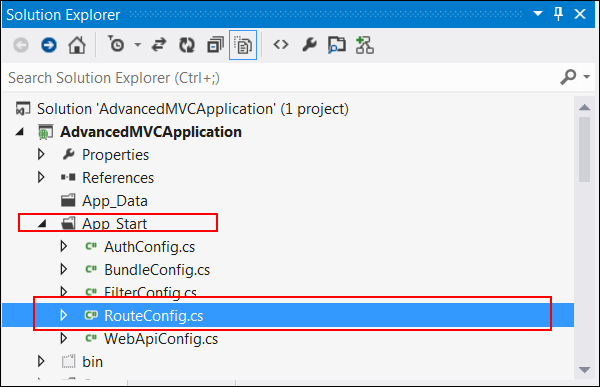 You will see the following code inside this file:
public class RouteConfig { public static void RegisterRoutes(RouteCollection routes) { routes.IgnoreRoute("{resource}.axd/{*pathInfo}"); routes.MapRoute( name: "Default", url: "{controller}/{action}/{id}", defaults: new { controller = "Home", action = "Index", id = UrlParameter.Optional } ); } }This RegisterRoutes method is called by the Global.ascx when the application is started. The Application_Start method under Global.ascx calls this MapRoute function which sets the default Controller and its action (method inside the Controller class).
To modify the above default mapping as per our example, change the following line of code:
defaults: new { controller = "Products", action = "Phones", id = UrlParameter.Optional }This setting will pick the ProductsController and call the Phone method inside that. Similarly, if you have another method such as Electronics inside ProductsController, the URL for it would be:
http://servername/Products/Electronics


No comments:
Post a Comment