
Assets are all about the additional components apart from the
existing framework in Phalcon. Phalcon has an asset manager which helps
to manage all the asset components like CSS or JS files.
The common methods used are −
The default controller for the project will invoke all the css files.
The common methods used are −
| Method | Importance |
|---|---|
| __construct(variable $options) | Initializes the component Phalcon\Assets\Manager |
| addCss(string $path, variable $local, variable $filter, variable $attributes) | Adds a CSS resource from the 'css' collection to a particular view |
| addJs(string $path, variable $local, variable $filter, variable $attributes) | Adds a JavaScript resource to the 'js' collection |
Example
Consider the sample project of Phalcon “vokuro” which is the best illustration for adding css files. It will include assets/Manager for invoking all the css files.The default controller for the project will invoke all the css files.
<?php

namespace Vokuro\Controllers;
use Phalcon\Assets\Manager;

/**
   * Display the default index page.
*/

class IndexController extends ControllerBase {
   /**
      * Default action. Set the public layout (layouts/public.volt)
   */
   public function indexAction() {
      $this->assets->addCss("public/style.css");
      $this->view->setVar('logged_in', is_array($this->auth->getIdentity()));
      $this->view->setTemplateBefore('public');
   }
}
Style.css
div.remember {
   margin-top: 7px;
   color: #969696;
}
div.remember label {
   padding-top: 15px;
}
div.forgot {
   margin-top: 7px;
   color: #dadada;
}
footer {
   background: url("../img/feature-gradient.png") no-repeat scroll center 100% white;
   color: #B7B7B7;
   font-size: 12px;
   padding: 30px 0;
   text-align: center;
}
footer a {
   margin-left: 10px;
   margin-right: 10px;
}
table.signup td {
   padding: 10px;
}
table.signup .alert {
   margin-bottom: 0;
   margin-top: 3px;
}
table.perms select {
   margin-top: 5px;
   margin-right: 10px;
}
table.perms label {
   margin-right: 10px;
}
div.main-container {
   min-height: 450px;
}
The assets will be managed inside views, which will display css files as an output.
Index.volt
{{ content() }}
{{ assets.outputCss() }}

<header class = "jumbotron subhead" id = "overview">
   <div class = "hero-unit">
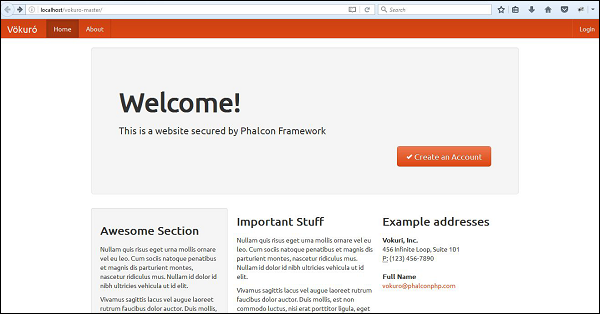
      <h1>Welcome!</h1>
      <p class = "lead">This is a website secured by Phalcon Framework</p>
      <div align = "right">
         {{ link_to('session/signup', '<i class="icon-ok icon-white">
            </i> Create an Account', 'class': 'btn btn-primary btn-large') }}
      </div>
   </div>
</header>
Output
It will produce the following output −

No comments:
Post a Comment