
RESTful Web Services make use of HTTP protocols as a medium of
communication between client and server. A client sends a message in
form of a HTTP Request and the server responds in the form of an HTTP
Response. This technique is termed as Messaging. These messages contain
message data and metadata i.e. information about message itself. Let us
have a look on the HTTP Request and HTTP Response messages for HTTP 1.1.
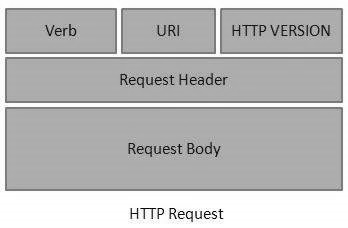 An HTTP Request has five major parts −
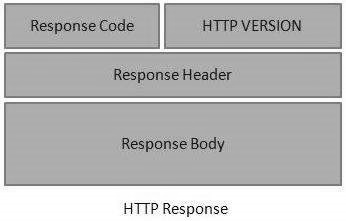 An HTTP Response has four major parts −
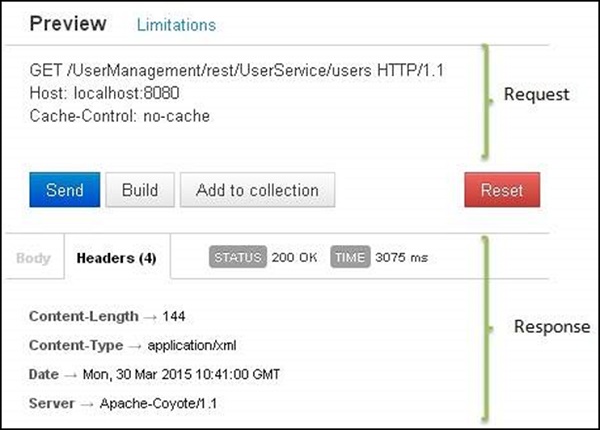 Here you can see, the browser sent a GET request and received a response body as XML.
HTTP Request
An HTTP Request has five major parts −- Verb − Indicates the HTTP methods such as GET, POST, DELETE, PUT, etc.
- URI − Uniform Resource Identifier (URI) to identify the resource on the server.
- HTTP Version − Indicates the HTTP version. For example, HTTP v1.1.
- Request Header − Contains metadata for the HTTP Request message as key-value pairs. For example, client (or browser) type, format supported by the client, format of the message body, cache settings, etc.
- Request Body − Message content or Resource representation.
HTTP Response
An HTTP Response has four major parts −- Status/Response Code − Indicates the Server status for the requested resource. For example, 404 means resource not found and 200 means response is ok.
- HTTP Version − Indicates the HTTP version. For example HTTP v1.1.
- Response Header − Contains metadata for the HTTP Response message as keyvalue pairs. For example, content length, content type, response date, server type, etc.
- Response Body − Response message content or Resource representation.
Example
As we have explained in the RESTful Web Services - First Application chapter, let us put http://localhost:8080/UserManagement/rest/UserService/users in the POSTMAN with a GET request. If you click on the Preview button which is near the send button of Postman and then click on the Send button, you may see the following output.
Here you can see, the browser sent a GET request and received a response body as XML.

No comments:
Post a Comment