
As seen in the initial introductory chapters, Views are the components involved with application's User Interface. These Views are generally bind from the model data and have extensions like html, aspx, cshtml, vbhtml, etc. In our First MVC Application, we had used Views with Controller to display data to the final user. For rendering these static and dynamic content to the browser, MVC Framework utilizes View Engines. View Engines are basically markup syntax implementation which are responsible for rendering the final HTML to the browser.
For rendering these static and dynamic content to the browser, MVC Framework utilizes View Engines. View Engines are basically markup syntax implementation which are responsible for rendering the final HTML to the browser.
The MVC Framework comes with two built-in view engines:
1. Razor Engine: Razor is a markup syntax that enables the server side C# or VB code into web pages. This server side code can be used to create dynamic content when the web page is being loaded. Razor is an advanced engine as compared to ASPX engine and was launched in the later versions of MVC.
2. ASPX Engine: ASPX or the Web Forms engine is the default view engine that is included in the MVC Framework since the beginning. Writing code with this engine is very similar to writing code in ASP.NET Web Forms.
Following are small code snippets comparing both Razor and ASPX engine.
Razor:
These View Engines can be coded and implemented in following two types:
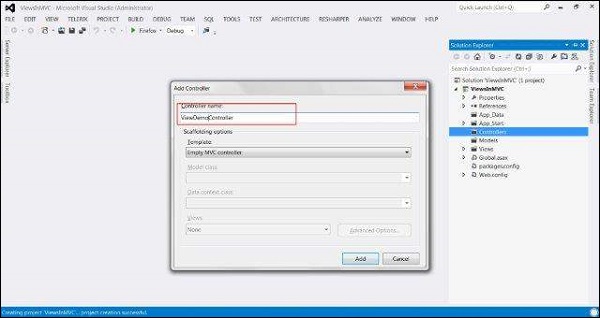 Now copy the following code in the controller file:
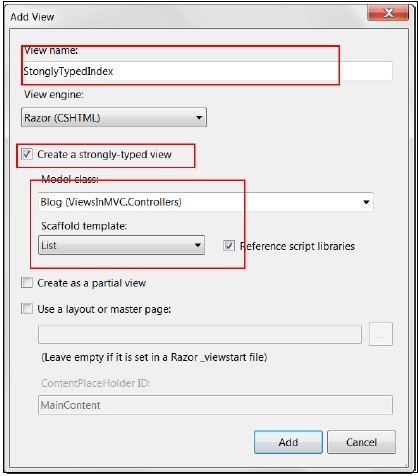
Right click on the StonglyTypedIndex action method and click Add View. In the next window, check the 'Create a strongly-typed view' checkbox. This will also enable the Model Class and Scaffold template options. Select List from Scaffold Template option. Click Add.
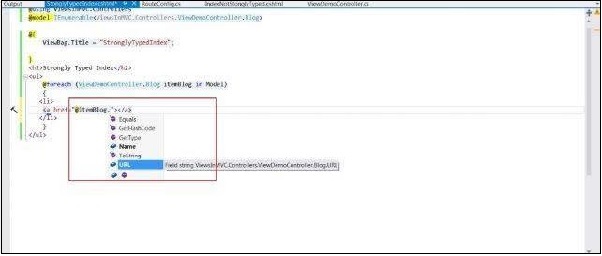
 A View file similar to below screenshot will be created. As you can note, it has included the ViewDemoController's Blog model class at the top. You will also be able to use intellisense in your code with this approach.
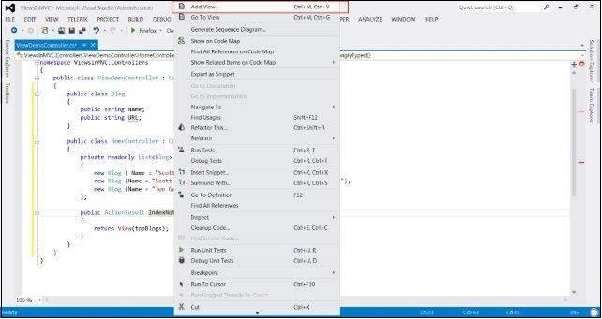 This time do not select the 'Create a strongly-typed view' checkbox.
 The resulting view will have the following code:
Strongly typed Views is considered as a better approach since we already know what data is being passed as the Model unlike dynamic typed Views in which the data gets bind at runtime and may lead to runtime errors if something changes in the linked model.
For rendering these static and dynamic content to the browser, MVC Framework utilizes View Engines. View Engines are basically markup syntax implementation which are responsible for rendering the final HTML to the browser.
The MVC Framework comes with two built-in view engines:
1. Razor Engine: Razor is a markup syntax that enables the server side C# or VB code into web pages. This server side code can be used to create dynamic content when the web page is being loaded. Razor is an advanced engine as compared to ASPX engine and was launched in the later versions of MVC.
2. ASPX Engine: ASPX or the Web Forms engine is the default view engine that is included in the MVC Framework since the beginning. Writing code with this engine is very similar to writing code in ASP.NET Web Forms.
Following are small code snippets comparing both Razor and ASPX engine.
Razor:
@Html.ActionLink("Create New", "UserAdd")ASPX:
<% Html.ActionLink("SignUp", "SignUp") %>Out of these two, Razor is more advanced View Engine as it comes with compact syntax, test driven development approaches, and better security features. We will use Razor engine in all our examples since it is the most dominantly used View engine.
These View Engines can be coded and implemented in following two types:
- Strongly typed
- Dynamic typed
Strongly Typed Views
To understand this concept, let us create a sample MVC application (follow the steps in the previous chapters) and add a Controller class file named ViewDemoController:
Now copy the following code in the controller file:using System.Collections.Generic; using System.Web.Mvc; namespace ViewsInMVC.Controllers { public class ViewDemoController : Controller { public class Blog { public string Name; public string URL; } private readonly List topBlogs = new List { new Blog { Name = "Joe Delage", URL = "http://tutorialspoint/joe/"}, new Blog {Name = "Mark Dsouza", URL = "http://tutorialspoint/mark"}, new Blog {Name = "Michael Shawn", URL = "http://tutorialspoint/michael"} }; public ActionResult StonglyTypedIndex() { return View(topBlogs); } public ActionResult IndexNotStonglyTyped() { return View(topBlogs); } } }In the above code, we have two action methods defined: StronglyTypedIndex and IndexNotStonglyTyped. We will now add Views for these action methods.
Right click on the StonglyTypedIndex action method and click Add View. In the next window, check the 'Create a strongly-typed view' checkbox. This will also enable the Model Class and Scaffold template options. Select List from Scaffold Template option. Click Add.
A View file similar to below screenshot will be created. As you can note, it has included the ViewDemoController's Blog model class at the top. You will also be able to use intellisense in your code with this approach.
Dynamic Typed Views:
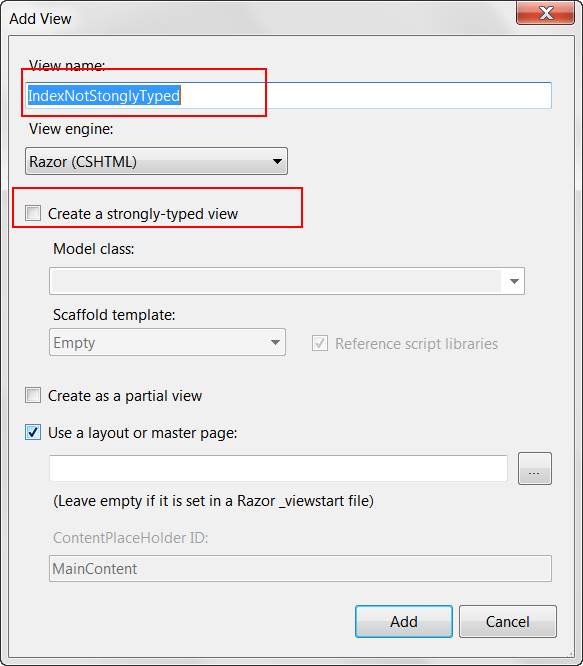
To create dynamic typed views, right click on the IndexNotStonglyTyped action and click Add View.
This time do not select the 'Create a strongly-typed view' checkbox.
The resulting view will have the following code:@model dynamic @{ ViewBag.Title = "IndexNotStonglyTyped"; } <h2>Index Not Stongly Typed</h2> <p> <ul> @foreach (var blog in Model) { <li> <a href="@blog.URL">@blog.Name</a> </li> } </ul> </p>As you can see in the above code, this time it did not add the Blog model to the View as in the previous case. Also, you would not be able to use intellisense this time because this time the binding will be done at run-time.
Strongly typed Views is considered as a better approach since we already know what data is being passed as the Model unlike dynamic typed Views in which the data gets bind at runtime and may lead to runtime errors if something changes in the linked model.


No comments:
Post a Comment