
In this chapter, we will discuss the Application Structure of
Phalcon. Following is the complete directory structure of a Phalcon
project.
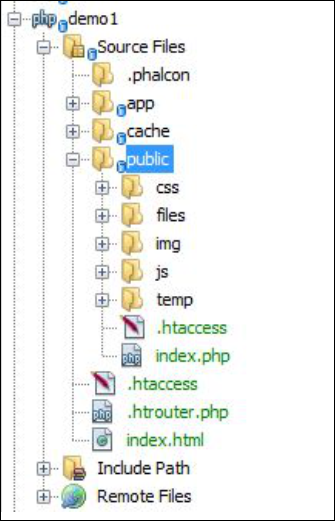
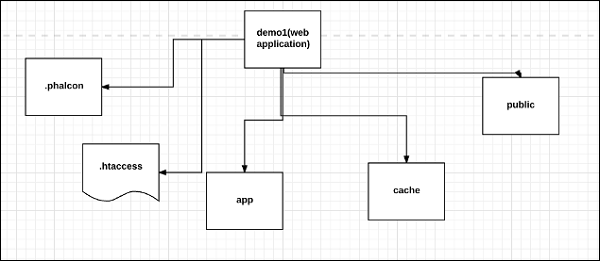 There is one root folder which is considered as the code base and is publicly available for the web server. It is also called as web directory. Other folders outside the web root directory are considered out of reach for the web server and for Phalcon project.
Once a project is created, the directory structure will be visible as follows in the wamp/xampp folder. Consider for the project which we created in the previous chapter.
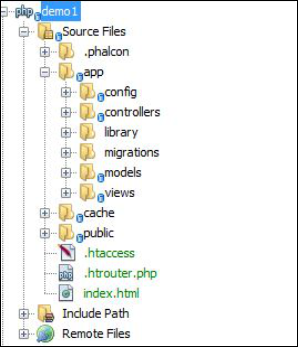 Following are the folders and sub-folders of the project.
Following is the detailed view of app folder for the given Phalcon web application.
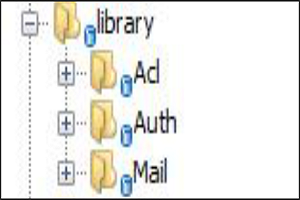
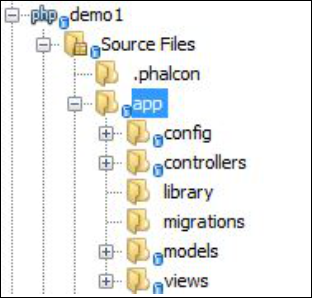 It consists of config, controllers, library, migrations, models and views.
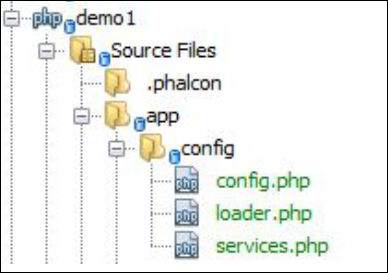 All the configuration required for the web application in Phalcon is
comprised in this folder. It includes information related to database
connectivity, third-party libraries to be added if any, and the services
to be included.
All the configuration required for the web application in Phalcon is
comprised in this folder. It includes information related to database
connectivity, third-party libraries to be added if any, and the services
to be included.
For example, it is possible to configure a website so that it will available only to specific IP addresses with .htaccess file.
There is one root folder which is considered as the code base and is publicly available for the web server. It is also called as web directory. Other folders outside the web root directory are considered out of reach for the web server and for Phalcon project.Once a project is created, the directory structure will be visible as follows in the wamp/xampp folder. Consider for the project which we created in the previous chapter.
Following are the folders and sub-folders of the project.App
This folder consists of all vital script files and folders. The complete web application is designed on the basis of “app” folder. The configuration files help in assisting the necessary configuration for running the application smoothly.Following is the detailed view of app folder for the given Phalcon web application.
It consists of config, controllers, library, migrations, models and views.Config
All the configuration required for the web application in Phalcon is
comprised in this folder. It includes information related to database
connectivity, third-party libraries to be added if any, and the services
to be included.Controllers
All the controllers are included in this folder. They are used for processing requests and generating response.Library
Third-party libraries for the web application (apart from the existing Phalcon framework).
Migrations
This sub-folder consists of all the files associated with data migration, which can also be used in any other framework.Models
Models include all the logic required to interact with the database. It is actually used for data representation.Views
It constitutes all the views related to the web application. These views are displayed to the end users with the help of controllers.Cache
This directory includes data related to caching, which helps in improving the performance.Public
It includes all the folders for asset management purpose which comprises of CSS, JavaScript, files to be uploaded, and some meta data.
.htaccess File
Web servers running on Apache Web Server software use .htaccess as a configuration file. When it is placed in a directory, all the necessary configuration is loaded as soon as the server is started.For example, it is possible to configure a website so that it will available only to specific IP addresses with .htaccess file.


No comments:
Post a Comment