
Sessions are server-side information storage which helps in user
interaction with the website or web application. Each session is
uniquely defined with a session ID, which is passed to the web server
whenever the browser makes an HTTP request. The session ID is paired
every time with the internal database such that all stored variables are
retrieved.
Following are the features in Phalcon −
 Step 2 − Create a session with a name and value.
Following is the syntax to unset variable values in session.
Sessions in Phalcon
Phalcon uses session components which includes the wrappers to access the session data.Following are the features in Phalcon −
- Session data can be isolated from other components on the same domain.
- According to the application needs, the session value can be changed with the help of the session adapter.
Starting a Session in Phalcon
All the session activities are associated with the adapter files which are declared in Services.php file inside the /config folder of the web application./** * Start the session the first time some component requests the session service */ $di->setShared('session', function () { $session = new SessionAdapter(); $session->start(); return $session; });
Creating a Session
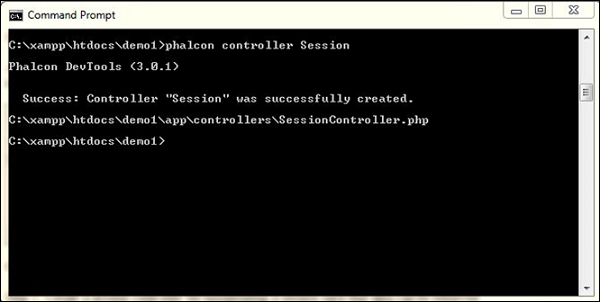
Step 1 − Create a session controller for instantiating a session such that data can be retrieved appropriately.
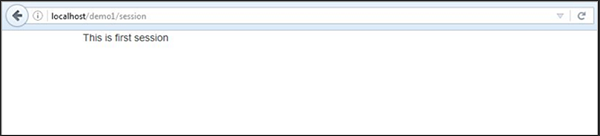
Step 2 − Create a session with a name and value.<?php class SessionController extends \Phalcon\Mvc\Controller { public function indexAction() { //Define a session variable $this->session->set("user-name", "Omkar"); //Check if the variable is defined if ($this->session->has("user-name")) { //Retrieve its value $name = $this->session->get("user-name"); echo($name); } } }The above code produces the following output.
Removing a Session
It is possible to destroy the session or unset some variable values within the session in Phalcon.Following is the syntax to unset variable values in session.
$this->session->remove(<variable-name>);As shown in the example above, the variable name created in the session is “data-content” which can be removed using the following code.
public function removeAction() {
   // Remove a session variable with associated session
   $this->session->remove("data-content");
}
; Following is the syntax to destroy the complete session.
$this->session->destroy();


No comments:
Post a Comment