
Phalcon provides security features with the help of Security
component, which helps in performing certain tasks like password hashing
and Cross-Site Request Forgery (CSRF).
Decryption of hashed data takes place by taking the value entered by the user as input and comparing hash form of the same. Usually for any web-based applications, storing passwords as plain text is a bad practice. It is prone to third-party attacks as those who have access to the database can easily procure passwords for any user.
Phalcon provides an easy way to store passwords in encrypted form which follows an algorithm like md5, base64 or sh1.
As seen in the previous chapters, where we created a project for blogs. The login screen accepts input as username and password for the user. To receive the passwords from the user and decrypt it in a particular form, the following code snippet is used.
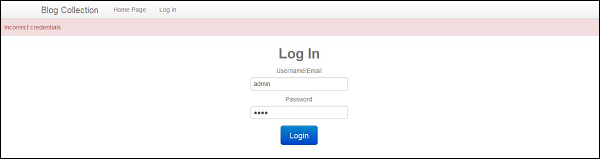
The decrypted password is then matched with the password accepted as input from the user. If the value matches, the user can successfully log in to web application else an error message is displayed.
 Once the user enters an appropriate username and password, the user
can access the system, else an error message is displayed as a
validation.
Once the user enters an appropriate username and password, the user
can access the system, else an error message is displayed as a
validation.
The data in each form is secured with the help of token generation. The token generated is random and it is matched with the token to which we are sending the form data (mostly outside the web application through POST method).
Include session adapter in services.php using the following code.
Hashing Password
Hashing can be defined as the process of converting a fixed length bit string into a specified length in such a way that it cannot be reversed. Any change in the input string will change the value of hashed data.Decryption of hashed data takes place by taking the value entered by the user as input and comparing hash form of the same. Usually for any web-based applications, storing passwords as plain text is a bad practice. It is prone to third-party attacks as those who have access to the database can easily procure passwords for any user.
Phalcon provides an easy way to store passwords in encrypted form which follows an algorithm like md5, base64 or sh1.
As seen in the previous chapters, where we created a project for blogs. The login screen accepts input as username and password for the user. To receive the passwords from the user and decrypt it in a particular form, the following code snippet is used.
The decrypted password is then matched with the password accepted as input from the user. If the value matches, the user can successfully log in to web application else an error message is displayed.
<?php
class UsersController extends Phalcon\Mvc\Controller {
   public function indexAction() {
   }
   public function registerUser() {
      $user = new Users();
      $login    = $this->request->getPost("login");
      $password = $this->request->getPost("password");
      $user->login = $login;

      // Store the hashed pasword
      $user->password = $this->security->sh1($password);
      $user->save();
   }
   public function loginAction() {
      if ($this->request->isPost()) {
         $user = Users::findFirst(array(
            'login = :login: and password = :password:',
            'bind' => array(
               'login' => $this->request->getPost("login"),
               'password' => sha1($this->request->getPost("password"))
            )
         ));
         if ($user === false) {
            $this->flash->error("Incorrect credentials");
            return $this->dispatcher->forward(array(
               'controller' => 'users',
               'action' => 'index'
            ));
         }
         $this->session->set('auth', $user->id);
         $this->flash->success("You've been successfully logged in");
      }
      return $this->dispatcher->forward(array(
         'controller' => 'posts',
         'action' => 'index'
      ));
   }
   public function logoutAction() {
      $this->session->remove('auth');
      return $this->dispatcher->forward(array(
         'controller' => 'posts',
         'action' => 'index'
      ));
   }
}
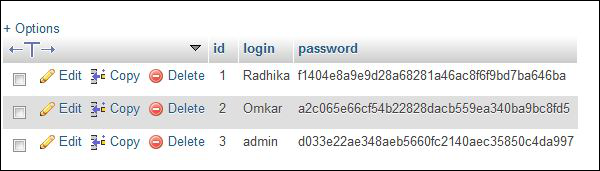
The passwords stored in the database are in an encrypted format of sh1 algorithm.
Once the user enters an appropriate username and password, the user
can access the system, else an error message is displayed as a
validation.
Cross-Site Request Forgery (CSRF)
It is an attack which forces authenticated users of web application to perform certain unwanted actions. Forms which accept inputs from the users are vulnerable to this attack. Phalcon tries to prevent this attack by protecting the data which is sent through forms outside the application.The data in each form is secured with the help of token generation. The token generated is random and it is matched with the token to which we are sending the form data (mostly outside the web application through POST method).
Code:
<?php echo Tag::form('session/login') ?>
   <!-- Login and password inputs ... -->
   <input type = "hidden" name = "<?php echo $this->security->getTokenKey() ?>"
      value = "<?php echo $this->security->getToken() ?>"/>
</form>
Note − It is important to use session adapter while sending tokens of form, as all the data will be maintained in the session.
Include session adapter in services.php using the following code.
/**
   * Start the session the first time some component request the session service
*/

$di->setShared('session', function () {
   $session = new SessionAdapter();
   $session->start();
   return $session;
});


No comments:
Post a Comment