
Caching refers to storing the server response in the client itself,
so that a client need not make a server request for the same resource
again and again. A server response should have information about how
caching is to be done, so that a client caches the response for a
time-period or never caches the server response.
Following are the headers which a server response can have in order to configure a client's caching −
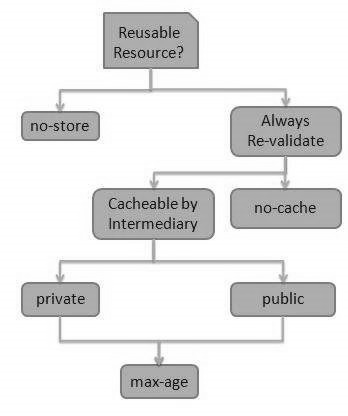
Following are the headers which a server response can have in order to configure a client's caching −
| Sr.No. | Header & Description |
|---|---|
1
|
Date Date and Time of the resource when it was created. |
2
|
Last Modified Date and Time of the resource when it was last modified. |
3
|
Cache-Control Primary header to control caching. |
4
|
Expires Expiration date and time of caching. |
5
|
Age Duration in seconds from when resource was fetched from the server. |
Cache-Control Header
Following are the details of a Cache-Control header −| Sr.No. | Directive & Description |
|---|---|
1
|
Public Indicates that resource is cacheable by any component. |
2
|
Private Indicates that resource is cacheable only by the client and the server, no intermediary can cache the resource. |
3
|
no-cache/no-store Indicates that a resource is not cacheable. |
4
|
max-age Indicates the caching is valid up to max-age in seconds. After this, client has to make another request. |
5
|
must-revalidate Indication to server to revalidate resource if max-age has passed. |
Best Practices
- Always keep static contents like images, CSS, JavaScript cacheable, with expiration date of 2 to 3 days.
- Never keep expiry date too high.
- Dynamic content should be cached for a few hours only.


No comments:
Post a Comment