
Google Checkout is online payment processing service provided by
Google. Magento allows integration of online stores with Google
checkout. It is like PayPal that simplifies the process of paying for
online purchases. To use Google Checkout, customers need to have Google
Checkout merchant account.
The following steps help to set up Magento store with Google Checkout.
Step (1): Login to your Magento Admin Panel.
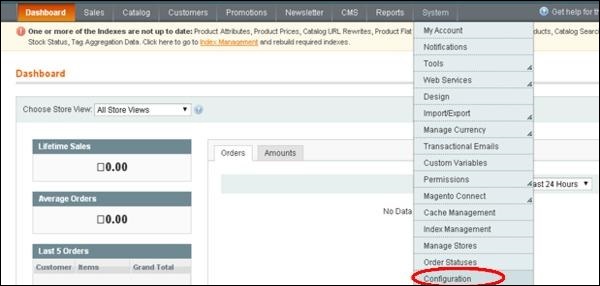
Step (2): Go to System menu and click on the Configuration option.
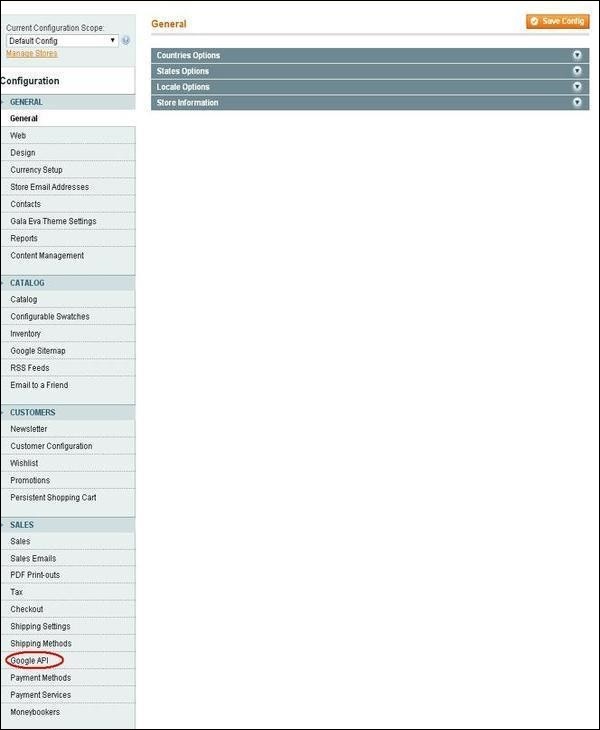
 Step (3): On the left side of the navigation, click on the Google API under Sales section.
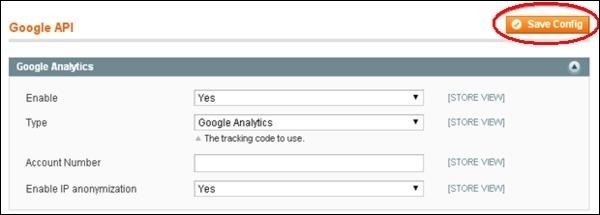
 Step (4): Expand the Google Analytics panel which shows some settings such as:
 After done with the settings, click on the Save Config button in top right corner to save the changes that you have made.
The following steps help to set up Magento store with Google Checkout.
Step (1): Login to your Magento Admin Panel.
Step (2): Go to System menu and click on the Configuration option.
Step (3): On the left side of the navigation, click on the Google API under Sales section.
Step (4): Expand the Google Analytics panel which shows some settings such as:- Enable option should be set to Yes to activate payment method,
- Type option provides two types: Google Analytics and Universal Analytics,
- Account Number accepts your account number,
- Enable IP anonymization option should be set to Yes.
After done with the settings, click on the Save Config button in top right corner to save the changes that you have made.

No comments:
Post a Comment