
The Hypertext Transfer Protocol (HTTP) is an application-level
protocol for distributed, collaborative, hypermedia information systems.
This is the foundation for data communication for the World Wide Web
(i.e. internet) since 1990. HTTP is a generic and stateless protocol
which can be used for other purposes as well using extensions of its
request methods, error codes, and headers.
Basically, HTTP is a TCP/IP based communication protocol, that is used to deliver data (HTML files, image files, query results, etc.) on the World Wide Web. The default port is TCP 80, but other ports can be used as well. It provides a standardized way for computers to communicate with each other. HTTP specification specifies how clients' request data will be constructed and sent to the server, and how the servers respond to these requests.
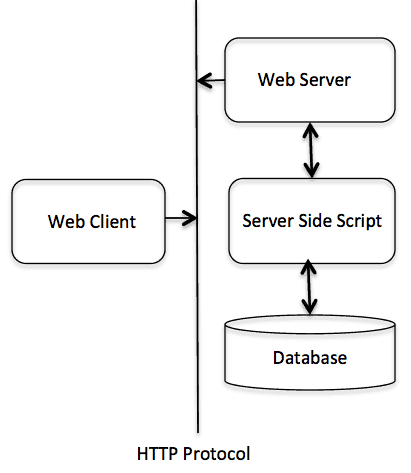 The HTTP protocol is a request/response protocol based on the
client/server based architecture where web browsers, robots and search
engines, etc. act like HTTP clients, and the Web server acts as a
server.
The HTTP protocol is a request/response protocol based on the
client/server based architecture where web browsers, robots and search
engines, etc. act like HTTP clients, and the Web server acts as a
server.
Basically, HTTP is a TCP/IP based communication protocol, that is used to deliver data (HTML files, image files, query results, etc.) on the World Wide Web. The default port is TCP 80, but other ports can be used as well. It provides a standardized way for computers to communicate with each other. HTTP specification specifies how clients' request data will be constructed and sent to the server, and how the servers respond to these requests.
Basic Features
There are three basic features that make HTTP a simple but powerful protocol:- HTTP is connectionless: The HTTP client, i.e., a browser initiates an HTTP request and after a request is made, the client disconnects from the server and waits for a response. The server processes the request and re-establishes the connection with the client to send a response back.
- HTTP is media independent: It means, any type of data can be sent by HTTP as long as both the client and the server know how to handle the data content. It is required for the client as well as the server to specify the content type using appropriate MIME-type.
- HTTP is stateless: As mentioned above, HTTP is connectionless and it is a direct result of HTTP being a stateless protocol. The server and client are aware of each other only during a current request. Afterwards, both of them forget about each other. Due to this nature of the protocol, neither the client nor the browser can retain information between different requests across the web pages.
HTTP/1.0 uses a new connection for each request/response exchange, where as HTTP/1.1 connection may be used for one or more request/response exchanges.
Basic Architecture
The following diagram shows a very basic architecture of a web application and depicts where HTTP sits:
The HTTP protocol is a request/response protocol based on the
client/server based architecture where web browsers, robots and search
engines, etc. act like HTTP clients, and the Web server acts as a
server.

No comments:
Post a Comment