
Jasmine also allows the developers to skip one or more than one test cases. These techniques can be applied at the Spec level or the Suite level. Depending on the level of application, this block can be called as a Skipping Spec and Skipping Suite respectively.
In the following example, we will learn how to skip a specific Spec or Suite using “x” character.
 As we can see in the message bar, it shows two spec blocks in pending
status, which means these two Spec blocks is disabled using “x” character. In the upcoming chapter, we will discuss different types of Jasmine test scenarios.
As we can see in the message bar, it shows two spec blocks in pending
status, which means these two Spec blocks is disabled using “x” character. In the upcoming chapter, we will discuss different types of Jasmine test scenarios.
In the following example, we will learn how to skip a specific Spec or Suite using “x” character.
Skipping Spec
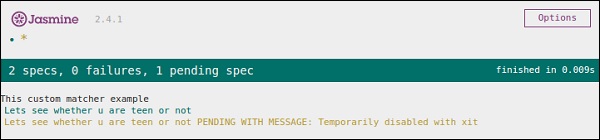
We will modify the previous example using “x” just before it statement.describe('This custom matcher example ', function() { beforeEach(function() { // We should add custom matched in beforeEach() function. jasmine.addMatchers({ validateAge: function() { return { compare: function(actual,expected) { var result = {}; result.pass = (actual > = 13 && actual < = 19); result.message = 'sorry u are not a teen '; return result; } }; } }); }); it('Lets see whether u are teen or not', function() { var myAge = 14; expect(myAge).validateAge(); }); xit('Lets see whether u are teen or not ', function() { //Skipping this Spec var yourAge = 18; }); });If we run this JavaScript code, we will receive the following output as a result in the browser. Jasmine itself will notify the user that the specific it block is disabled temporarily using “xit”.
Skipping Suite
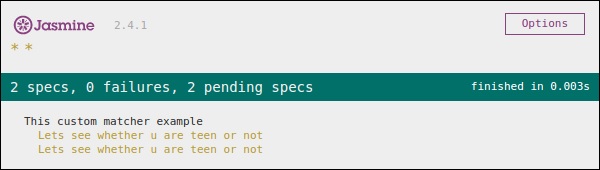
In the same way, we can disable the describe block in order to implement the technique of Skipping Suite. In the following example, we will learn about the process of skipping suite block.xdescribe('This custom matcher example ', function() { //Skipping the entire describe block beforeEach(function() { // We should add custom matched in beforeEach() function. jasmine.addMatchers({ validateAge: function() { return { compare: function(actual,expected) { var result = {}; result.pass = (actual >=13 && actual<=19); result.message ='sorry u are not a teen '; return result; } }; } }); }); it('Lets see whether u are teen or not', function() { var myAge = 14; expect(myAge).validateAge(); }); it('Lets see whether u are teen or not ', function() { var yourAge = 18; expect(yourAge).validateAge(); }); });The above code will generate the following screenshot as an output.
As we can see in the message bar, it shows two spec blocks in pending
status, which means these two Spec blocks is disabled using “x” character. In the upcoming chapter, we will discuss different types of Jasmine test scenarios.

No comments:
Post a Comment