
In this chapter, we will study about Creating Submenus in
Joomla step by step. Submenu is a menu accessed from a general menu, it
can be either shown as one menu with more than two levels or as separate
menu modules.
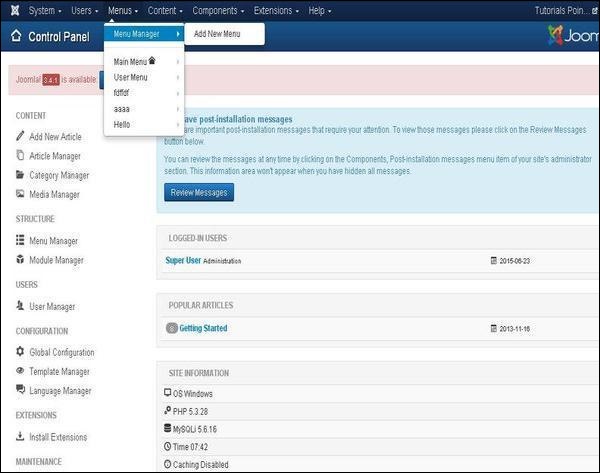
Step (1) − Click on Menus → Menu Manager as shown below.
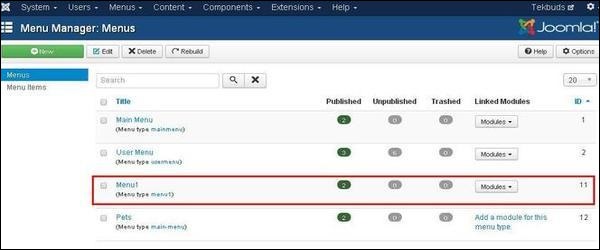
 Step (2) − After clicking on Menu Manager you will get the following screen. Here we have already created a menu as Menu1 as shown below.
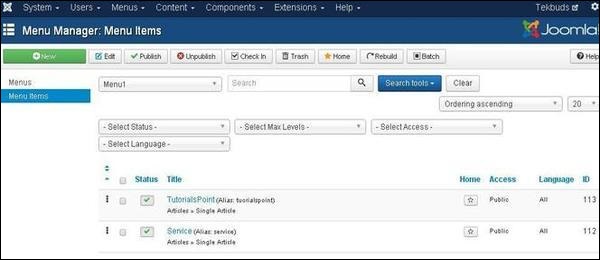
 Step (3) − Click directly on Menu1 link, you get the following screen.
 Step (4) − Create a new article called as Policy and later create a menu item called Policy as shown below −
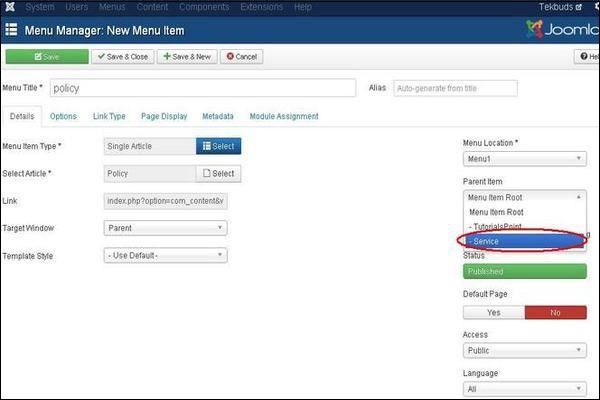 Follow the same steps to create menu from the chapter Joomla - Create Menus. But here we are creating submenus for Service so we have to use Menu Location as Menu1 and Select Parent Item as Service.
Step (5) − Click on the button Save & Close.
Step (6) − Repeating step (4) and step (5) we have created one more submenu called Additional Service.
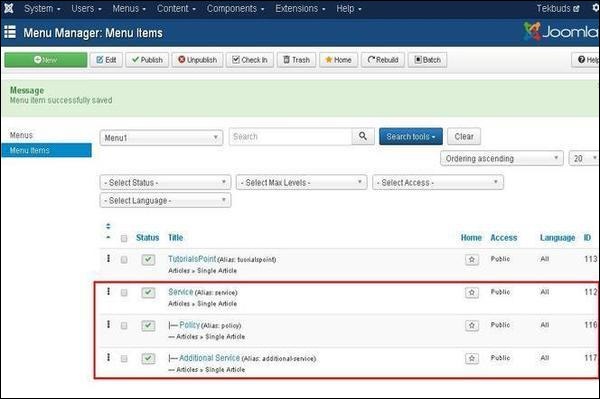
Step (7) − After you have finished creating submenus in menu items, the Menu Manager − Menu Items will look like as shown below. We can see that there are two submenus present below the Service Menu.
 Step (8) − Repeating the above steps, we can create many similar submenus for other than service menu also.
Creating Submenus
Following are the simple steps to create submenus in Joomla.Step (1) − Click on Menus → Menu Manager as shown below.
Step (2) − After clicking on Menu Manager you will get the following screen. Here we have already created a menu as Menu1 as shown below.
Step (3) − Click directly on Menu1 link, you get the following screen.
Step (4) − Create a new article called as Policy and later create a menu item called Policy as shown below −
Follow the same steps to create menu from the chapter Joomla - Create Menus. But here we are creating submenus for Service so we have to use Menu Location as Menu1 and Select Parent Item as Service.Step (5) − Click on the button Save & Close.
Step (6) − Repeating step (4) and step (5) we have created one more submenu called Additional Service.
Step (7) − After you have finished creating submenus in menu items, the Menu Manager − Menu Items will look like as shown below. We can see that there are two submenus present below the Service Menu.
Step (8) − Repeating the above steps, we can create many similar submenus for other than service menu also.

No comments:
Post a Comment