
In this chapter, we will study about Extensions Manager in Joomla. We can install different types of extensions to extend the functionality of the site.
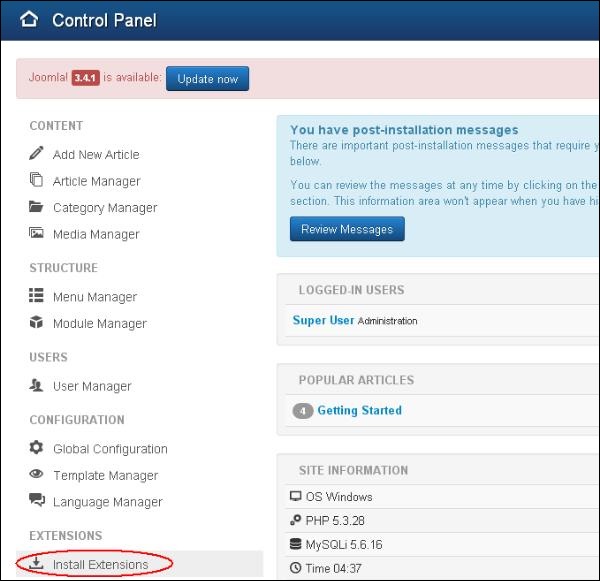
Step (1) − Click on Install Extensions option in Joomla.
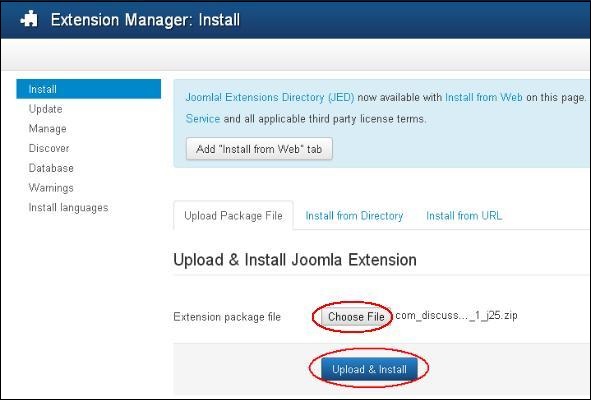
 Step (2) − Click on Choose File button and choose the extension forum which you have downloaded to include on your web site. Click on Upload & Install button.
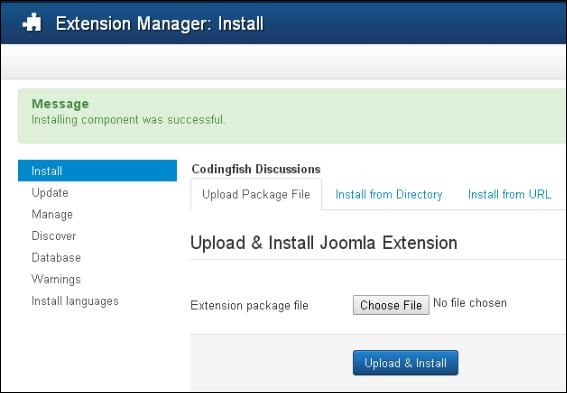
 Step (3) − Joomla starts installing the Forum extension for your site. After completing the installation, you will get the successful installation message as shown below.
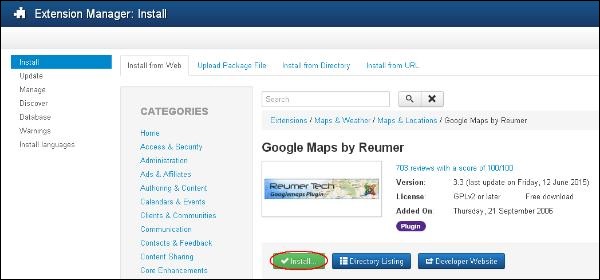
 Step (4) − It is also possible to install the extensions directly from the web, select the extension that you want to add on your website and click on Install button.
Joomla Extensions Manager
Following are the simple steps used to set the Joomla Extensions Manager.Step (1) − Click on Install Extensions option in Joomla.
Step (2) − Click on Choose File button and choose the extension forum which you have downloaded to include on your web site. Click on Upload & Install button.
Step (3) − Joomla starts installing the Forum extension for your site. After completing the installation, you will get the successful installation message as shown below.
Step (4) − It is also possible to install the extensions directly from the web, select the extension that you want to add on your website and click on Install button.

No comments:
Post a Comment