
In this chapter, we will study about Website SEO in Joomla. SEO (Search Engine Optimization) is about optimizing a website for search engine. It helps search engines find and rank your site higher than the other sites in response to a search query.
Step (1) − Click on System → Global Configuration in Joomla administrator. By default Site tab opens up as shown below.
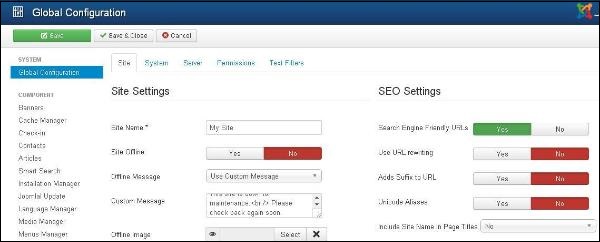 Following are the details of the fields present in the SEO Setting.
Joomla Website SEO
Following are the simple steps used to set the Joomla Website SEO −Step (1) − Click on System → Global Configuration in Joomla administrator. By default Site tab opens up as shown below.
Following are the details of the fields present in the SEO Setting.- Search Engine Friendly URLs − Optimizing the URL's to the search engine.
- Use URL rewriting − Selecting the server, which rewrites the URL's to meet a specific condition.
- Adds Suffix to URL − Based on the document type the suffix to the URL is added.
- Unicode Aliases − It selects between the transliteration and Unicode aliases.
- Include Site Name in Page Titles − Provide your site name on all pages at the beginning or end of the page.
Toolbar
Following are the toolbar options in SEO −- Save − Saves your SEO Setting.
- Save & Close − Saves the SEO Setting and closes the current screen.
- Cancel − Cancels the SEO Setting in Joomla.


No comments:
Post a Comment