
While writing a program, you may encounter a situation where you need
to perform an action over and over again. In such situations, you would
need to write loop statements to reduce the number of lines.
JavaScript supports all the necessary loops to ease down the pressure of programming.
JavaScript supports all the necessary loops to ease down the pressure of programming.
The while Loop
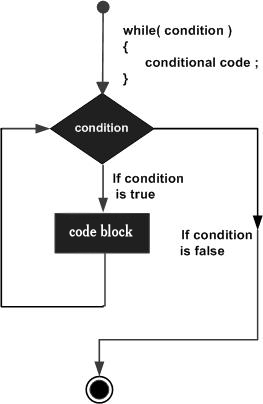
The most basic loop in JavaScript is the while loop which would be discussed in this chapter. The purpose of a while loop is to execute a statement or code block repeatedly as long as an expression is true. Once the expression becomes false, the loop terminates.Flow Chart
The flow chart of while loop looks as follows −
Syntax
The syntax of while loop in JavaScript is as follows −while (expression){ Statement(s) to be executed if expression is true }
Example
Try the following example to implement while loop.<html> <body> <script type="text/javascript"> <!-- var count = 0; document.write("Starting Loop "); while (count < 10){ document.write("Current Count : " + count + "<br />"); count++; } document.write("Loop stopped!"); //--> </script> <p>Set the variable to different value and then try...</p> </body> </html>
Output
Starting Loop
Current Count : 0
Current Count : 1
Current Count : 2
Current Count : 3
Current Count : 4
Current Count : 5
Current Count : 6
Current Count : 7
Current Count : 8
Current Count : 9
Loop stopped!
Set the variable to different value and then try...
The do...while Loop
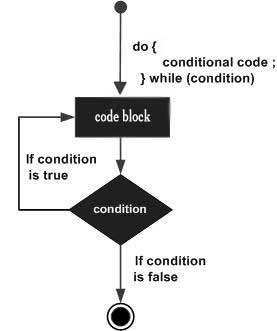
The do...while loop is similar to the while loop except that the condition check happens at the end of the loop. This means that the loop will always be executed at least once, even if the condition is false.Flow Chart
The flow chart of a do-while loop would be as follows −
Syntax
The syntax for do-while loop in JavaScript is as follows −do{ Statement(s) to be executed; } while (expression);Note − Don’t miss the semicolon used at the end of the do...while loop.
Example
Try the following example to learn how to implement a do-while loop in JavaScript.<html> <body> <script type="text/javascript"> <!-- var count = 0; document.write("Starting Loop" + "<br />"); do{ document.write("Current Count : " + count + "<br />"); count++; } while (count < 5); document.write ("Loop stopped!"); //--> </script> <p>Set the variable to different value and then try...</p> </body> </html>
Output
Starting Loop
Current Count : 0
Current Count : 1
Current Count : 2
Current Count : 3
Current Count : 4
Loop Stopped!
Set the variable to different value and then try...


No comments:
Post a Comment