
While writing a program, there may be a situation when you need to
adopt one out of a given set of paths. In such cases, you need to use
conditional statements that allow your program to make correct decisions
and perform right actions.
JavaScript supports conditional statements which are used to perform different actions based on different conditions. Here we will explain the if..else statement.
 JavaScript supports the following forms of if..else statement −
JavaScript supports conditional statements which are used to perform different actions based on different conditions. Here we will explain the if..else statement.
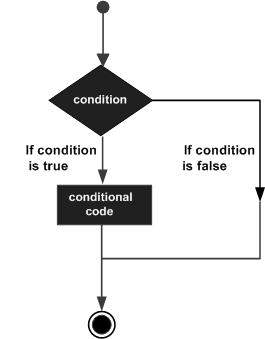
Flow Chart of if-else
The following flow chart shows how the if-else statement works.
JavaScript supports the following forms of if..else statement −- if statement
- if...else statement
- if...else if... statement.
if statement
The if statement is the fundamental control statement that allows JavaScript to make decisions and execute statements conditionally.Syntax
The syntax for a basic if statement is as follows −if (expression){ Statement(s) to be executed if expression is true }Here a JavaScript expression is evaluated. If the resulting value is true, the given statement(s) are executed. If the expression is false, then no statement would be not executed. Most of the times, you will use comparison operators while making decisions.
Example
Try the following example to understand how the if statement works.<html> <body> <script type="text/javascript"> <!-- var age = 20; if( age > 18 ){ document.write("<b>Qualifies for driving</b>"); } //--> </script> <p>Set the variable to different value and then try...</p> </body> </html>
Output
Qualifies for driving Set the variable to different value and then try...
if...else statement:
The 'if...else' statement is the next form of control statement that allows JavaScript to execute statements in a more controlled way.Syntax
if (expression){ Statement(s) to be executed if expression is true } else{ Statement(s) to be executed if expression is false }Here JavaScript expression is evaluated. If the resulting value is true, the given statement(s) in the ‘if’ block, are executed. If the expression is false, then the given statement(s) in the else block are executed.
Example
Try the following code to learn how to implement an if-else statement in JavaScript.<html> <body> <script type="text/javascript"> <!-- var age = 15; if( age > 18 ){ document.write("<b>Qualifies for driving</b>"); } else{ document.write("<b>Does not qualify for driving</b>"); } //--> </script> <p>Set the variable to different value and then try...</p> </body> </html>
Output
Does not qualify for driving
Set the variable to different value and then try...
if...else if... statement
The if...else if... statement is an advanced form of if…else that allows JavaScript to make a correct decision out of several conditions.Syntax
The syntax of an if-else-if statement is as follows −if (expression 1){ Statement(s) to be executed if expression 1 is true } else if (expression 2){ Statement(s) to be executed if expression 2 is true } else if (expression 3){ Statement(s) to be executed if expression 3 is true } else{ Statement(s) to be executed if no expression is true }There is nothing special about this code. It is just a series of if statements, where each if is a part of the else clause of the previous statement. Statement(s) are executed based on the true condition, if none of the conditions is true, then the else block is executed.
Example
Try the following code to learn how to implement an if-else-if statement in JavaScript.<html> <body> <script type="text/javascript"> <!-- var book = "maths"; if( book == "history" ){ document.write("<b>History Book</b>"); } else if( book == "maths" ){ document.write("<b>Maths Book</b>"); } else if( book == "economics" ){ document.write("<b>Economics Book</b>"); } else{ document.write("<b>Unknown Book</b>"); } //--> </script> <p>Set the variable to different value and then try...</p> </body> <html>
Output
Maths Book
Set the variable to different value and then try...


No comments:
Post a Comment