
In this chapter, we will study about Debug in Joomla. By
enabling the debug mode it helps to troubleshoot the various issues of
Joomla. It shows details of how Joomla is rendering Session Data,
Profile Information, Memory Usage and Database Queries.
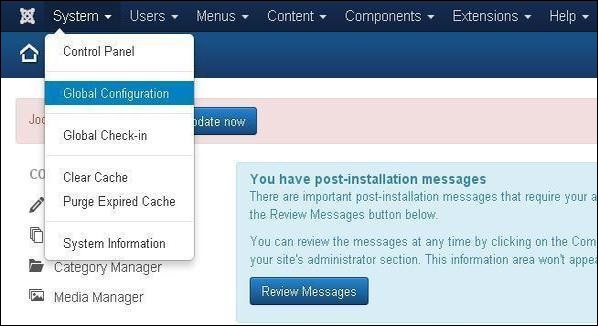
Step (1) − Go to System → Global Configuration as shown in the following screen.
 Next, click on the System tab in Joomla Global Configuration as shown below.
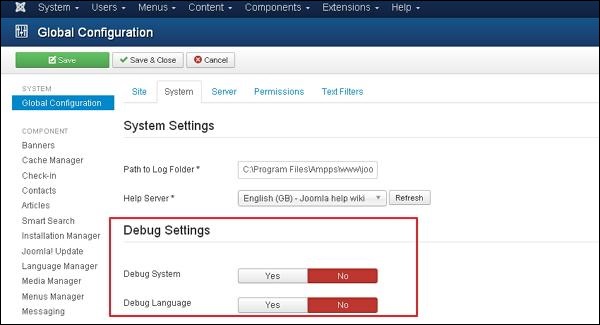 Below we have mentioned the details of the fields present in the Joomla Debug Setting section.
Joomla Debug
Following are the simple steps used to set the Joomla debug.Step (1) − Go to System → Global Configuration as shown in the following screen.
Next, click on the System tab in Joomla Global Configuration as shown below.
Below we have mentioned the details of the fields present in the Joomla Debug Setting section.- Debug System − It is a debugging system of Joomla which provides debug information by setting it to "Yes". It provides various forms such as diagnostic information, language translations and SQL errors. The default setting is "No".
- Debug Language − It provides debug language translations for Joomla site by setting it to "Yes".
Toolbar
Following are the toolbar options in the debug.- Save − Saves your configuration setting.
- Save & Close − Saves the configuration setting and closes the current screen.
- Cancel − Cancels the configuration setting in Joomla.


No comments:
Post a Comment