
In this chapter we will study the simple steps to modify menu items in Joomla. You can learn how to create menu in the chapter Joomla − Create Menu. You can also learn how to add menu items in a menu bar in the chapter Joomla − Adding Menu Items.
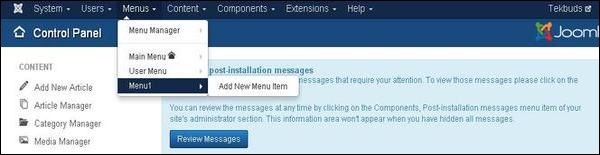
Step (1) − Click on Menus → Menu1 (Menu1 was created in the chapter Joomla - Create Menu) as shown below.
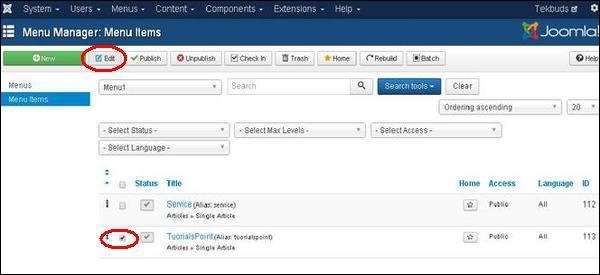
 Step (2) − Select a file which you would like to modify by clicking on the checkbox and then click on Edit button to open the selected page for editing as shown below.
 Step (3) − After clicking on edit button you get the following screen. Here you can modify the file as per your choice.
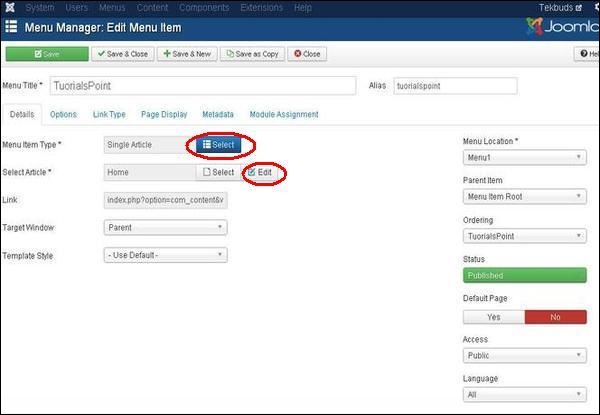 Here you can change the Menu Item Type by clicking on the Select button and selecting the type of menu. And in Select Article by clicking on the Edit button you can edit any particular page or article.
Click on the save button to save the changes of the edited file.
Step (1) − Click on Menus → Menu1 (Menu1 was created in the chapter Joomla - Create Menu) as shown below.
Step (2) − Select a file which you would like to modify by clicking on the checkbox and then click on Edit button to open the selected page for editing as shown below.
Step (3) − After clicking on edit button you get the following screen. Here you can modify the file as per your choice.
Here you can change the Menu Item Type by clicking on the Select button and selecting the type of menu. And in Select Article by clicking on the Edit button you can edit any particular page or article.Click on the save button to save the changes of the edited file.


No comments:
Post a Comment