
In this chapter, we will study about Article Metadata in Joomla. Metadata describes details of the article in short. It makes it easy to work with a particular data.
Step (1) − Go to System → Global Configuration as shown in the following screen.
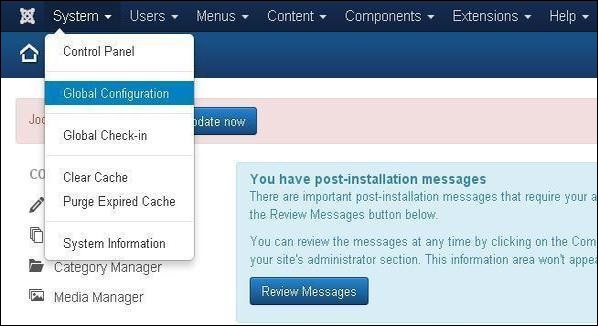 Next, click on Global Configuration, you will get to see the following screen. Fill the fields with appropriate values.
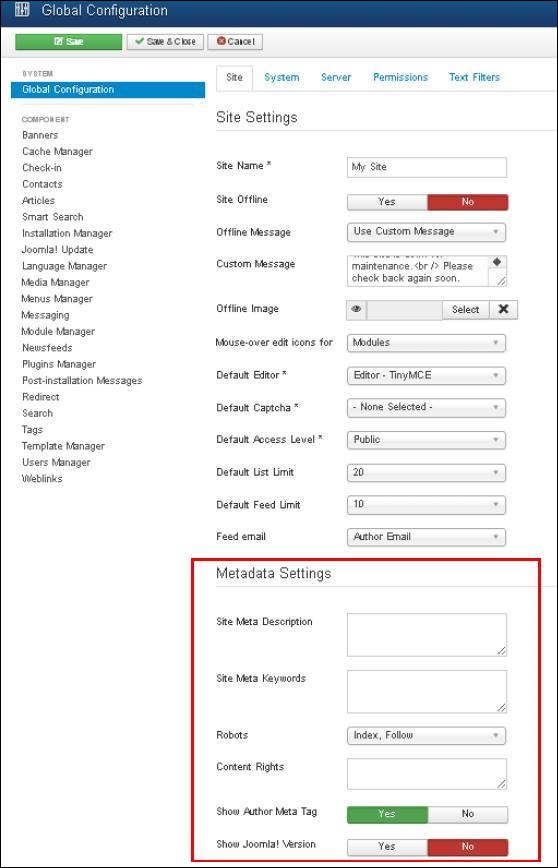 Below we have mentioned the details of the fields present in the Joomla Article Metadata section.
Joomla - Article Metadata
Following are the simple steps used to set the Joomla article metadata −Step (1) − Go to System → Global Configuration as shown in the following screen.
Next, click on Global Configuration, you will get to see the following screen. Fill the fields with appropriate values.
Below we have mentioned the details of the fields present in the Joomla Article Metadata section.- Site Meta Description − Overall description of the website is written here. This will be used by the search engine.
- Site Meta Keywords − Keywords and phrases are written to describe your website. Both should be separated by comma.
- Robots − Robot instruction.
- Content Rights − Writing the rights of the content which is being used by others.
- Show Author Meta Tag − The Author Meta tag is shown during viewing the articles.
- Show Joomla! Version − It displays the currently used Joomla version.
Toolbar
Following are the toolbar options in the Metadata −- Save − Saves your metadata settings.
- Save & Close − Saves the metadata settings and closes the current screen.
- Cancel − Cancels the metadata settings in Joomla.


No comments:
Post a Comment