
We can translate Magento default frontend through csv file as specified below:
Look into your (root)/app/locale/en_US folder. There you have .csv's that do the translating. The Mage_Catalog.csv contains the translations for all the files that use the /app/code/core/Mage/Catalog/classes and /app/design/frontend/default/default/locale/en_US/translate.csv template files. Here, you'll also find Mage_Adminhtml.csv, which handles most of the admin translations.
If Magento translation fails, you should check the settings for store in admin panel, if there is something wrong with your locale.
Look into your (root)/app/locale/en_US folder. There you have .csv's that do the translating. The Mage_Catalog.csv contains the translations for all the files that use the /app/code/core/Mage/Catalog/classes and /app/design/frontend/default/default/locale/en_US/translate.csv template files. Here, you'll also find Mage_Adminhtml.csv, which handles most of the admin translations.
If Magento translation fails, you should check the settings for store in admin panel, if there is something wrong with your locale.
- On the Magento Admin Panel, go to System menu and click on the Configuration option.
- Select the Configuration Scope of the store view in the upper left corner.
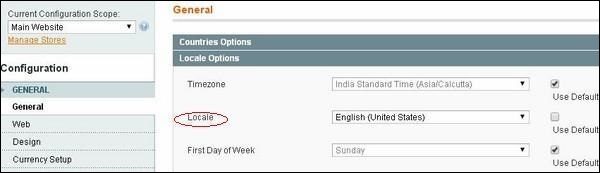
- On the General configuration page, expand the Locale Options section.
- Under Locale Options, set Locale to the new language for the store view and click the Save Config button.


No comments:
Post a Comment