
One of the most time consuming process of the Magento store is its
interaction with the database. Optimize Magento Database is important
task to maintain the Magento site. Magento saves a lot of database
because of tracking. The ecommerce system must have tracking module
which shows information when something goes wrong with their order.
The following points describe how to improve the performance of database:
Step (1): Login to your Magento Admin Panel.
Step (2): Go to System menu and click on the Configuration option.
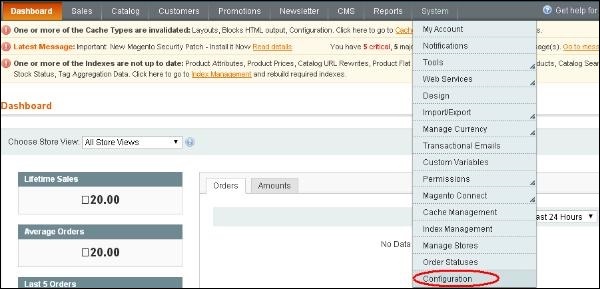 Step (3): On the left side of the navigation, go to Advanced section and click on the System option.
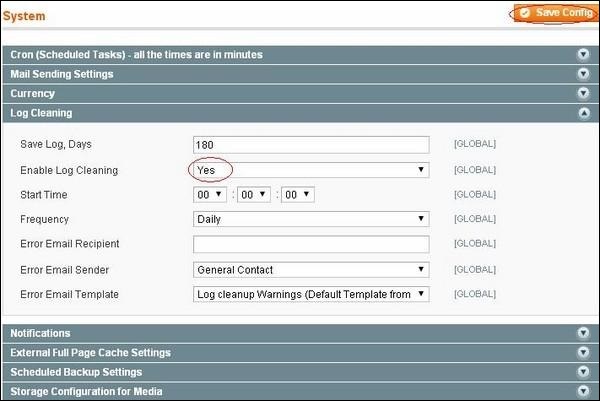
Step (3): Expand the Log Cleaning panel, change "Enable Log Cleaning" to Yes option and click the Save Config button.
The following points describe how to improve the performance of database:
- Unused data must be cleaned up regularly for better performance.
- Optimization of database queries.
- Configuration of setting and limits of the database server (e.g. memory setting, query cache, sort buffer optimization).
Step (1): Login to your Magento Admin Panel.
Step (2): Go to System menu and click on the Configuration option.
Step (3): On the left side of the navigation, go to Advanced section and click on the System option.Step (3): Expand the Log Cleaning panel, change "Enable Log Cleaning" to Yes option and click the Save Config button.


No comments:
Post a Comment