
For managing dependencies, Laravel uses composer. Make sure you have a Composer installed on your system before you install Laravel.
Step 1 − Visit the following URL and download composer to install it on your system.
https://getcomposer.org/download/
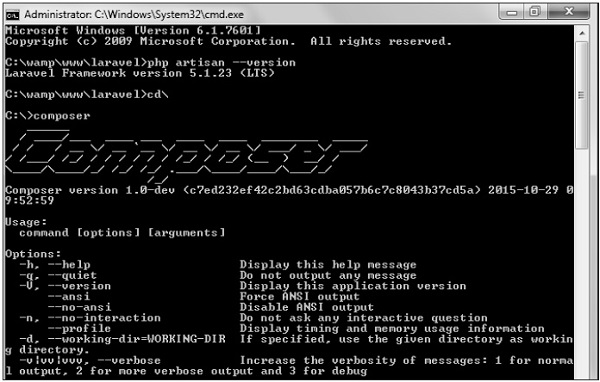
Step 2 − After the Composer is installed, check the installation by typing the Composer command in the command prompt as shown in the following screenshot.
 Step 3 − Create a new directory anywhere in your system for
your new Laravel project. After that, move to path where you have
created the new directory and type the following command there to
install Laravel.
Step 3 − Create a new directory anywhere in your system for
your new Laravel project. After that, move to path where you have
created the new directory and type the following command there to
install Laravel.
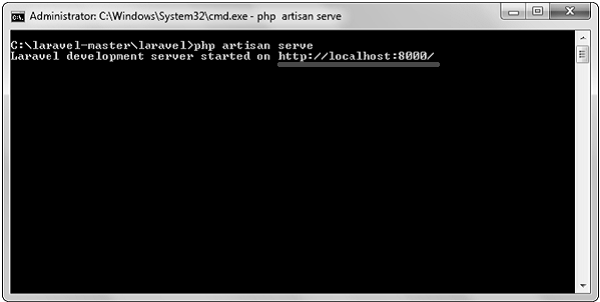 Step 6 − Copy the URL underlined in gray in the above
screenshot and open that URL in the browser. If you see the following
screen, it implies Laravel has been installed successfully.
Step 6 − Copy the URL underlined in gray in the above
screenshot and open that URL in the browser. If you see the following
screen, it implies Laravel has been installed successfully.
Step 1 − Visit the following URL and download composer to install it on your system.
https://getcomposer.org/download/
Step 2 − After the Composer is installed, check the installation by typing the Composer command in the command prompt as shown in the following screenshot.
Step 3 − Create a new directory anywhere in your system for
your new Laravel project. After that, move to path where you have
created the new directory and type the following command there to
install Laravel.composer create-project laravel/laravel –-prefer-distStep 4 − The above command will install Laravel in the current directory. Start the Laravel service by executing the following command.
php artisan serveStep 5 − After executing the above command, you will see a screen as shown below −
Step 6 − Copy the URL underlined in gray in the above
screenshot and open that URL in the browser. If you see the following
screen, it implies Laravel has been installed successfully.

thank you for nice information.
ReplyDeletelearn laravel