
Google Analytics is a finest Google service for those who are
actively managing websites and adds analytics to Magento store including
Ecommerce tracking and conversions of their websites. It allows
administrators to monitor their website's traffic.
The following steps help you to set up Google Analytics in Magento store:
Step (1): Login to your Magento Admin Panel.
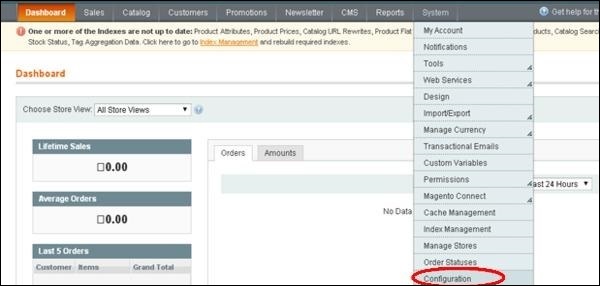
Step (2): Go to the System menu and click on the Configuration option.
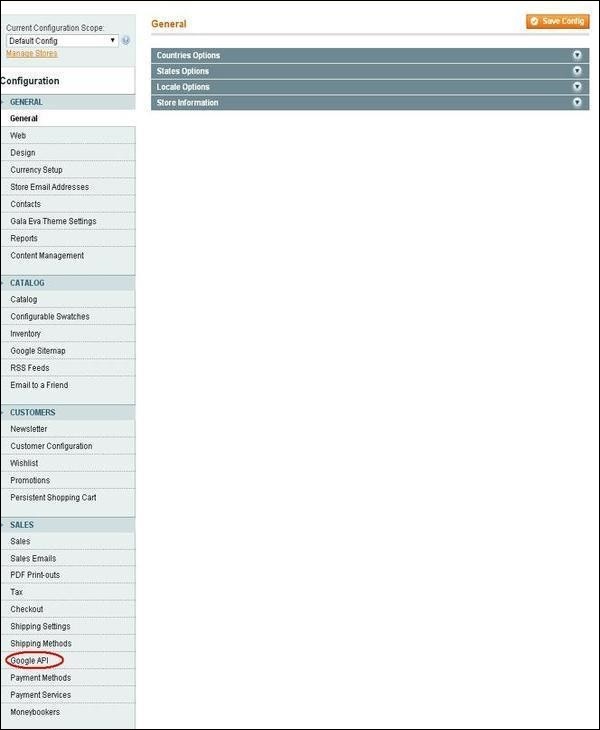
 Step (3): On the left side of the navigation, click on the Goggle API option under Sales section.
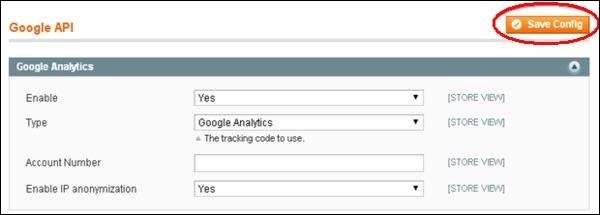
 Step (4): Expand the Google Analytics panel which shows some settings such as:
The following steps help you to set up Google Analytics in Magento store:
Step (1): Login to your Magento Admin Panel.
Step (2): Go to the System menu and click on the Configuration option.
Step (3): On the left side of the navigation, click on the Goggle API option under Sales section.
Step (4): Expand the Google Analytics panel which shows some settings such as:- Enable option should be set to Yes to activate payment method
- Type option provides two types: Google Analytics and Universal Analytics
- Account Number accepts your account number
- Enable IP anonymization option should be set to Yes. After done with the settings


No comments:
Post a Comment