
Basic Routing
Basic routing is meant to route your request to an appropriate controller. The routes of the application can be defined in app/Http/routes.php file. Here is the general route syntax for each of the possible request.Route::get('/', function () { return 'Hello World'; }); Route::post('foo/bar', function () { return 'Hello World'; }); Route::put('foo/bar', function () { // }); Route::delete('foo/bar', function () { // });Let us now understand how to see the Laravel homepage with the help of routing.
Example
app/Http/routes.php<?php Route::get('/', function () { return view('welcome'); });resources/view/welcome.blade.php
<!DOCTYPE html>
<html>

   <head>
      <title>Laravel</title>
      <link href = "https://fonts.googleapis.com/css?family=Lato:100" rel = "stylesheet"
         type = "text/css">

      <style>
         html, body {
            height: 100%;
         }
         body {
            margin: 0;
            padding: 0;
            width: 100%;
            display: table;
            font-weight: 100;
            font-family: 'Lato';
         }
         .container {
            text-align: center;
            display: table-cell;
            vertical-align: middle;
         }
         .content {
            text-align: center;
            display: inline-block;
         }
         .title {
            font-size: 96px;
         }
      </style>
   </head>

   <body>
      <div class = "container">

         <div class = "content">
            <div class = "title">Laravel 5</div>
         </div>

      </div>
   </body>

</html>
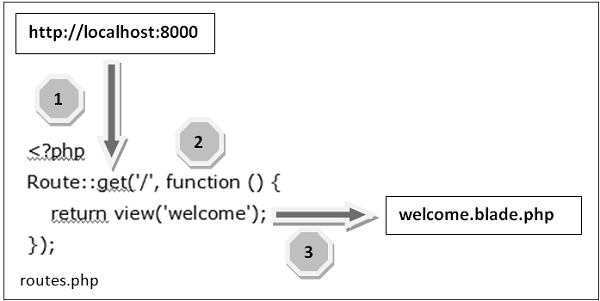
The routing mechanism is depicted in the following image −
 Let us now understand the steps in detail −
- Step 1 − First, we need to execute the root URL of the application.
- Step 2 − The executed URL will match with the appropriate method in the route.php file. In our case, it will match to get the method and the root (‘/’) URL. This will execute the related function.
- Step 3 − The function calls the template file resources/views/welcome.blade.php. The function later calls the view() function with argument ‘welcome’ without using the blade.php. It will produce the following HTML output.

Routing Parameters
Often in the application, we intend to capture the parameters passed with the URL. To do this, we need to modify the code in routes.php file accordingly. There are two ways by which we can capture the parameters passed with the URL.- Required Parameters
- Optional Parameters
Required Parameters
These parameters must be present in the URL. For example, you may intend to capture the ID from the URL to do something with that ID. Here is the sample coding for routes.php file for that purpose.Route::get('ID/{id}',function($id){ echo 'ID: '.$id; });Whatever argument that we pass after the root URL (http://localhost:8000/ID/5), it will be stored in $id and we can use that parameter for further processing but here we are simply displaying it. We can pass it onto view or controller for further processing.
Optional Parameters
There are some parameters which may or may not be present in the URL and in such cases we can use the optional parameters. The presence of these parameters is not necessary in the URL. These parameters are indicated by “?” sign after the name of the parameters. Here is the sample coding for routes.php file for that purpose.Route::get('/user/{name?}',function($name = 'Virat'){
echo "Name: ".$name;
});
Example
routes.php<?php // First Route method – Root URL will match this method Route::get('/', function () { return view('welcome'); }); // Second Route method – Root URL with ID will match this method Route::get('ID/{id}',function($id){ echo 'ID: '.$id; }); // Third Route method – Root URL with or without name will match this method Route::get('/user/{name?}',function($name = 'Virat Gandhi'){ echo "Name: ".$name; });Step 1 − Here, we have defined 3 routes with get methods for different purposes. If we execute the below URL then it will execute the first method.
http://localhost:8000
Step 2 − After successful execution of the URL, you will receive the following output −
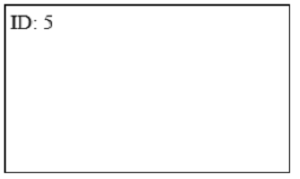
 Step 3 − If we execute the below URL, it will execute the 2nd method and the argument/parameter ID will be passed to the variable $id.
http://localhost:8000/ID/5
Step 4 − After successful execution of the URL, you will receive the following output −
 Step 5 − If we execute the below URL, it will execute the 3rd
method and the optional argument/parameter name will be passed to the
variable $name. The last argument ‘Virat’ is optional. If you remove it,
the default name will be used that we have passed in the function as ‘Virat Gandhi’
Step 5 − If we execute the below URL, it will execute the 3rd
method and the optional argument/parameter name will be passed to the
variable $name. The last argument ‘Virat’ is optional. If you remove it,
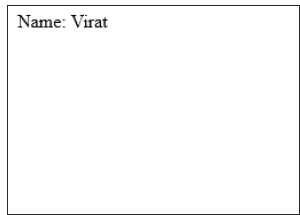
the default name will be used that we have passed in the function as ‘Virat Gandhi’http://localhost:8000/user/Virat
Step 6 − After successful execution of the URL, you will receive the following output −
 Note − Regular expression can also be used to match the parameters.

No comments:
Post a Comment