
Magento is one of the search engine friendly systems. It is an
essential component of a running web based business and important form
of marketing online. To make e-store more visible to the potential
buyers, the website admin need to enhance e-store ranking in search
engine results.
They will like more if your site is clean, clear and easy to navigate. Magento allows managing URLs, creating images and handling of links that makes easy use of SEO, so that your site can easily be indexed in search engines. After installing Magento and set up your store, you can start optimizing your site for search engines from the web configuration menu.
The following steps describe how to setup Search Engine Optimization (SEO) in Magento:
Step (1): Login to your Magento Admin Panel.
Step (2): Go to the System menu and click on Configuration option.
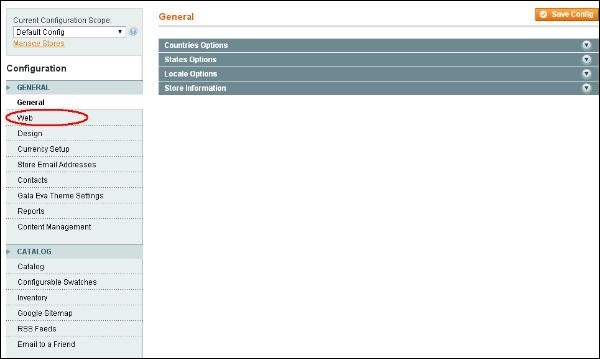
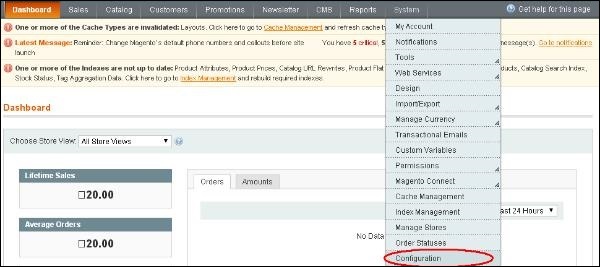 Step (3): On the left side of the navigation, go to the General section and click on the Web option.
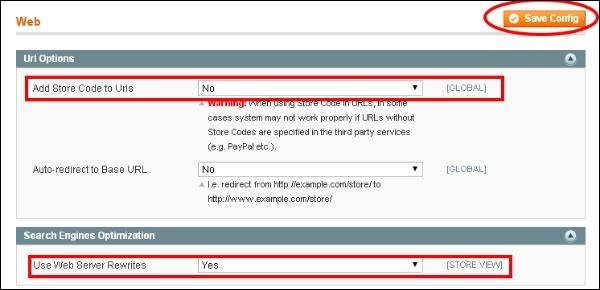
 Step (4): Expand the Url Options panel, set the Add Store Code to URLs option to No so that store codes are not added to URLs.
Step (5): In the Search Engine Optimization panel, set the Use Web Server Rewrites option to Yes to generate more search engine friendly and readable URLs. Click on Save Config button to save your changes.
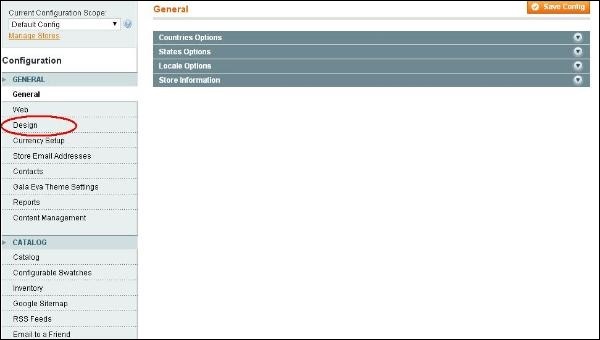
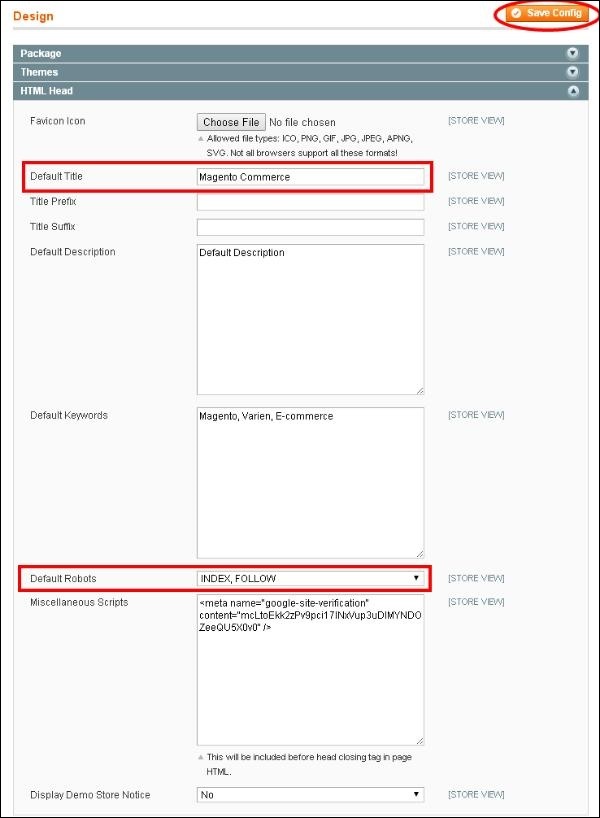
 Step (6): To set the default page title, change setting of default robots, go to System -> Configuration and under General section and click on the Design option.
 Step (7): Expand the HTML Head panel, write the title and description in the Default Title and Default Description for your pages, change the Default Robots field to INDEX, FOLLOW option so that search engines can index your website and show it in search results. When you are done, click Save Config button.
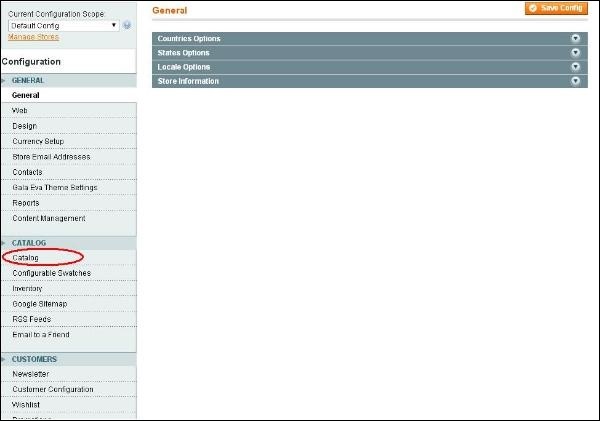
 Step (8): To avoid duplications in URLs, go to the System -> Configuration and under Catalog section, click on the Catalog option.
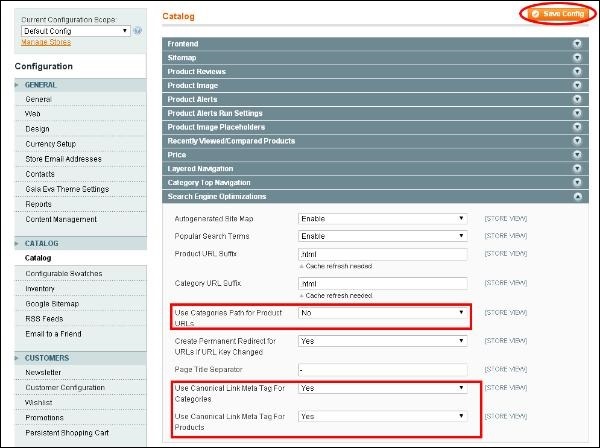
 Step (9): Expand the Search Engine Optimizations option and set the Use Categories Path for Product URLs
option to No, to prevent Magento from generating duplicate content when
you want to show the same product in multiple categories, set both Canonical Link Meta Tag fields to Yes. After done with the settings, click the Save Config button.
Step (9): Expand the Search Engine Optimizations option and set the Use Categories Path for Product URLs
option to No, to prevent Magento from generating duplicate content when
you want to show the same product in multiple categories, set both Canonical Link Meta Tag fields to Yes. After done with the settings, click the Save Config button.
They will like more if your site is clean, clear and easy to navigate. Magento allows managing URLs, creating images and handling of links that makes easy use of SEO, so that your site can easily be indexed in search engines. After installing Magento and set up your store, you can start optimizing your site for search engines from the web configuration menu.
The following steps describe how to setup Search Engine Optimization (SEO) in Magento:
Step (1): Login to your Magento Admin Panel.
Step (2): Go to the System menu and click on Configuration option.
Step (3): On the left side of the navigation, go to the General section and click on the Web option.
Step (4): Expand the Url Options panel, set the Add Store Code to URLs option to No so that store codes are not added to URLs.Step (5): In the Search Engine Optimization panel, set the Use Web Server Rewrites option to Yes to generate more search engine friendly and readable URLs. Click on Save Config button to save your changes.
Step (6): To set the default page title, change setting of default robots, go to System -> Configuration and under General section and click on the Design option.
Step (7): Expand the HTML Head panel, write the title and description in the Default Title and Default Description for your pages, change the Default Robots field to INDEX, FOLLOW option so that search engines can index your website and show it in search results. When you are done, click Save Config button.
Step (8): To avoid duplications in URLs, go to the System -> Configuration and under Catalog section, click on the Catalog option.
Step (9): Expand the Search Engine Optimizations option and set the Use Categories Path for Product URLs
option to No, to prevent Magento from generating duplicate content when
you want to show the same product in multiple categories, set both Canonical Link Meta Tag fields to Yes. After done with the settings, click the Save Config button.

No comments:
Post a Comment