
Mixins are similar to functions in programming languages. Mixins are
group of CSS properties which allows you to use properties of one class
into another class and includes class name as its properties. In LESS,
you can declare mixin in the same way as CSS style using class or id
selector. It can store multiple values and can be reused in the code
whenever necessary.
Below table demonstrates the use of LESS mixins in detail.
 The parentheses are optional when calling mixins. In the above example, both statements .p1(); and .p1; do the same thing.
Below table demonstrates the use of LESS mixins in detail.
| S.N. | Mixins usage & Description |
|---|---|
| 1 | Not Outputting the Mixin Mixins can be made disappear in the output by simply placing the parentheses after it. |
| 2 | Selectors in Mixins The mixins can contain not just properties, but they can also contaion selectors too. |
| 3 | Namespaces Namespaces are used to group the mixins under common name. |
| 4 | Guarded Namespaces When guard is applied to namespace, mixins defined by it are used only when guard condition returns true. |
| 5 | The !important keyword The !important keyword is used to override the particular property. |
Example
The below example demonstrates the use of mixins in the LESS file:<html> <head> <link rel="stylesheet" href="style.css" type="text/css" /> <title>LESS Mixins</title> </head> <body> <h1>Welcome to Tutorialspoint</h1> <p class="p1">LESS is a CSS pre-processor that enables customizable, manageable and reusable style sheet for web site.</p> <p class="p2">LESS is a dynamic style sheet language that extends the capability of CSS. </p> <p class="p3">LESS is cross browser friendly.</p> </body> </html>Next, create file style.less.
style.less
.p1{
  color:red;
}
.p2{
  background : #64d9c0;
  .p1();
}
.p3{
   background : #DAA520;
  .p1;
}
You can compile the style.less to style.css by using the following command:
lessc style.less style.cssNext execute the above command, it will create style.css file automatically with the below code:
style.css
.p1 {
  color: red;
}
.p2 {
  background: #64d9c0;
  color: red;
}
.p3 {
  background: #DAA520;
  color: red;
}
Output
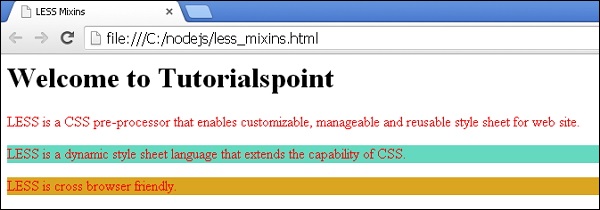
Let's carry out the following steps to see how above code works:- Save above html code in less_mixins.html file.
- Open this HTML file in a browser, an output as below gets displayed.
The parentheses are optional when calling mixins. In the above example, both statements .p1(); and .p1; do the same thing.

No comments:
Post a Comment