
You can use Magento for more user and search engine friendly URLs as shown in the below steps.
Step (1): Login to your Magento Admin Panel.
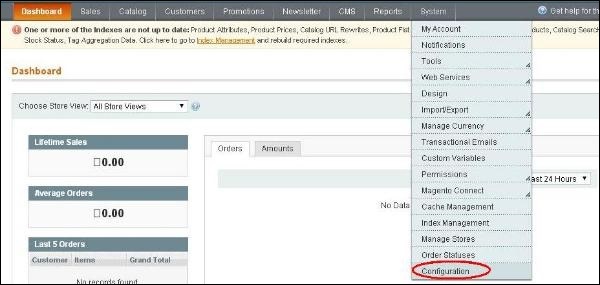
Step (2): Go to System menu and click on the Configuration option.
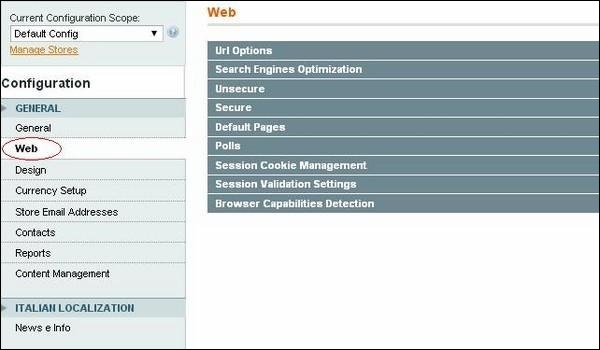
 Step (3): On the left side of the navigation, click on the Web option under General section.
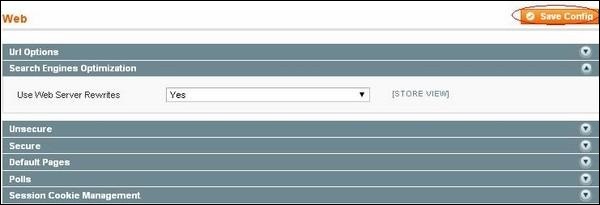
 Step (4): When page loads, expand the Search Engines Optimization option. Set the option Use Web Server Rewrites to Yes to enable the Search Engine Friendly URLs in Magento. If you select the option as No, then Magento will not use Search Engine URLs. Click on the Save Config button and your Magento SEF URLs will be enabled.
Step (1): Login to your Magento Admin Panel.
Step (2): Go to System menu and click on the Configuration option.
Step (3): On the left side of the navigation, click on the Web option under General section.
Step (4): When page loads, expand the Search Engines Optimization option. Set the option Use Web Server Rewrites to Yes to enable the Search Engine Friendly URLs in Magento. If you select the option as No, then Magento will not use Search Engine URLs. Click on the Save Config button and your Magento SEF URLs will be enabled. 

No comments:
Post a Comment