
Ajax (Asynchronous JavaScript and XML) is a set of web
development techniques utilizing many web technologies used on the
client-side to create asynchronous Web applications. Import jquery
library in your view file to use ajax functions of jquery which will be
used to send and receive data using ajax from the server. On the server
side you can use the response() function to send response to client and
to send response in JSON format you can chain the response function with
json() function.
 Step 4 − Copy the following code in app/Http/Controllers/AjaxController.php file.
app/Http/Controllers/AjaxController.php
app/Http/routes.php
http://localhost:8000/ajax
Step 7 − You will be redirected to a page where you will see a message as shown in the following image.
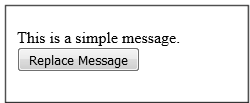
 Step 8 − The output will appear as shown in the following image after clicking the button.
json() function syntax
json(string|array $data = array(), int $status = 200, array $headers = array(), int $options)
Example
Step 1 − Create a view file called resources/views/message.php and copy the following code in that file.<html> <head> <title>Ajax Example</title> <script src = "https://ajax.googleapis.com/ajax/libs/jquery/2.1.3/jquery.min.js"> </script> <script> function getMessage(){ $.ajax({ type:'POST', url:'/getmsg', data:'_token = <?php echo csrf_token() ?>', success:function(data){ $("#msg").html(data.msg); } }); } </script> </head> <body> <div id = 'msg'>This message will be replaced using Ajax. Click the button to replace the message.</div> <?php echo Form::button('Replace Message',['onClick'=>'getMessage()']); ?> </body> </html>Step 2 − Create a controller called AjaxController by executing the following command.
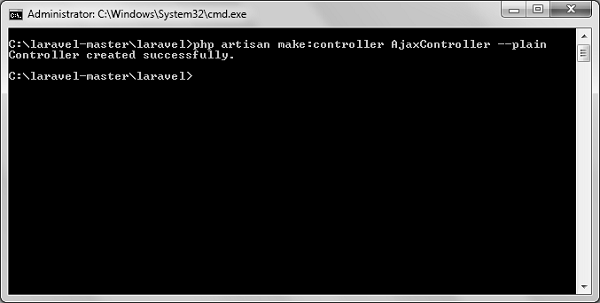
php artisan make:controller AjaxController --plainStep 3 − After successful execution, you will receive the following output −
Step 4 − Copy the following code in app/Http/Controllers/AjaxController.php file.app/Http/Controllers/AjaxController.php
<?php
namespace App\Http\Controllers;
use Illuminate\Http\Request;
use App\Http\Requests;
use App\Http\Controllers\Controller;

class AjaxController extends Controller {
   public function index(){
      $msg = "This is a simple message.";
      return response()->json(array('msg'=> $msg), 200);
   }
}
Step 5 − Add the following lines in app/Http/routes.php.
app/Http/routes.php
Route::get('ajax',function(){
   return view('message');
});
Route::post('/getmsg','AjaxController@index');
Step 6 − Visit the following URL to test the Ajax functionality.http://localhost:8000/ajax
Step 7 − You will be redirected to a page where you will see a message as shown in the following image.
Step 8 − The output will appear as shown in the following image after clicking the button.

No comments:
Post a Comment