
Laravel provides various in built tags to handle HTML forms easily
and securely. All the major elements of HTML are generated using
Laravel. To support this, we need to add HTML package to Laravel using
composer.
 Step 3 − Now, we need to add this package to Laravel configuration file which is stored at config/app.php.
Open this file and you will see a list of Laravel service providers as
shown in the following image. Add HTML service provider as indicated in
the outlined box in the following image.
Step 3 − Now, we need to add this package to Laravel configuration file which is stored at config/app.php.
Open this file and you will see a list of Laravel service providers as
shown in the following image. Add HTML service provider as indicated in
the outlined box in the following image.
 Step 4 − Add aliases in the same file for HTML and Form.
Notice the two lines indicated in the outlined box in the following
image and add those two lines.
Step 4 − Add aliases in the same file for HTML and Form.
Notice the two lines indicated in the outlined box in the following
image and add those two lines.
 Step 5 − Now everything is setup. Let’s see how we can use various HTML elements using Laravel tags.
resources/views/form.php
app/Http/routes.php
http://localhost:8000/form
Step 4 − The output will appear as shown in the following image.
Example 1
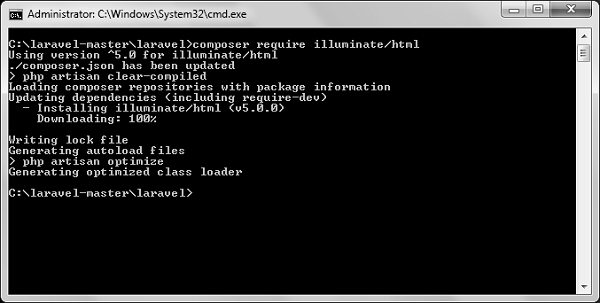
Step 1 − Execute the following command to proceed with the same.composer require illuminate/htmlStep 2 − This will add HTML package to Laravel as shown in the following image.
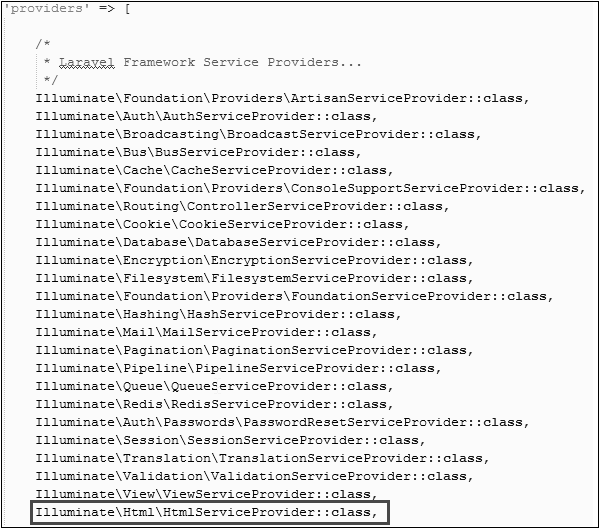
Step 3 − Now, we need to add this package to Laravel configuration file which is stored at config/app.php.
Open this file and you will see a list of Laravel service providers as
shown in the following image. Add HTML service provider as indicated in
the outlined box in the following image.
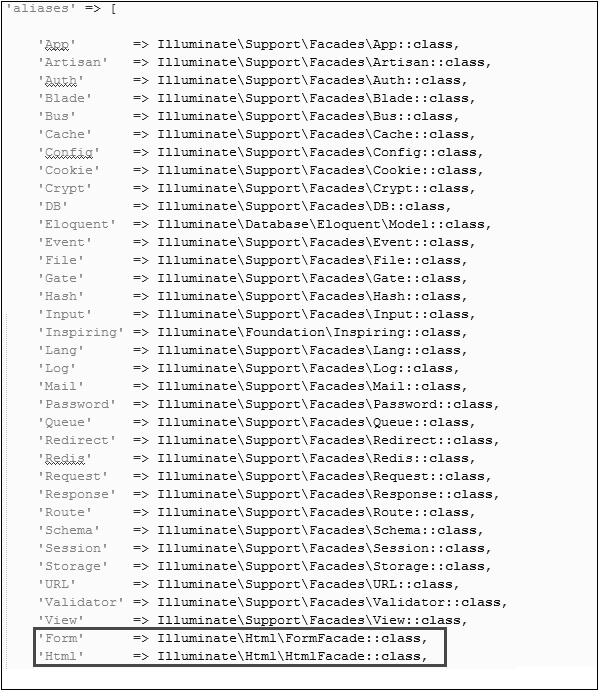
Step 4 − Add aliases in the same file for HTML and Form.
Notice the two lines indicated in the outlined box in the following
image and add those two lines.
Step 5 − Now everything is setup. Let’s see how we can use various HTML elements using Laravel tags.Opening a Form
{{ Form::open(array('url' => 'foo/bar')) }}
   //
{{ Form::close() }}
Generating a Label Element
echo Form::label('email', 'E-Mail Address');
Generating a Text Input
echo Form::text('username');
Specifying a Default Value
echo Form::text('email', 'example@gmail.com');
Generating a Password Input
echo Form::password('password');
Generating a File Input
echo Form::file('image');
Generating a Checkbox Or Radio Input
echo Form::checkbox('name', 'value');
echo Form::radio('name', 'value');
Generating a Checkbox Or Radio Input That Is Checked
echo Form::checkbox('name', 'value', true);
echo Form::radio('name', 'value', true);
Generating a Drop-Down List
echo Form::select('size', array('L' => 'Large', 'S' => 'Small'));
Generating A Submit Button
echo Form::submit('Click Me!');
Example 2
Step 1 − Copy the following code to create a view called resources/views/form.php.resources/views/form.php
<html>
   <body>

      <?php
         echo Form::open(array('url' => 'foo/bar'));
            echo Form::text('username','Username');
            echo '<br/>';

            echo Form::text('email', 'example@gmail.com');
            echo '<br/>';

            echo Form::password('password');
            echo '<br/>';

            echo Form::checkbox('name', 'value');
            echo '<br/>';

            echo Form::radio('name', 'value');
            echo '<br/>';

            echo Form::file('image');
            echo '<br/>';

            echo Form::select('size', array('L' => 'Large', 'S' => 'Small'));
            echo '<br/>';

            echo Form::submit('Click Me!');
         echo Form::close();
      ?>

   </body>
</html>
Step 2 − Add the following line in app/Http/routes.php to add a route for view form.php
app/Http/routes.php
Route::get('/form',function(){
   return view('form');
});
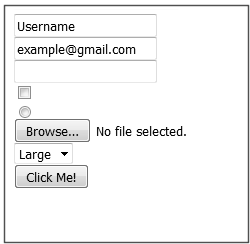
Step 3 − Visit the following URL to see the form.http://localhost:8000/form
Step 4 − The output will appear as shown in the following image.


No comments:
Post a Comment