
In this chapter, we will study about how to Configure Site in
Grav's Administration Panel. You can directly configure the settings of
your site's System with the help of Configuration page. The Site tab allows you to modify the settings in the /user/config/system.yaml
file. This tab allows you to modify options and fields that affect site
related features such as the name, default author etc used in your
site.
Follwoing are the different configuration settings that you can see in the Site tab.

Follwoing are the different configuration settings that you can see in the Site tab.
Default
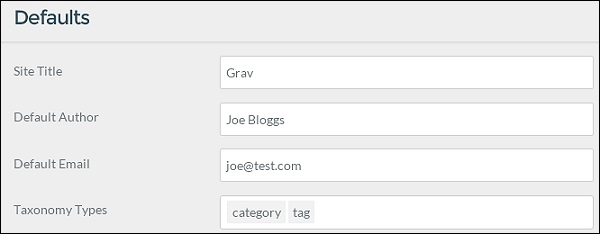
In this area, you can set the basic properties to manage the content for your site. Here, you can set several content display options such as the home page, default theme and many others.
- Site Title: It specifies the title for your site.
- Default Author: It specifies a default author name that is used in themes or page content.
- Default Email: It specifies a default email in themes or pages.
- Taxonomy Types: It specifies the taxonomy types that you use them in pages.
Page Summary
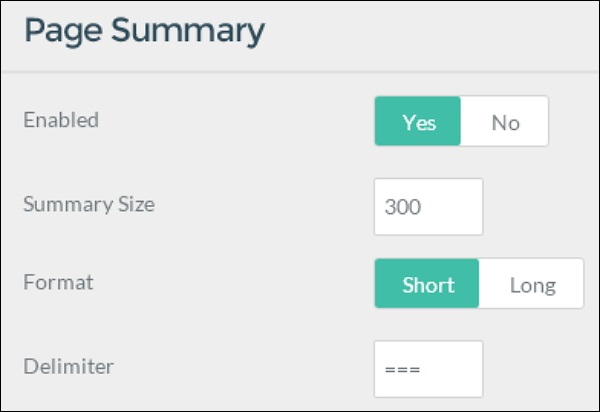
A page summary has the ability to present you a small preview of a page's content. You can define a "cut off" point in the page, between the summary content with the help of delimiter.
- Enabled: It specifies to enable the page summary.
- Summary Size: It defines the number of characters to be used as content summary in the page.
- Format: Short uses the first occurrence of delimiter Long ignores summary delimiter.
- Delimiter: It specifies summary delimiter. Default value is default '==='. You can use this in the page summary and post this after opening a paragraph.
Metadata
Metadata plays an important role in the pages and improves your SEO. You can set several metadata properties here, so that your links can appear in several search engines and social feeds as per the demand.
- Metadata: It specifies default metadata value, later you can make the modifications.
Redirects and Routes
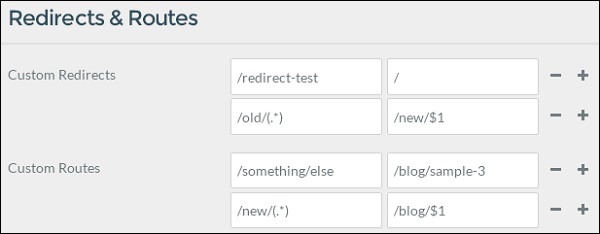
This allows you to set redirects and routes to other pages of your site.
- Custom Redirects: It defines routes to direct to other pages. The replacement of standard regex is valid.
- Custom Routes: Routes to alias to other pages. The replacement of standard regex is valid.


No comments:
Post a Comment