PHP login with session
Php login script is used to provide the authentication for our web
pages. the Script executes after submitting the user login button.
Login Page
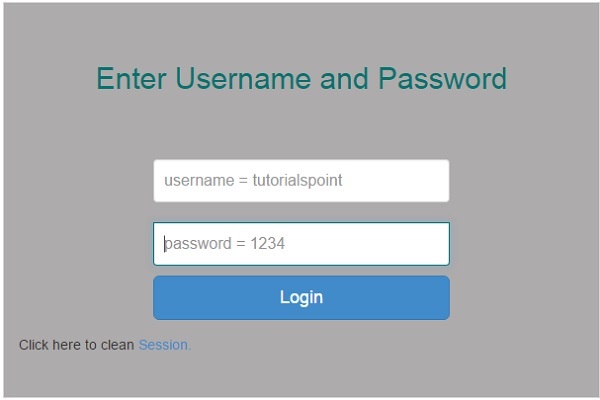
Login page should be as follows and works based on session. If the user close the session, it will erase the session data.
<?php
   ob_start();
   session_start();
?>

<?
   // error_reporting(E_ALL);
   // ini_set("display_errors", 1);
?>

<html lang = "en">

   <head>
      <title>Tutorialspoint.com</title>
      <link href = "css/bootstrap.min.css" rel = "stylesheet">

      <style>
         body {
            padding-top: 40px;
            padding-bottom: 40px;
            background-color: #ADABAB;
         }

         .form-signin {
            max-width: 330px;
            padding: 15px;
            margin: 0 auto;
            color: #017572;
         }

         .form-signin .form-signin-heading,
         .form-signin .checkbox {
            margin-bottom: 10px;
         }

         .form-signin .checkbox {
            font-weight: normal;
         }

         .form-signin .form-control {
            position: relative;
            height: auto;
            -webkit-box-sizing: border-box;
            -moz-box-sizing: border-box;
            box-sizing: border-box;
            padding: 10px;
            font-size: 16px;
         }

         .form-signin .form-control:focus {
            z-index: 2;
         }

         .form-signin input[type="email"] {
            margin-bottom: -1px;
            border-bottom-right-radius: 0;
            border-bottom-left-radius: 0;
            border-color:#017572;
         }

         .form-signin input[type="password"] {
            margin-bottom: 10px;
            border-top-left-radius: 0;
            border-top-right-radius: 0;
            border-color:#017572;
         }

         h2{
            text-align: center;
            color: #017572;
         }
      </style>

   </head>

   <body>

      <h2>Enter Username and Password</h2>
      <div class = "container form-signin">

         <?php
            $msg = '';

            if (isset($_POST['login']) && !empty($_POST['username'])
               && !empty($_POST['password'])) {

               if ($_POST['username'] == 'tutorialspoint' &&
                  $_POST['password'] == '1234') {
                  $_SESSION['valid'] = true;
                  $_SESSION['timeout'] = time();
                  $_SESSION['username'] = 'tutorialspoint';

                  echo 'You have entered valid use name and password';
               }else {
                  $msg = 'Wrong username or password';
               }
            }
         ?>
      </div> <!-- /container -->

      <div class = "container">

         <form class = "form-signin" role = "form"
            action = "<?php echo htmlspecialchars($_SERVER['PHP_SELF']);
            ?>" method = "post">
            <h4 class = "form-signin-heading"><?php echo $msg; ?></h4>
            <input type = "text" class = "form-control"
               name = "username" placeholder = "username = tutorialspoint"
               required autofocus></br>
            <input type = "password" class = "form-control"
               name = "password" placeholder = "password = 1234" required>
            <button class = "btn btn-lg btn-primary btn-block" type = "submit"
               name = "login">Login</button>
         </form>

         Click here to clean <a href = "logout.php" tite = "Logout">Session.

      </div>

   </body>
</html>
Logout.php
It will erase the session data.
<?php
   session_start();
   unset($_SESSION["username"]);
   unset($_SESSION["password"]);

   echo 'You have cleaned session';
   header('Refresh: 2; URL = login.php');
?>
It will produce the following result −


thank you for nice information.
ReplyDeletelearn php