Predefined QColor Styles
| Qt.NoBrush |
No brush pattern |
| Qt.SolidPattern |
Uniform color |
| Qt.Dense1Pattern |
Extremely dense brush pattern |
| Qt.HorPattern |
Horizontal lines |
| Qt.VerPattern |
Vertical lines |
| Qt.CrossPattern |
Crossing horizontal and vertical lines |
| Qt.BDiagPattern |
Backward diagonal lines |
| Qt.FDiagPattern |
Forward diagonal lines |
| Qt.DiagCrossPattern |
Crossing diagonal lines |
Predefined QColor Objects
| Qt.white |
| Qt.black |
| Qt.red |
| Qt.darkRed |
| Qt.green |
| Qt.darkGreen |
| Qt.blue |
| Qt.cyan |
| Qt.magenta |
| Qt.yellow |
| Qt.darkYellow |
| Qt.gray |
Custom color can be chosen by specifying RGB or CMYK or HSV values.
Example
The following example implements some of these methods.
import sys
from PyQt4.QtGui import *
from PyQt4.QtCore import *

class Example(QWidget):

   def __init__(self):
      super(Example, self).__init__()
      self.initUI()

   def initUI(self):
      self.text = "hello world"
      self.setGeometry(100,100, 400,300)
      self.setWindowTitle('Draw Demo')
      self.show()

   def paintEvent(self, event):
      qp = QPainter()
      qp.begin(self)
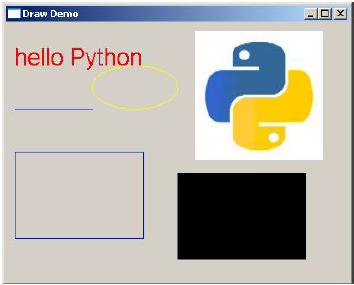
      qp.setPen(QColor(Qt.red))
      qp.setFont(QFont('Arial', 20))

      qp.drawText(10,50, "hello Pyth
  on")
      qp.setPen(QColor(Qt.blue))
      qp.drawLine(10,100,100,100)
      qp.drawRect(10,150,150,100)

      qp.setPen(QColor(Qt.yellow))
      qp.drawEllipse(100,50,100,50)
      qp.drawPixmap(220,10,QPixmap("python.jpg"))
      qp.fillRect(200,175,150,100,QBrush(Qt.SolidPattern))
      qp.end()

def main():
   app = QApplication(sys.argv)
   ex = Example()
   sys.exit(app.exec_())

if __name__ == '__main__':
   main()
The above code produces the following output −


No comments:
Post a Comment