
A typical GUI application may have multiple windows. Tabbed and stacked widgets allow to activate one such window at a time. However, many a times this approach may not be useful as view of other windows is hidden.
One way to display multiple windows simultaneously is to create them as independent windows. This is called as SDI (single Document Interface). This requires more memory resources as each window may have its own menu system, toolbar, etc.
MDI (Multiple Document Interface) applications consume lesser memory resources. The sub windows are laid down inside main container with relation to each other. The container widget is called QMdiArea.
QMdiArea widget generally occupies the central widget of QMainWondow object. Child windows in this area are instances of QMdiSubWindow class. It is possible to set any QWidget as the internal widget of subWindow object. Sub-windows in the MDI area can be arranged in cascaded or tile fashion.
The following table lists important methods of QMdiArea class and QMdiSubWindow class −
QMdiArea object emits subWindowActivated() signal whereas windowStateChanged() signal is emitted by QMdisubWindow object.
The complete code is as follows −
One way to display multiple windows simultaneously is to create them as independent windows. This is called as SDI (single Document Interface). This requires more memory resources as each window may have its own menu system, toolbar, etc.
MDI (Multiple Document Interface) applications consume lesser memory resources. The sub windows are laid down inside main container with relation to each other. The container widget is called QMdiArea.
QMdiArea widget generally occupies the central widget of QMainWondow object. Child windows in this area are instances of QMdiSubWindow class. It is possible to set any QWidget as the internal widget of subWindow object. Sub-windows in the MDI area can be arranged in cascaded or tile fashion.
The following table lists important methods of QMdiArea class and QMdiSubWindow class −
| S.No. | Methods & Description |
|---|---|
| 1 |
addSubWindow() Adds a widget as a new subwindow in MDI area |
| 2 |
removeSubWindow() Removes a widget that is internal widget of a subwindow |
| 3 |
setActiveSubWindow() Activates a subwindow |
| 4 |
cascadeSubWindows() Arranges subwindows in MDiArea in a cascaded fashion |
| 5 |
tileSubWindows() Arranges subwindows in MDiArea in a tiled fashion |
| 6 |
closeActiveSubWindow() Closes the active subwindow |
| 7 |
subWindowList() Returns the list of subwindows in MDI Area |
| 8 |
setWidget() Sets a QWidget as an internal widget of a QMdiSubwindow instance |
Example
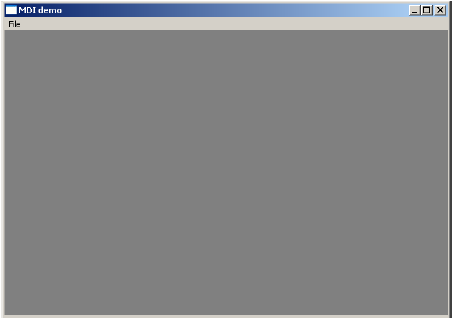
In the following example, top level window comprising of QMainWindow has a menu and MdiArea.self.mdi = QMdiArea() self.setCentralWidget(self.mdi) bar = self.menuBar() file = bar.addMenu("File") file.addAction("New") file.addAction("cascade") file.addAction("Tiled")Triggered() signal of the menu is connected to windowaction() function.
file.triggered[QAction].connect(self.windowaction)The new action of menu adds a subwindow in MDI area with a title having an incremental number to it.
MainWindow.count = MainWindow.count+1
sub = QMdiSubWindow()
sub.setWidget(QTextEdit())
sub.setWindowTitle("subwindow"+str(MainWindow.count))
self.mdi.addSubWindow(sub)
sub.show()
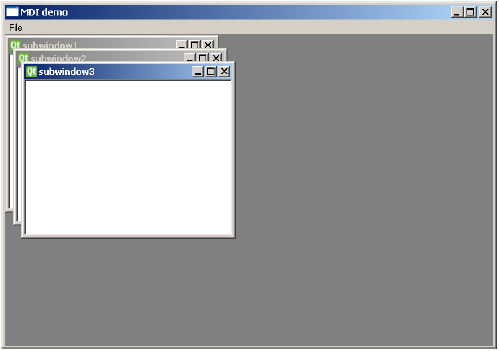
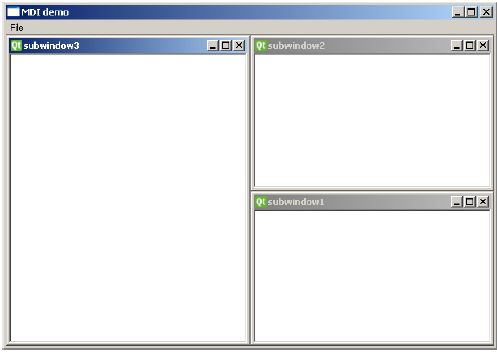
Cascaded and tiled buttons of the menu arrange currently displayed subwindows in cascaded and tiled fashion respectively.
The complete code is as follows −
import sys
from PyQt4.QtCore import *
from PyQt4.QtGui import *

class MainWindow(QMainWindow):
   count = 0

   def __init__(self, parent = None):
      super(MainWindow, self).__init__(parent)
      self.mdi = QMdiArea()
      self.setCentralWidget(self.mdi)
      bar = self.menuBar()

      file = bar.addMenu("File")
      file.addAction("New")
      file.addAction("cascade")
      file.addAction("Tiled")
      file.triggered[QAction].connect(self.windowaction)
      self.setWindowTitle("MDI demo")

   def windowaction(self, q):
      print "triggered"

   if q.text() == "New":
      MainWindow.count = MainWindow.count+1
      sub = QMdiSubWindow()
      sub.setWidget(QTextEdit())
      sub.setWindowTitle("subwindow"+str(MainWindow.count))
      self.mdi.addSubWindow(sub)
      sub.show()

   if q.text() == "cascade":
      self.mdi.cascadeSubWindows()

   if q.text() == "Tiled":
      self.mdi.tileSubWindows()

   def main():
      app = QApplication(sys.argv)
      ex = MainWindow()
      ex.show()
      sys.exit(app.exec_())

   if __name__ == '__main__':
      main()
The above code produces the following output −


No comments:
Post a Comment