
The gtk.Box class is an abstract class defining the functionality of a
container in which widgets are placed in a rectangular area. gtk.HBox
and gtk.VBox widgets are derived from it.
Child widgets in gtk.Hbox are arranged horizontally in the same row. On the other hand, child widgets of gtk.VBox are arranged vertically in the same column.
gtk.Box class uses the following constructor −
gtk.Box uses the packing mechanism to place child widgets in it with reference to a particular position, either with reference to start or end. pack_start() method places widgets from start to end. On the contrary, the pack_end() method puts widgets from end to start. Alternatively, you can use the add() method which is similar to pack_start().
The following methods are available for gtk.HBox as well as gtk.VBox −
The method add (widget) is inherited from the gtk.Container class. It adds widget to the container. This method can be used instead of the pack_start() method.
Observe the following code −
Child widgets in gtk.Hbox are arranged horizontally in the same row. On the other hand, child widgets of gtk.VBox are arranged vertically in the same column.
gtk.Box class uses the following constructor −
gtk.Box(homogenous = True, spacing = 0)The homogenous property is set to True by default. As a result, all child widgets are given equal allocation.
gtk.Box uses the packing mechanism to place child widgets in it with reference to a particular position, either with reference to start or end. pack_start() method places widgets from start to end. On the contrary, the pack_end() method puts widgets from end to start. Alternatively, you can use the add() method which is similar to pack_start().
The following methods are available for gtk.HBox as well as gtk.VBox −
- gtk_box_pack_start ()
- gtk_box_pack_end ()
gtk_box_pack_start ()
This method adds child to the box, packed with reference to the start of box −pack_start(child, expand = True, fill = True, padding = 0)The following are the parameters −
- child − This is the widget object to be added to box
- expand − This is set to True if child is to be given extra space in the box. Extra space is divided between all child widgets.
- fill − If True, extra space will be allocated to child. Otherwise, this parameter is used as padding.
- padding − This is the space in pixels between widgets in the box.
gtk_box_pack_end ()
This adds child to the box, packed with reference to the end of the box.pack_end (child, expand = True, fill = True, padding = 0)The following are the parameters −
- child − This is the widget object to be added
- expand − This is set to True if child is to be given extra space in the box. This extra space is divided between all child widgets.
- fill − If True, extra space will be allocated to child otherwise used as padding.
- padding − This is the space in pixels between the widgets in the box.
The method add (widget) is inherited from the gtk.Container class. It adds widget to the container. This method can be used instead of the pack_start() method.
Example
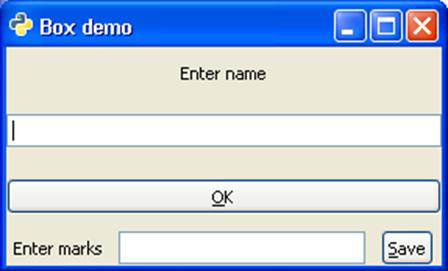
In the example given below, the toplevel window contains a vertical box (gtk.VBox object box). It in turn has a VBox object vb and HBox object hb. In the upper box, a label, an entry widget and a button are placed vertically. In the lower box, another set of label, entry and button are placed vertically.Observe the following code −
import gtk
class PyApp(gtk.Window):
   def __init__(self):
      super(PyApp, self).__init__()
      self.set_title("Box demo")

      box = gtk.VBox()
      vb = gtk.VBox()
      lbl = gtk.Label("Enter name")

      vb.pack_start(lbl, expand = True, fill = True, padding = 10)
      text = gtk.Entry()

      vb.pack_start(text, expand = True, fill = True, padding = 10)
      btn = gtk.Button(stock = gtk.STOCK_OK)

      vb.pack_start(btn, expand = True, fill = True, padding = 10)
      hb = gtk.HBox()

      lbl1 = gtk.Label("Enter marks")
      hb.pack_start(lbl1, expand = True, fill = True, padding = 5)
      text1 = gtk.Entry()

      hb.pack_start(text1, expand = True, fill = True, padding = 5)
      btn1 = gtk.Button(stock = gtk.STOCK_SAVE)

      hb.pack_start(btn1, expand = True, fill = True, padding = 5)
      box.add(vb)
      box.add(hb)
      self.add(box)
      self.show_all()
PyApp()
gtk.main()
The above code will produce the following output −


No comments:
Post a Comment