
The PyQt installer comes with a GUI builder tool called Qt Designer.
Using its simple drag and drop interface, a GUI interface can be
quickly built without having to write the code. It is however, not an
IDE such as Visual Studio. Hence, Qt Designer does not have the facility
to debug and build the application.
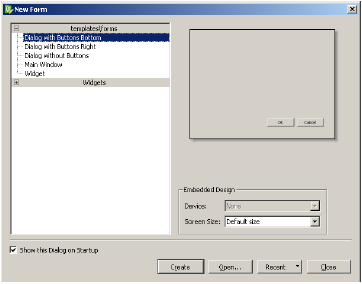
Creation of a GUI interface using Qt Designer starts with choosing a top level window for the application.
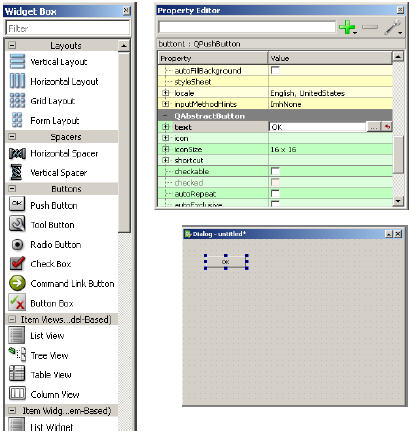
 You can then drag and drop required widgets from the widget box on
the left pane. You can also assign value to properties of widget laid on
the form.
You can then drag and drop required widgets from the widget box on
the left pane. You can also assign value to properties of widget laid on
the form.
 The designed form is saved as demo.ui. This ui file contains XML
representation of widgets and their properties in the design. This
design is translated into Python equivalent by using pyuic4 command line
utility. This utility is a wrapper for uic module. The usage of pyuic4
is as follows −
The designed form is saved as demo.ui. This ui file contains XML
representation of widgets and their properties in the design. This
design is translated into Python equivalent by using pyuic4 command line
utility. This utility is a wrapper for uic module. The usage of pyuic4
is as follows −
 The user can input data in input fields but clicking on Add button
will not generate any action as it is not associated with any function.
Reacting to user-generated response is called as event handling.
The user can input data in input fields but clicking on Add button
will not generate any action as it is not associated with any function.
Reacting to user-generated response is called as event handling.
Creation of a GUI interface using Qt Designer starts with choosing a top level window for the application.
You can then drag and drop required widgets from the widget box on
the left pane. You can also assign value to properties of widget laid on
the form.
The designed form is saved as demo.ui. This ui file contains XML
representation of widgets and their properties in the design. This
design is translated into Python equivalent by using pyuic4 command line
utility. This utility is a wrapper for uic module. The usage of pyuic4
is as follows −pyuic4 –x demo.ui –o demo.pyIn the above command, -x switch adds a small amount of additional code to the generated XML so that it becomes a self-executable standalone application.
if __name__ == "__main__":
   import sys
   app = QtGui.QApplication(sys.argv)
   Dialog = QtGui.QDialog()
   ui = Ui_Dialog()
   ui.setupUi(Dialog)
   Dialog.show()
   sys.exit(app.exec_())
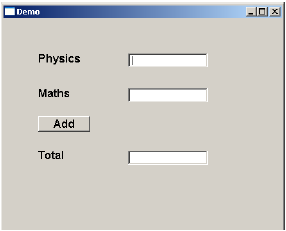
The resultant python script is executed to show the following dialog box −
The user can input data in input fields but clicking on Add button
will not generate any action as it is not associated with any function.
Reacting to user-generated response is called as event handling.

python training in mumbai
ReplyDeletepython training in pune
python training in bangalore | python online training
ReplyDeleteaws training in Bangalore | aws online training
artificial intelligence training in bangalore | artificial intelligence online training
machine learning training in bangalore | machine learning online training
data science training in bangalore | data science online training