
This widget proves useful in controlling alignment and size of its
child widgets. It has four properties called xalign, yalign, xscale and
yscale. The scale properties specify how much of free space will be used
by the child widgets. The align properties areused to place the child
widget within available area.
All four properties take up a float value between 0 and 1.0. If xscale and yscale property is set to 0, it means that widget absorbs none of free space and if set to 1, widget absorbs maximum free space horizontally or vertically respectively.
The xalign and yalign property if set to 0, means that there will be no free space to the left or above widget. If set to 1, there will be maximum free space to left or above the widget.
The gtk.alignment class has the following constructor −
In the lower HBox, all the available free space is on the left side. This is achieved by assigning 1 to xalign property. Hence, two buttons in the horizontal box appear right aligned.
All four properties take up a float value between 0 and 1.0. If xscale and yscale property is set to 0, it means that widget absorbs none of free space and if set to 1, widget absorbs maximum free space horizontally or vertically respectively.
The xalign and yalign property if set to 0, means that there will be no free space to the left or above widget. If set to 1, there will be maximum free space to left or above the widget.
The gtk.alignment class has the following constructor −
gtk.alignment(xalign = 0.0, yalign = 0.0, xscale = 0.0, yscale = 0.0)Where,
- xalign − Is the fraction of the horizontal free space to the left of the child widget.
- yalign − Is the fraction of vertical free space above the child widget.
- xscale − Is is the fraction of horizontal free space that the child widget absorbs.
- yscale − Is is the fraction of vertical free space that the child widget absorbs.
Example
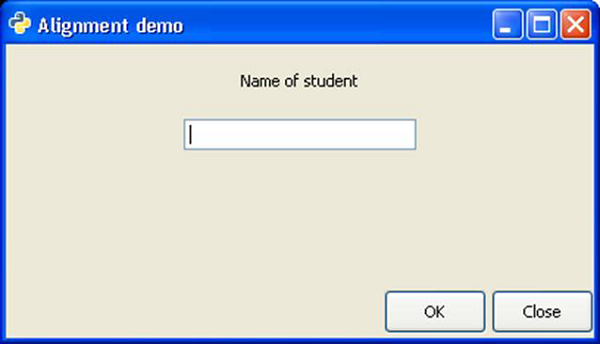
The following code demonstrates the use of gtk.alignment widget. A Vbox in the toplevel window has an upper Vbox and lower Hbox placed in it. In the upper vertical box, a label and an Entry widget are placed such that towards the left, 50% of space is kept free and more than 25% of this is occupied by assigning 0.5 xalign and 0.25 to yalign properties.In the lower HBox, all the available free space is on the left side. This is achieved by assigning 1 to xalign property. Hence, two buttons in the horizontal box appear right aligned.
import gtk
class PyApp(gtk.Window):
   def __init__(self):
      super(PyApp, self).__init__()
      self.set_title("Alignment demo")
      self.set_size_request(400,200)
      self.set_position(gtk.WIN_POS_CENTER)

      vbox = gtk.VBox(False, 5)
      vb = gtk.VBox()
      hbox = gtk.HBox(True, 3)
      valign = gtk.Alignment(0.5,0.25, 0, 0)

      lbl = gtk.Label("Name of student")
      vb.pack_start(lbl, True, True, 10)
      text = gtk.Entry()

      vb.pack_start(text, True, True, 10)
      valign.add(vb)
      vbox.pack_start(valign)

      ok = gtk.Button("OK")
      ok.set_size_request(70, 30)

      close = gtk.Button("Close")
      hbox.add(ok)
      hbox.add(close)

      halign = gtk.Alignment(1, 0, 0, 0)
      halign.add(hbox)

      vbox.pack_start(halign, False, False, 3)

      self.add(vbox)
      self.connect("destroy", gtk.main_quit)
      self.show_all()
PyApp()
gtk.main()
The above code produces the following output −


No comments:
Post a Comment