
A QDialog widget presents a top level window mostly used to collect response from the user. It can be configured to be Modal (where it blocks its parent window) or Modeless (the dialog window can be bypassed).
PyQt API has a number of preconfigured Dialog widgets such as InputDialog, FileDialog, FontDialog, etc.
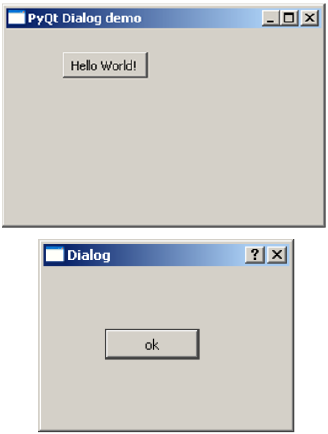
A PushButton on a top level QWidget window, when clicked, produces a Dialog window. A Dialog box doesn’t have minimize and maximize controls on its title bar.
The user cannot relegate this dialog box in the background because its WindowModality is set to ApplicationModal.
PyQt API has a number of preconfigured Dialog widgets such as InputDialog, FileDialog, FontDialog, etc.
Example
In the following example, WindowModality attribute of Dialog window decides whether it is modal or modeless. Any one button on the dialog can be set to be default. The dialog is discarded by QDialog.reject() method when the user presses the Escape key.A PushButton on a top level QWidget window, when clicked, produces a Dialog window. A Dialog box doesn’t have minimize and maximize controls on its title bar.
The user cannot relegate this dialog box in the background because its WindowModality is set to ApplicationModal.
import sys
from PyQt4.QtGui import *
from PyQt4.QtCore import *

def window():
   app = QApplication(sys.argv)
   w = QWidget()
   b = QPushButton(w)
   b.setText("Hello World!")
   b.move(50,50)
   b.clicked.connect(showdialog)
   w.setWindowTitle("PyQt Dialog demo")
   w.show()
   sys.exit(app.exec_())

def showdialog():
   d = QDialog()
   b1 = QPushButton("ok",d)
   b1.move(50,50)
   d.setWindowTitle("Dialog")
   d.setWindowModality(Qt.ApplicationModal)
   d.exec_()

if __name__ == '__main__':
   window()
The above code produces the following output −


No comments:
Post a Comment