
PyQt API contains an elaborate class system to communicate with many SQL based databases. Its QSqlDatabase provides access through a Connection object. Following is the list of currently available SQL drivers −
QSqlQuery class has the functionality to execute and manipulate SQL commands. Both DDL and DML type of SQL queries can be executed. The most important method in the class is exec_(), which takes as an argument a string containing SQL statement to be executed.
A QTableModel object is declared in the following manner −
Example
A connection with a SQLite database is established using the static method −db = QtSql.QSqlDatabase.addDatabase('QSQLITE')
db.setDatabaseName('sports.db')
Other methods of QSqlDatabase class are as follows −| S.No. | Methods & Description |
|---|---|
| 1 |
setDatabaseName() Sets the name of the database with which connection is sought |
| 2 |
setHostName() Sets the name of the host on which the database is installed |
| 3 |
setUserName() Specifies the user name for connection |
| 4 |
setPassword() Sets the connection object’s password if any |
| 5 |
commit() Commits the transactions and returns true if successful |
| 6 |
rollback() Rolls back the database transaction |
| 7 |
close() Closes the connection |
query = QtSql.QSqlQuery()
query.exec_("create table sportsmen(id int primary key,
   " "firstname varchar(20), lastname varchar(20))")
The following script creates a SQLite database sports.db with a table of sportsperson populated with five records.from PyQt4 import QtSql, QtGui def createDB(): db = QtSql.QSqlDatabase.addDatabase('QSQLITE') db.setDatabaseName('sports.db') if not db.open(): QtGui.QMessageBox.critical(None, QtGui.qApp.tr("Cannot open database"), QtGui.qApp.tr("Unable to establish a database connection.\n" "This example needs SQLite support. Please read " "the Qt SQL driver documentation for information " "how to build it.\n\n" "Click Cancel to exit."), QtGui.QMessageBox.Cancel) return False query = QtSql.QSqlQuery() query.exec_("create table sportsmen(id int primary key, " "firstname varchar(20), lastname varchar(20))") query.exec_("insert into sportsmen values(101, 'Roger', 'Federer')") query.exec_("insert into sportsmen values(102, 'Christiano', 'Ronaldo')") query.exec_("insert into sportsmen values(103, 'Ussain', 'Bolt')") query.exec_("insert into sportsmen values(104, 'Sachin', 'Tendulkar')") query.exec_("insert into sportsmen values(105, 'Saina', 'Nehwal')") return True if __name__ == '__main__': import sys app = QtGui.QApplication(sys.argv) createDB()QSqlTableModel class in PyQt is a high-level interface that provides editable data model for reading and writing records in a single table. This model is used to populate a QTableView object. It presents to the user a scrollable and editable view that can be put on any top level window.
A QTableModel object is declared in the following manner −
model = QtSql.QSqlTableModel()Its editing strategy can be set to any of the following −
| QSqlTableModel.OnFieldChange | All changes will be applied immediately |
| QSqlTableModel.OnRowChange | Changes will be applied when the user selects a different row |
| QSqlTableModel.OnManualSubmit | All changes will be cached until either submitAll() or revertAll() is called |
Example
In the following example, sportsperson table is used as a model and the strategy is set as −model.setTable('sportsmen') model.setEditStrategy(QtSql.QSqlTableModel.OnFieldChange) model.select()QTableView class is part of Model/View framework in PyQt. The QTableView object is created as follows −
view = QtGui.QTableView()
view.setModel(model)
view.setWindowTitle(title)
return view
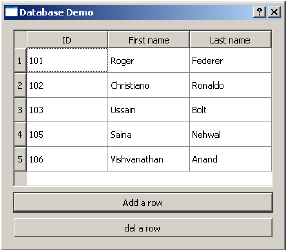
This QTableView object and two QPushButton widgets are added to the top level QDialog window. Clicked() signal of add button is connected to addrow() which performs insertRow() on the model table.
button.clicked.connect(addrow)
def addrow():
   print model.rowCount()
   ret = model.insertRows(model.rowCount(), 1)
   print ret
The Slot associated with the delete button executes a lambda function that deletes a row, which is selected by the user.
btn1.clicked.connect(lambda: model.removeRow(view1.currentIndex().row()))The complete code is as follows −
import sys
from PyQt4 import QtCore, QtGui, QtSql
import sportsconnection

def initializeModel(model):
   model.setTable('sportsmen')
   model.setEditStrategy(QtSql.QSqlTableModel.OnFieldChange)
   model.select()
   model.setHeaderData(0, QtCore.Qt.Horizontal, "ID")
   model.setHeaderData(1, QtCore.Qt.Horizontal, "First name")
   model.setHeaderData(2, QtCore.Qt.Horizontal, "Last name")

def createView(title, model):
   view = QtGui.QTableView()
   view.setModel(model)
   view.setWindowTitle(title)
   return view

def addrow():
   print model.rowCount()
   ret = model.insertRows(model.rowCount(), 1)
   print ret

def findrow(i):
   delrow = i.row()

if __name__ == '__main__':

   app = QtGui.QApplication(sys.argv)
   db = QtSql.QSqlDatabase.addDatabase('QSQLITE')
   db.setDatabaseName('sports.db')
   model = QtSql.QSqlTableModel()
   delrow = -1
   initializeModel(model)

   view1 = createView("Table Model (View 1)", model)
   view1.clicked.connect(findrow)

   dlg = QtGui.QDialog()
   layout = QtGui.QVBoxLayout()
   layout.addWidget(view1)

   button = QtGui.QPushButton("Add a row")
   button.clicked.connect(addrow)
   layout.addWidget(button)

   btn1 = QtGui.QPushButton("del a row")
   btn1.clicked.connect(lambda: model.removeRow(view1.currentIndex().row()))
   layout.addWidget(btn1)

   dlg.setLayout(layout)
   dlg.setWindowTitle("Database Demo")
   dlg.show()
   sys.exit(app.exec_())
The above code produces the following output −


No comments:
Post a Comment