
The ButtonBox class in gtk API serves as a base class for containers
to hold multiple buttons either horizontally or vertically. Two
subclasses HButtonBox and VButtonBox are derived from the ButtonBox
class, which itself is a subclass of gtk.Box class.
A button box is used to provide a consistent layout of buttons throughout an application. It provides one default layout and a default spacing value that are persistent across all widgets.
The set_spacing() method of the gtk.Box class can be used to change the default spacing between buttons in the button box.
The default layout of buttons can be changed by the set_default() method. The possible values of the button layout are −
Observe the code −
A button box is used to provide a consistent layout of buttons throughout an application. It provides one default layout and a default spacing value that are persistent across all widgets.
The set_spacing() method of the gtk.Box class can be used to change the default spacing between buttons in the button box.
The default layout of buttons can be changed by the set_default() method. The possible values of the button layout are −
- gtk.BUTTONBOX_SPREAD
- gtk.BUTTONBOX_EDGE
- gtk.BUTTONBOX_START
- gtk.BUTTONBOX_END.
Example
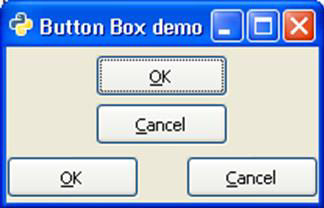
In the following example, a VBox object inside the toplevel window internally contains one VButtonBox object and one HButtonBox object, each containing two buttons, arranged vertically and horizontally respectively.Observe the code −
import gtk
class PyApp(gtk.Window):
   def __init__(self):
      super(PyApp, self).__init__()
      self.set_title("Button Box demo")
      self.set_size_request(200,100)
      self.set_position(gtk.WIN_POS_CENTER)

      vb = gtk.VBox()
      box1 = gtk.VButtonBox()
      btn1 = gtk.Button(stock = gtk.STOCK_OK)
      btn2 = gtk.Button(stock = gtk.STOCK_CANCEL)

      box1.pack_start(btn1, True, True, 0)
      box1.pack_start(btn2, True, True, 0)
      box1.set_border_width(5)

      vb.add(box1)
      box2 = gtk.HButtonBox()
      btn3 = gtk.Button(stock = gtk.STOCK_OK)
      btn4 = gtk.Button(stock = gtk.STOCK_CANCEL)

      ent = gtk.Entry()
      box2.pack_start(btn3, True, True, 0)
      box2.pack_start(btn4, True, True, 0)
      box1.set_border_width(5)

      vb.add(box2)
      self.add(vb)
      self.show_all()
PyApp()
gtk.main()
The above code generates the following output −


No comments:
Post a Comment