
We can use Facebook login to allow the users to get access into the
websites. This page will explain you about login with facebook PHP SDK.
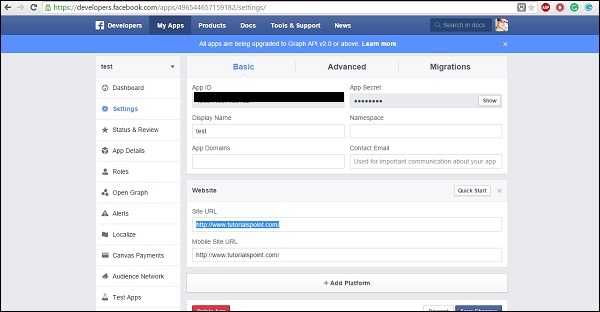

Login With Facebook
- Need to go https://developers.facebook.com/apps/ and click on add a new group button to make the app ID.
- Choose Website
- Give an app name and click on Create New Facebook App ID
- Click on Create app ID
- Click on Skip Quick Test
fbconfig.php file overview
- Now download zip from here
- Now open fbconfig.php file and add you app ID and app Secrete
FacebookSession::setDefaultApplication( 'your app ID','App Secrete ' );
// login helper with redirect_uri
   $helper = new FacebookRedirectLoginHelper('You web address' );
Finally fbconfig.php file as shown below −
<?php

   session_start();

   // added in v4.0.0
   require_once 'autoload.php';
   use Facebook\FacebookSession;
   use Facebook\FacebookRedirectLoginHelper;
   use Facebook\FacebookRequest;
   use Facebook\FacebookResponse;
   use Facebook\FacebookSDKException;
   use Facebook\FacebookRequestException;
   use Facebook\FacebookAuthorizationException;
   use Facebook\GraphObject;
   use Facebook\Entities\AccessToken;
   use Facebook\HttpClients\FacebookCurlHttpClient;
   use Facebook\HttpClients\FacebookHttpable;

   // init app with app id and secret
   FacebookSession::setDefaultApplication( '496544657159182','e6d239655aeb3e496e52fabeaf1b1f93' );

   // login helper with redirect_uri
   $helper = new FacebookRedirectLoginHelper('http://www.tutorialspoint.com/' );

   try {
      $session = $helper->getSessionFromRedirect();
   }catch( FacebookRequestException $ex ) {
      // When Facebook returns an error
   }catch( Exception $ex ) {
      // When validation fails or other local issues
   }

   // see if we have a session
   if ( isset( $session ) ) {
      // graph api request for user data
      $request = new FacebookRequest( $session, 'GET', '/me' );
      $response = $request->execute();

      // get response
      $graphObject = $response->getGraphObject();
      $fbid = $graphObject->getProperty('id');           // To Get Facebook ID
      $fbfullname = $graphObject->getProperty('name');   // To Get Facebook full name
      $femail = $graphObject->getProperty('email');      // To Get Facebook email ID

      /* ---- Session Variables -----*/
      $_SESSION['FBID'] = $fbid;
      $_SESSION['FULLNAME'] = $fbfullname;
      $_SESSION['EMAIL'] =  $femail;

      /* ---- header location after session ----*/
      header("Location: index.php");
   }else {
      $loginUrl = $helper->getLoginUrl();
      header("Location: ".$loginUrl);
   }
?>
Login page Overview
Login page is used to login into FB<?php session_start(); session_unset(); $_SESSION['FBID'] = NULL; $_SESSION['FULLNAME'] = NULL; $_SESSION['EMAIL'] = NULL; header("Location: index.php"); ?>
Index.php
Index page is as shown below.<?php session_start(); ?> <html xmlns:fb = "http://www.facebook.com/2008/fbml"> <head> <title>Login with Facebook</title> <link href = "http://www.bootstrapcdn.com/twitter-bootstrap/2.2.2/css/bootstrap-combined.min.css" rel = "stylesheet"> </head> <body> <?php if ($_SESSION['FBID']): ?> <!-- After user login --> <div class = "container"> <div class = "hero-unit"> <h1>Hello <?php echo $_SESSION['USERNAME']; ?></h1> <p>Welcome to "facebook login" tutorial</p> </div> <div class = "span4"> <ul class = "nav nav-list"> <li class = "nav-header">Image</li> <li><img src = "https://graph.facebook.com/<?php echo $_SESSION['FBID']; ?>/picture"></li> <li class = "nav-header">Facebook ID</li> <li><?php echo $_SESSION['FBID']; ?></li> <li class = "nav-header">Facebook fullname</li> <li><?php echo $_SESSION['FULLNAME']; ?></li> <li class = "nav-header">Facebook Email</li> <li><?php echo $_SESSION['EMAIL']; ?></li> <div><a href="logout.php">Logout</a></div> </ul> </div> </div> <?php else: ?> <!-- Before login --> <div class = "container"> <h1>Login with Facebook</h1> Not Connected <div> <a href = "fbconfig.php">Login with Facebook</a> </div> <div> <a href = "http://www.tutorialspoint.com" title = "Login with facebook">More information about Tutorialspoint</a> </div> </div> <?php endif ?> </body> </html>It will produce the result. Before trying this example, please logout your face book account in your browser.
Logout Facebook
Below code is used to logout facebook.<?php session_start();. session_unset(); $_SESSION['FBID'] = NULL; $_SESSION['FULLNAME'] = NULL; $_SESSION['EMAIL'] = NULL; header("Location: index.php"); ?>


No comments:
Post a Comment