
The gtk.Layout is a container widget similar to gtk.Fixed. Widgets
are placed in Layout widget by specifying absolute coordinates. However,
the Layout differs from fixed widget in the following ways −
The following table lists out the frequently used methods of the layout −
The Layout object emits the set_scroll_adjustment signal when the adjustments associated with it are changed.
Observe the code −
- The layout widget can have infinite width and height. The maximum
value of width and height is limited by the size of unsigned integer.
- A gtk.DrawingArea widget can be enclosed in a layout container. The DrawingArea is a canvas on which 2D elements like line, rectangle etc. can be drawn.
- In order to put the Layout container in the toplevel window of lesser dimensions, it can be associated with the scrollbars or can be placed in a ScrolledWindow.
gtk.Layout(hadjustment = None, vadjustment = None)The hadjustment and vadjustment properties represent an object having an adjustable bounded value.
The following table lists out the frequently used methods of the layout −
| put(widget, x, y) | Places a child widget at the specified coordinates |
| set_size(w, h) | Sets the size of the Layout container to the specified width and height |
Example
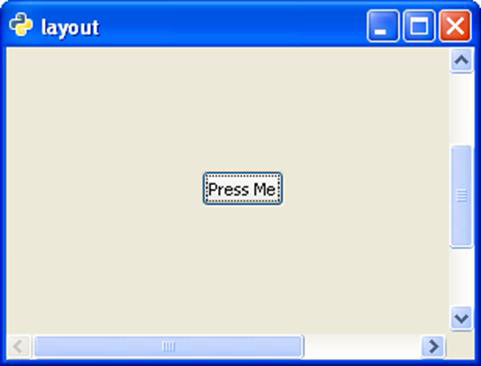
In the following example, a Label is paced at the centre of a Layout container, which in turn is to be placed in a toplevel window of smaller size. Hence, it is first added to a ScrolledWindow and the ScrolledWindow is then added to the main window.Observe the code −
import gtk
class PyApp(gtk.Window):
   def __init__(self):
      super(PyApp, self).__init__()
      self.set_title("layout")
      self.set_size_request(300,200)
      self.set_position(gtk.WIN_POS_CENTER)
      sc = gtk.ScrolledWindow()
      lo = gtk.Layout()
      lo.set_size(400,400)
      button = gtk.Button("Press Me")
      lo.put(button, 125,200)
      sc.add(lo)
      self.add(sc)
      self.connect("destroy", gtk.main_quit)
      self.show_all()
PyApp()
gtk.main()
The above code will generate the following output −


No comments:
Post a Comment