
A simple way to display information about a program like its logo,
name, copyright, website and license is offered by the gtk.AboutDialog
widget. An about dialog is typically opened when the user selects the About option from the Help menu. All parts of the dialog are optional.
The About Dialog can contain URLs and email addresses. gtk.AboutDialog offers global hooks when the user clicks URLs and email ID
The following is a constructor of the gtk.AboutDialog class −
The About Dialog can contain URLs and email addresses. gtk.AboutDialog offers global hooks when the user clicks URLs and email ID
The following is a constructor of the gtk.AboutDialog class −
dlg = gtk.AboutDialog()The following methods are used to configure the About Dialog
- set_program_name() − This sets the name to be displayed in the About Dialog. defaults to application_name().
- set_version() − This sets the "version" property
- set_copyright() − This sets the "copyright". If None, the copyright notice is hidden.
- set_license() − This sets the "license". If None, the license button is hidden.
- set_website() − This sets the "website" property to the string whichg should be a valid URL.
- set_author() − This sets the "authors" property to the list of author names displayed in the authors tab of the secondary credits dialog.
- set_logo() − This sets the "logo" property to the Pixbuf object. If None, the default window icon set will be used.
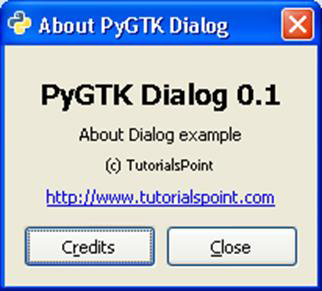
def on_abtdlg(self, widget):
   about = gtk.AboutDialog()
   about.set_program_name("PyGTK Dialog")
   about.set_version("0.1")
   about.set_authors("M.V.Lathkar")
   about.set_copyright("(c) TutorialsPoint")
   about.set_comments("About Dialog example")
   about.set_website("http://www.tutorialspoint.com")
   about.run()
   about.destroy()
The above function generates the following output −


No comments:
Post a Comment