A Messagedialog widget is a Dialog window configured to display an
image representing the type of message, i.e., error, question, or some
informational text. A MessageDialog object is declared by using the
following constructor −
gtk.MessageDialog(parent = None, flags = 0, type = gtk.MESSAGE_INFO,
   buttons = gtk.BUTTONS_NONE, message_format = None)
The following predefined message types are used to configure message dialog −
| gtk.MESSAGE_INFO |
This is an informational message |
| gtk.MESSAGE_WARNING |
This is a nonfatal warning message |
| gtk.MESSAGE_QUESTION |
This question requires a choice |
| gtk.MESSAGE_ERROR |
This is a fatal error message |
A set of predefined button sets are also available for use.
| gtk.BUTTONS_NONE |
No buttons at all |
| gtk.BUTTONS_OK |
This is an OK button |
| gtk.BUTTONS_CLOSE |
This is a Close button |
| gtk.BUTTONS_CANCEL |
This is a Cancel button |
| gtk.BUTTONS_YES_NO |
These are the Yes and No buttons |
| gtk.BUTTONS_OK_CANCEL |
These are OK and Cancel buttons |
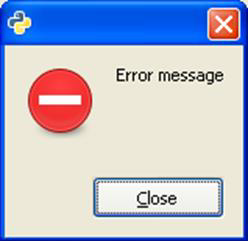
When the MessageBox menu item is activated, the following callback function is called and a message box pops up as an output.
def on_msgdlg(self, widget):
   md = gtk.MessageDialog(self,
      gtk.DIALOG_DESTROY_WITH_PARENT, gtk.MESSAGE_ERROR,
      gtk.BUTTONS_CLOSE, "Error message")
   md.run()
The above function will generate the following output −


No comments:
Post a Comment